


Participant
August 21, 2025
Answered

Numerical Texts and Bullet Points/ Numbering and Punctuations Automatically Shifts to opposite end
  • August 21, 2025
  • 2 replies
  • 235 views


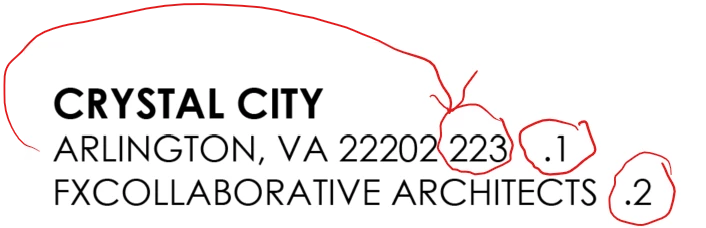
I have been racking my mind for hours trying to figure this out. I used various Open Ai sources to no avail too. Please refer to the screenshot above: You see, when I type the address, the number portion of the address automatically places itself at the end of the sentence. No matter what I did, even making a new paragraph style did not work. In one of the online solutions I was following, I turned on number only to find out that this too only appeared on the right hand side of the composition. Any punctuation marks I made then shows up to the left. I checked the indent tab, I looked for invisible elements, under character, I changed the language from Hebrew to English USA, and countless other things and I am at my wits end. 

Hopefully someone here knows the answer and can help me to solve this. Thank you so much in advance! 

Correct answer daniel_54321

Anantha, 

This ended up working and fixed the punctuation and the numbers issues! Thank you so much! When I searched it up online, I was told to change "Adobe World-Ready Paragraph Composer."  So unfortunately I was pushed further from the solution. 

2 replies

Anantha Prabu G
Legend
August 21, 2025


  • Select the problematic text.

  • Go to the Paragraph panel (Window > Type & Tables > Paragraph).

  • In the panel menu (the little hamburger menu at top right), look for “Adobe World-Ready Paragraph Composer” or “Adobe World-Ready Single-Line Composer.”

    • If this is selected → numbers and punctuation often reorder themselves (RTL issue).

    • Switch it back to “Adobe Paragraph Composer” or “Adobe Single-Line Composer.”

  • Also, check the Paragraph Direction buttons (in the Paragraph panel, they look like arrows pointing left-to-right and right-to-left).

    • Make sure Left-to-Right is selected.


Thanks,PrabuDesign smarter, faster, and bolder with InDesign scripting.
daniel_54321AuthorCorrect answer
Participant
August 21, 2025

Anantha, 

This ended up working and fixed the punctuation and the numbers issues! Thank you so much! When I searched it up online, I was told to change "Adobe World-Ready Paragraph Composer."  So unfortunately I was pushed further from the solution. 

Willi Adelberger
Community Expert
Community Expert
August 21, 2025

Change in you Paragraph Styles in Fine Tuning or Justificatiom from a Wotld Composer to Adobe Paragraph Composer.

But check character direction in Paragraph and Character Styles. This might not be available if you have not installed a ME version-

Participant
August 21, 2025

Yes. Thank you, this was the issue!