


Participant
May 17, 2022
Answered

Objects aligning from x axis on right side of object, not the left

  • May 17, 2022
  • 2 replies
  • 433 views

Hello everyone,


I am having issues with the alignment of objects. Previously, all objects would by default align from the x asis on the left side of an object. Now, objects are aligning from the right side.


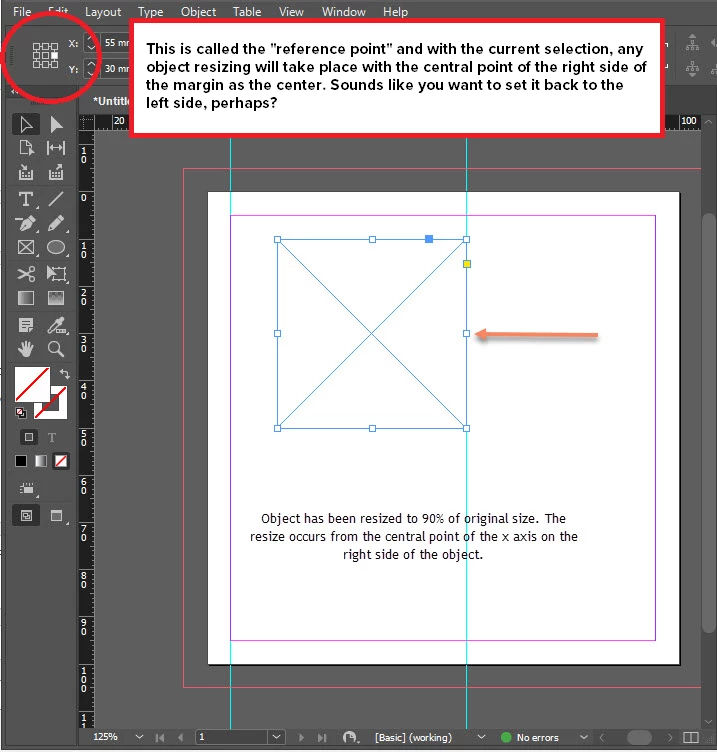
In my current situation, if an object was 100mm wide, and the left side of the object was placed at 10mm, indesign will read the x axis position as 110mm (not 10mm). Images attached may explain it more effectively.


Can anyone help restore to the previous deault setting of an object being aligned from the x axis on the left side.


Thank you. Geoff.
This topic has been closed for replies.
Correct answer Joel Cherney

It looks like you have the right-side reference point selected, so the resizing behavior you're seeing here is expected behavior. Sounds like you want to set it back to the right side? 


2 replies

Joel Cherney
Community Expert
Joel CherneyCommunity ExpertCorrect answer
Community Expert
May 18, 2022

It looks like you have the right-side reference point selected, so the resizing behavior you're seeing here is expected behavior. Sounds like you want to set it back to the right side? 


Participant
May 18, 2022

OMG so simple. Thank you for @Joel Cherney @jane-e for the solution.


This has solved the problem.

jane-e
Community Expert
Community Expert
May 18, 2022

You're welcome, @geoffsedgman , I'm happy we could help 😊


Jane


jane-e
Community Expert
Community Expert
May 18, 2022

@geoffsedgman 

This is normal behavior. You have chosen the reference point on the right center (circled), so that's the point that won't move. Click the reference point in the upper left (arrow) to lock that point down.


Jane