Known Participant
January 17, 2024
Answered

Open IDML file in InDesign

  • January 17, 2024
  • 1 reply
  • 9927 views

Hello,


I was supposed to translate an INDD file from InDesign in SDL Trados, so this file had to be saved as IDML file.

Now that the translation is complete, I need to open this IDML file back in InDesign (i.e. import it). It is a catalogue that should be printed next.

How should I do it, please?


I have no experience with InDesign.


Thank you very much.


This topic has been closed for replies.
Correct answer Joel Cherney

Thank you all for your replies, but I would like to ask a quite urgent question now: I have the 7-day free trial version of InDesign and when I try to set English as the language of the User Dictionary for hyphenating words, the setting always returns to the default English. I right click on a word in the text, then Spelling → User Dictionary → Language: Slovak → Add → Done. The point is that I need the German client to get the text with split Slovak words right - so that e.g. he doesn't have German as the default language there, as a result of which the Slovak words could possibly be split incorrectly and the Slovak language could not be set for hyphenation. Could such a thing be a real threat, please? How could this be prevented or set up correctly?

Thank you


The first thing to do is to ensure that you are marking text as English or German or Slovak correctly. The User Dictionary settings aren't the right place. Here's where you would select it if you were just taking a paragraph and marking it as German (two different locations, same setting):
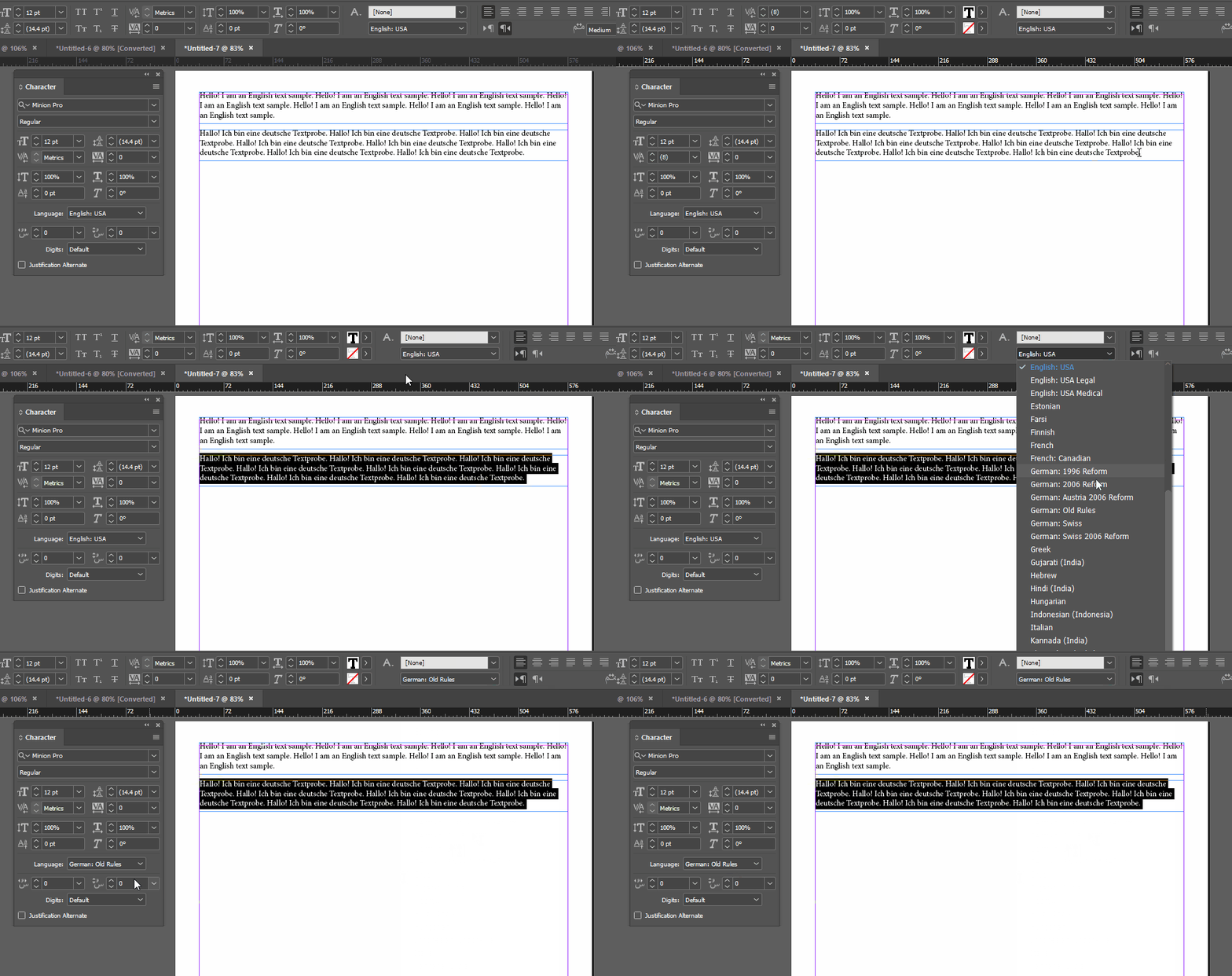


(I left Slovak out only because it was so far down the list that the animation would have been unnecessarily tall.  But it's in the list.)


Once you've marked text as German (or Slovak) then the spellcheck and hyphenation settings should work. This isn't the best way to do it, of course, but we can't tell if your client's designer made paragraph and character styles correctly. If they did, you should be able to just edit the paragraph styles:
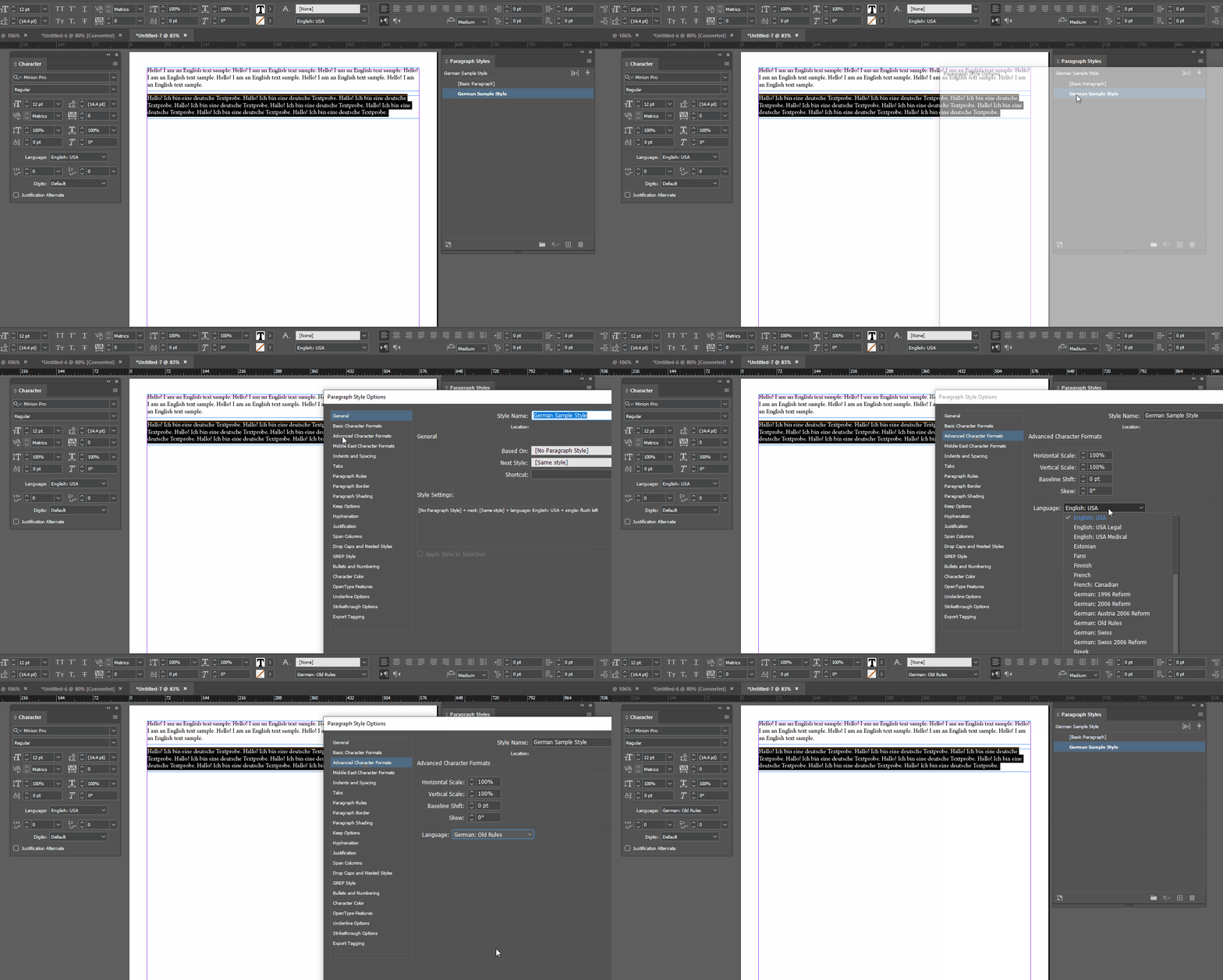



1 reply

Willi Adelberger
Adobe Expert
January 17, 2024

The IDML file should be on the very same place as its INDD original was, when the origina, IDML was saved or exported. Otherwise  the Font folder fonts and links ma not be detected correctly. Then you can open it as it would be an INDD file. Save the opened file now as iNDD on the same place. Take care not to overwrite any needed existing INDD file. Give it a new name.

Miriam348Author
Known Participant
January 17, 2024

Yes, the fonts and links do not work now. So I guess I have to ask my client to provide me with the INDD file, so that I can save it in my PC as IDML files, and I will have to create the translation project again, unfortunately... Then I should save the translation again as IDML, open it in InDesign (would have to buy the licence) and save it as an INDD file with a different name.

Is it then possible to send this new INDD file to my client by wetransfer, for example?


Thank you again for your reply.

Joel Cherney
Adobe Expert
January 18, 2024

"Yes. But the customer needs to either relink his external data, or you need to create an environment that reflects the customer's infrastructure."


So which option is potentially more effective, please? How can the customer do the relinking, please? (So that I could send them instructions...) 


There's a great deal of good advice for you in this thread. However, I want to encourage you to be careful with your client, here. There's usually a whole layer of localization engineers or DTP professionals in between a translator and a client, right? That's who would ordinarily clean up your translated IDML; me! 


A completed translation of an InDesign book file (that's what the .indb file is, a Book file that collects a bunch of individual chapters that are all in .indd format) is not a small formatting task, and probably if you've never used InDesign before will be extremely challenging, unless you already have a great deal of expertise in page layout applications. I mean, even someone who is e.g. a Framemaker expert will find some stumbling blocks on their first InDesign project. 


If your customer sent you an IDML file to translate, with no package or fonts or linked images, then I feel like it'd be reasonable to return that IDML file to them, without all of the DTP work that you're trying to do right now. If your client wants you to open the IDML file and format all the text into place, then @Abambo 's advice is completely correct; you can leave all of the images in their current state, which I imagine is a bunch of grey boxes, right? You'd just need to get the fonts to work correctly, which if it's not working for you is something that can be fixed (usually by logging out of fonts.adobe.com then logging back in). Then there's just the formatting work of handling text expansion, which can sometimes be as simple as resizing a text frame or three to allow for text expansion, and sometimes is a massive undertaking requiring significant reengineering of the document. 


But, if your client is expecting a completed Book file from you, then I'd have two things to say: a) @Robert at ID-Tasker 's advice is completely correct, he's already told you exactly what you'd need to do, but also b) maybe you've bitten off more than you can chew? Maybe think about jobbing this out to someone who does this kind of work for a living? 


(Not flogging my own services, here; I'm pretty much working at 100% capacity already 🙂 )

