


New Participant
January 24, 2020
Answered

Override GREP paragraph style with superscript

  • January 24, 2020
  • 1 reply
  • 1905 views

I'm facing a GREP problem and need some help. I'm creating a Bible devotional and have a GREP paragraph style set up that superscripts the Bible verses. The problem is, each paragraph starts with the reference, which I don't want superscripted. I've been able to do the following using the formula 

\s\d+(?!\:|\,)

(The reason I'm using a : or , is it will be translated into multiple languages)

My problem arises when sometimes the reference has multiple verses, in which case the second reference is superscripted:

My question is, is there a way to ignore a GREP style? Ideally, I would have an en space after the reference and start my style after that. I've also tried using a nested character style, but the character style doesn't override the GREP style.

Thanks!
This topic has been closed for replies.
Correct answer David Popham

If hyphenation and spellchecking is important, you may want to consider a paragraph style for each language with the correct Language settings. You could customize your GREP code for each style where different patterns occur.


The following should work using your current GREP style.

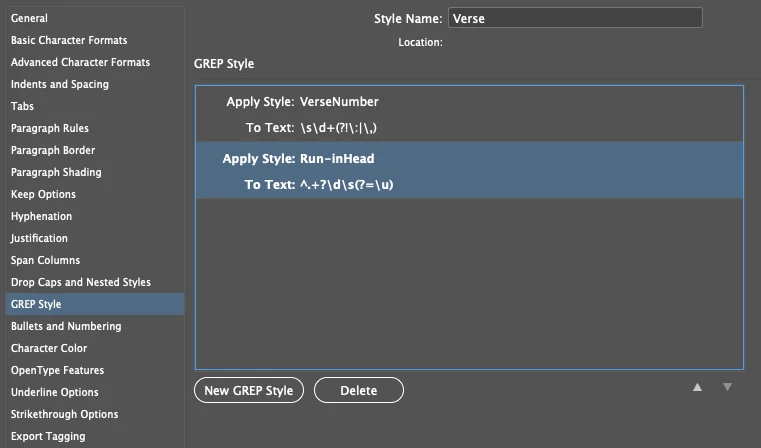
1. Create a second GREP style for your run-in head: ^.+?\d\s(?=\u).

2. In the character style for the run-in head, set Basic Character Formats > Position: Normal.

3. Make sure that the new GREP comes after the GREP style for the verse number in the GREP Style pane.

1 reply

David Popham
Participating Frequently
January 24, 2020

Based on your example, where the verse number always follows a space and directly precedes an uppercase letter, would \s\d+(?=\u) not work in place of your current expression?

bhautle77Author
New Participant
January 24, 2020

Thanks David. That's not always the case—especially with different versions and languages.

David Popham
Participating Frequently
January 24, 2020

If hyphenation and spellchecking is important, you may want to consider a paragraph style for each language with the correct Language settings. You could customize your GREP code for each style where different patterns occur.