
Participant
March 26, 2025
Answered

P: Error message (Script line 2798) with InDesign & Illustrator after update
  • March 26, 2025
  • 31 replies
  • 32874 views

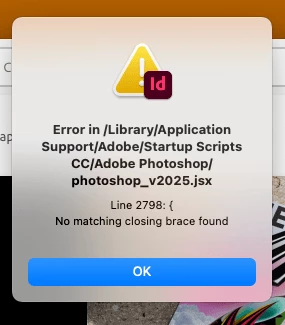
I just installed updates for Photoshop and Photoshop beta and received this error on opening Indesign. Any ideas? [I am on a Mac Mini M4] - there is no error opening Photoshop or Photoshop Beta.


<Title renamed by MOD>

Correct answer SanyamTalwar

Hi,

As confirmed by the user, the issue is due to the latest Photoshop update, and the workaround below will resolve the issue.

  • Workaround 1:
    • Uninstall Photoshop 26.5 (make sure to remove preferences).
    • Reinstall Photoshop 26.5. This will install the correct “photoshop_v2025.jsx”.
  • Workaround 2:
    • Open jsx, which is available at "/Library/application support/Adobe/Startup Scripts CC/Adobe Photoshop/" mentioned in the alert in the Text Editor 
    • Add } in the last line

Reference UserVoice Thread - Error message is seen while opening InDesign after Photoshop 26.5 update 

Sanyam Talwar

31 replies

active_developer1549
Participating Frequently
March 28, 2025

I just uninstalled the Photoshop Beta and when I opened Illustrator I no longer go that Line 2798 code error.

Community Expert
March 28, 2025

Hi together,

today I updated two versions of PhotoShop plus the Beta-Version of PhotoShop:

PhotoShop v 26.5

PhotoShop v 25.12.2

PhotoShop (Beta) v 26.6


Now I see this error message when starting up InDesign 2024 v 19.5.3.44:


Despite the fact that the message is pointing at a script named after PhotoShop v 2025 uninstalling PhotoShop (Beta) v 26.6 is the solution! Did not install PhotoShop (Beta) again. I had no need to uninstall InDesign 2024.


Thanks @jk-d6 for the hint!


Regards,
Uwe Laubender
( Adobe Community Expert )

Community Expert
March 28, 2025

Forgot: I'm on macOS 12.7.1 with a MacBookPro M1.


Regards,
Uwe Laubender
( Adobe Community Expert )

Participating Frequently
March 27, 2025

Anytime I open Adobe InDesign or Illustrator I get this error message. Does anyone know how to fix this? 


Colin Flashman
Community Expert
Community Expert
March 28, 2025

Edit: This looks like a new bug. See this post for developing information:


https://community.adobe.com/t5/indesign-discussions/error-in-scripts-opening-indesign-after-photoshop-update-line-2798-no-matching-closing-brace-found/td-p/15231798


have you ever installed any adobe indesign startup scripts (or photoshop startup scripts) that - over time - may no longer work on recent versions? If you inspect the indesign startup scripts folder (located here /Applications/Adobe InDesign 2025/Scripts/startup scripts ) and see if there's anything beyond the ForceDirectory.txt file. Chances are, if there are scripts in here, one of them may be the cause.

If the answer wasn't in my post, perhaps it might be on my blog at colecandoo!
Participant
March 27, 2025

Un-installing then re-installing PS CC and PS Beta CC resolved the issue for me (MacBook Pro M1 Sequoia 15.3.2).

Participant
March 27, 2025

Hi

I keep getting this message when I open Illustrator CC and InDesign CC (but not in Photoshop CC):

Error in /Library/Application Support/Adobe/Startup Scripts CC/Adobe Photoshop/photoshop_v2025.jsx Line 2798: { No matching closing brace found

Mac M1 Pro

Sequoia 15.3.2

Thoughts? Thanks!

Abhishek Rao
Community Manager
Community Manager
March 27, 2025

Hi @Eric26242375qi7o,


That error message seems to be affecting a few users after the latest update. You might find the discussions helpful, as it mentions similar report:

https://adobe.ly/4j9TEKp


Take a look and see if any of the solutions mentioned there work for you. Let me know how it goes!


^

Abhishek

Participant
March 27, 2025

the correct answer worked for me

--
*Eric McClellan*
Chief Creative
WYLIE
...personal details removed by moderator...

Participant
March 27, 2025

Hallo liebe Community

Beim öffnen von Adobe Indesign 2025 kriege ich diese Fehlermeldung:

Error in /Library/Application Support/Adobe/Startup Scripts CC/Adobe Photoshop/photoshop_v2025.jsx

Darunter kleine: Line 2798 :{ No matching closing brace found.


Danke für die Hilfe zur Lösung!

Babuche

Community Expert
March 27, 2025

Looks like there's a file in the Startup Scripts folder that is called a script for Photoshop 2025 and it's missing the closing brace.

Do you need the script? If you don't delete it from the Scripts folder - go to the Scripts panel and reveal any of the scripts in the Finder - then go back a folder to the Startup script folder on your system - remove the script from the Startup folder. 


If you need the script - then what is the script? How is it used and can you post it here? 


It looks like you just need fix the closing brace at the line it mentions. 


Participant
March 27, 2025

Yesterday my InDesign and Illustrator started giving me the same error. I do not get what you are saying on how to fix this


sandin85196467
Participating Frequently
March 27, 2025

I have been experiencing the same error issue with both InDesign and InDesign (Beta) running Windows 11 which only began today, with the following updates:

  • Photoshop v26.5 —TODAY;
  • Photoshop (Beta) v26.6 —TODAY;
  • InDesign v20.2 —11 days ago; 
  • InDesign (Beta) v20.1 —13 days ago
Participant
March 26, 2025

I had this issue starting Illustrator and InDesign, running on Windows 11 Home. I also had Photoshop Beta installed. All updates installed. The folder 'Adobe Photoshop' did not exist in 'Startup Scripts CC'.


I uninstalled and reinstalled Illustrator and InDesign but the issue persisted. I uninstalled and reinstalled Photoshop Beta and the issue was resolved. The folder 'Adobe Photoshop' now exists in 'Startup Scripts CC'.

m1b
Community Expert
Community Expert
March 26, 2025

Thanks @jk-d6 that's good info.

m1b
Community Expert
Community Expert
March 26, 2025

An additional note is that I am on MacOS also, but I don't have that folder "Startup Scripts CC" at all. (Edit: yes I do, was looking in wrong Library folders.) Maybe you could move that folder to your desktop and restart, and see if that makes a difference.

- Mark

Community Expert
March 26, 2025

Hi @m1b rather than moving the whole folder if it contains more jsx files removing just this file should solve the purpose and preserve the functionality added by the other scripts files. This file seems to be from Adobe if there are multiple reported instances of it so if someone posts the file it should be easy to fix the code if it is just a problem of missing braces.

-Manan

-Manan
m1b
Community Expert
Community Expert
March 26, 2025

Hi @Manan Joshi yes I'm also intrigued about what the script is, and I'd like to see it, but also intrigued that some users have the "Startup Scripts" folder installed, even though—as a user said on the Illustrator thread—they'd never used scripts.

- Mark

m1b
Community Expert
Community Expert
March 26, 2025

Hi @default11h12xm5yo8m this does seem to be a somewhat widespread issue. We have Illustrator users reporting the same error.


@HARSHIKA_VERMA@Sanyam Talwar could either of you help us get this information to the right person? Might be a buggy script as part of the latest Photoshop beta?

- Mark