


Exit
  • Global community
    • Language:
      • Deutsch
      • English
      • Español
      • Français
      • Português
  • 日本語コミュニティ
  • 한국 커뮤니티
0

Page Numbering and Layout Issue in Book Formatting

Contributor ,
Mar 12, 2025 Mar 12, 2025

Hi,

I am working on a book. Before the first chapter, I have an imprint and a table of contents. In these two sections, I don’t want any page numbering.

When I set the first chapter to start at page one, for some reason they dont stay togheter.  There should be two pages next to each other, not one on its own. Why is this happening, and how can I fix it?
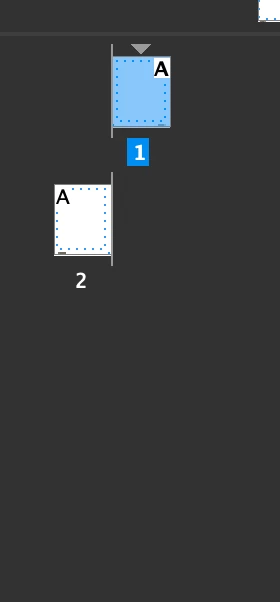
Screenshot 2025-03-12 at 13.22.41.png


TOPICS
How to
189
Translate
Report
Community guidelines
Be kind and respectful, give credit to the original source of content, and search for duplicates before posting. Learn more
community guidelines
Contributor ,
Mar 12, 2025 Mar 12, 2025

It makes sense for it to be set up like this, if this is the first page of the book, but the issue is that it's not. As mentioned before, this chapter follows two additional sections (Table of Contents and Imprint).

 
Translate
Report
Community guidelines
Be kind and respectful, give credit to the original source of content, and search for duplicates before posting. Learn more
community guidelines
LEGEND ,
Mar 31, 2025 Mar 31, 2025

@Mateomono 


You need to start a Section:


RobertatIDTasker_0-1743439143330.png


Enter EVEN value:


RobertatIDTasker_1-1743439187335.png


RobertatIDTasker_2-1743439199791.png


The other option would be to UNSELECT "Allow Document Pages to Shuffle" - which might sound counter-intuitive - but if you think from InDesign's perspective - it makes sense 😉 it means that you are prohibiting InDesign from controlling automatic reflow of the Pages:


RobertatIDTasker_3-1743439248141.png


then move pages close together - I'm drag&dropping right page till there is this extra line:


RobertatIDTasker_7-1743439474167.png


but then you'll end up with something like this:


RobertatIDTasker_4-1743439336957.png


And then you'll have to move LEFT page to the left side of the spine line:


RobertatIDTasker_8-1743439529191.png


to get to this:


RobertatIDTasker_0-1743439939708.png


But this second method - will make your document look llike this - if you'll start adding new pages:


RobertatIDTasker_9-1743439834587.png


New pages will ALWAYS be added on the right side of the spine.


Where the first method - will produce correct spreads:


RobertatIDTasker_1-1743440048889.png


But you won't be able to start from the ODD number - as this would require unchecking "Allow Document Pages to Shuffle" and all your new pages will end up like in the second method - on the right side of the spine and you'll have to move them manually. 


Unless, of course, you'll be modifying an existing document - after unchecking "Allow Document Pages to Shuffle":


RobertatIDTasker_3-1743440343582.png


RobertatIDTasker_4-1743440354728.png


Translate
Report
Community guidelines
Be kind and respectful, give credit to the original source of content, and search for duplicates before posting. Learn more
community guidelines
LEGEND ,
Mar 31, 2025 Mar 31, 2025

Just checking. 

Translate
Report
Community guidelines
Be kind and respectful, give credit to the original source of content, and search for duplicates before posting. Learn more
community guidelines
Community Expert ,
Mar 31, 2025 Mar 31, 2025
LATEST

Use @Robert at ID-Tasker 's suggestion for sectioning. Please don't have your odd page numbers on the left-hand page. 

Remember--just because you can, doesn't mean you should...


David Creamer: Community Expert (ACI and ACE 1995-2023)
Translate
Report
Community guidelines
Be kind and respectful, give credit to the original source of content, and search for duplicates before posting. Learn more
community guidelines