


Brigit Ananya
Inspiring
December 1, 2023
Answered

Page numbering

  • December 1, 2023
  • 5 replies
  • 2345 views

I have this master page with page number text boxes:
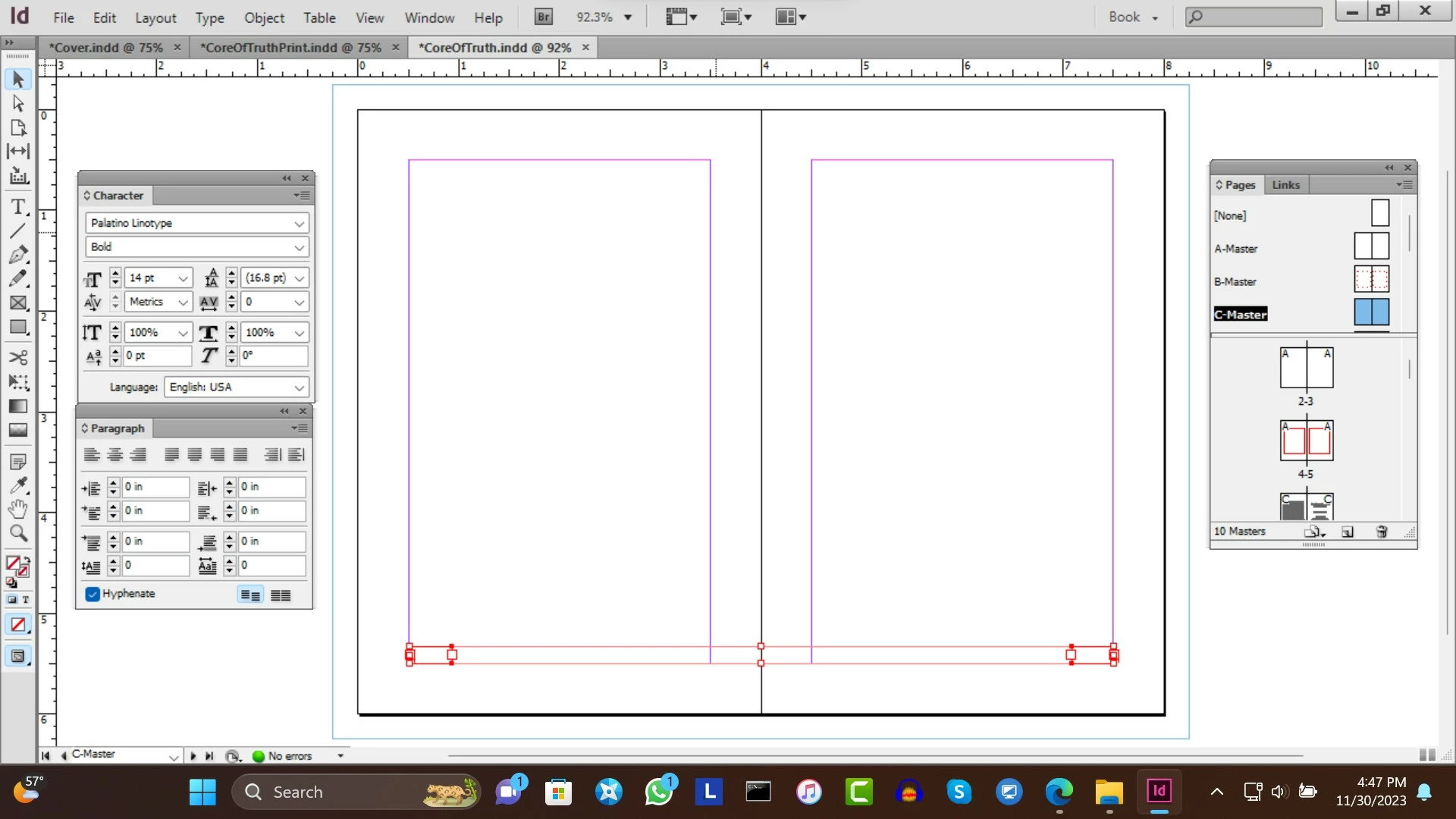
I can't select Layout "Numbering and Section Options". How can I set page numbers i, ii, iii, etc starting on page 5 and ending on page 22? 

This topic has been closed for replies.
Correct answer Barb Binder

Hi @Brigit Ananya:


OK, I think you're asking us how to add the page numbers on the master pages. Is the actual question? 


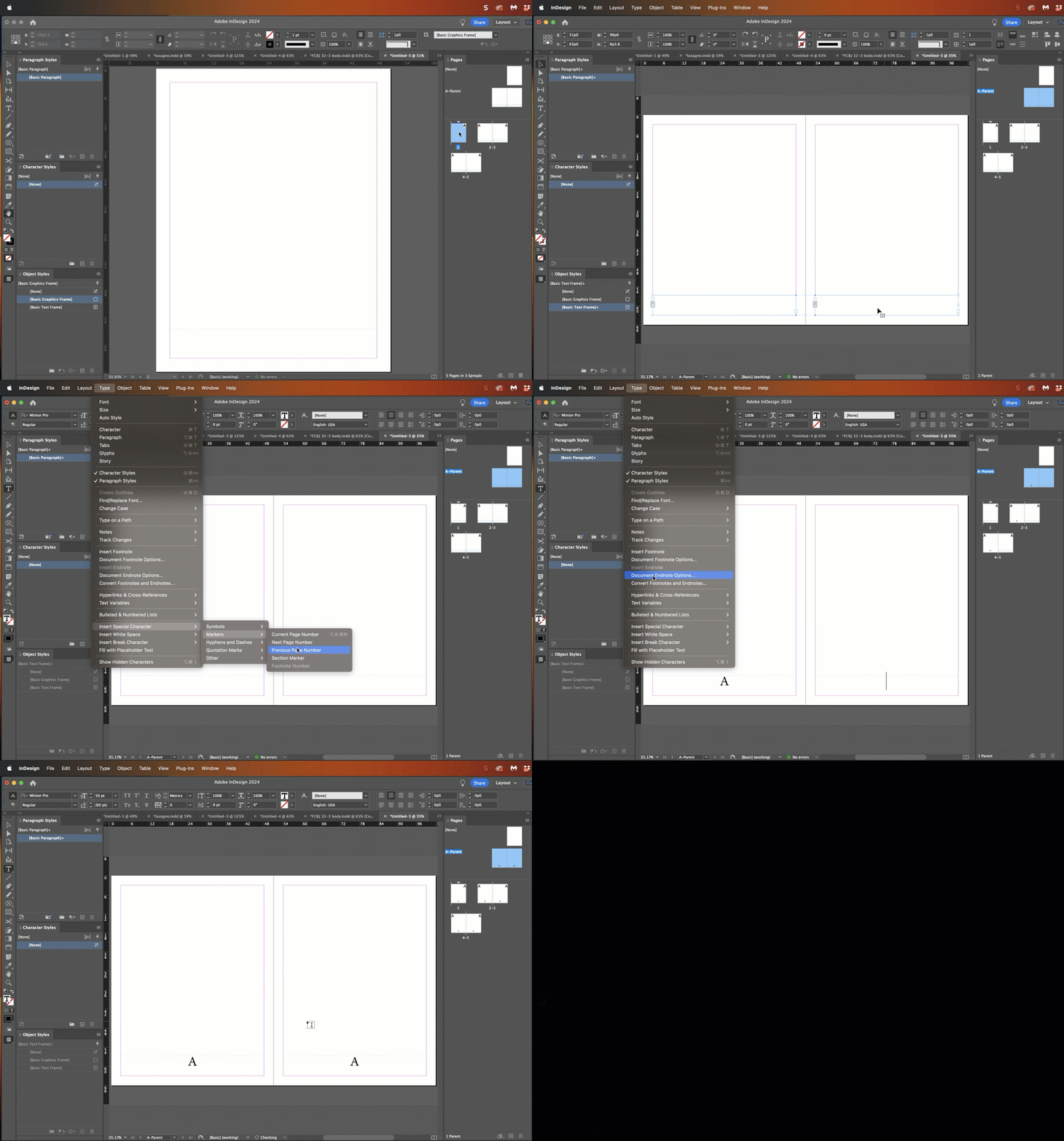
Use Type > Insert Special Character > Markers > Current Page Number to add the markers to your master pages. The numbers will appear when you return to the body pages.


~Barb


5 replies

Barb BinderCorrect answer
Braniac
December 1, 2023

Hi @Brigit Ananya:


OK, I think you're asking us how to add the page numbers on the master pages. Is the actual question? 


Use Type > Insert Special Character > Markers > Current Page Number to add the markers to your master pages. The numbers will appear when you return to the body pages.


~Barb


Brigit Ananya
Inspiring
December 1, 2023

OK, thanks, I first had to set my trext frames in the Page Master to contain page numbers.

But now when I set the page numbers i, ii, iii on the page panel starting at page 5, it starts with page v. 

I want it to start with page i.

Inspiring
December 1, 2023

I deleted page numbers 1-4 on the pages by deleting the text frames, but the page numbers 1-4 still show underneath the pages in the page panel. How can I delete them, so that I can start with page 1 at my page xix?


You cannot delete the page numbers in the page panel! As long as you don't have the page number marker on those pages the page number won't show on those pages. Just apply a Parent Page that doesn't contain the page number marker to pages 1 to 4.

At your page xix, do the same thing that you did on page 5, and start that page at 1 and change the style to 1, 2, 3,…

Braniac
December 1, 2023

Hi @Brigit Ananya:


You have the answers you need, just wanted to point out that the reason Numbering & Section Options isn't available in your screen shot is because you have master pages selected (note the blue page icons next to C-Master and the black behind the words). 


Numbering & Section Options is only available on body pages. 


~Barb

Brigit Ananya
Inspiring
December 1, 2023

My text frames are red, because they have to be in the foreground, and my graphics frames for the background colors of all pages are blue, because they are in the background. 

Why can't I set the page numbers by right clicking on the text frame for the page number on page 5?

Robert at ID-Tasker
Braniac
December 1, 2023

Color of the edges of the objects is from the color of the layer the object is on. 


Steve Werner
Braniac
December 1, 2023

Number styling in "Numbering and Section Options" is set by selecting the pages included on the Pages panel:


Brigit Ananya
Inspiring
December 1, 2023

Yes, but I want my page numbers not underneath the pages in the Pagea Panel, I want the page numbers in the text frames I have set up with the Page Master page I showed before.

Inspiring
December 1, 2023

Changing the page numbering style to what we have described will set how the page number shows up in the text frames you have set up on your pages. Have you done what we have suggested here? You will see the page number on your pages change to i, ii, iii etc.

Inspiring
December 1, 2023

Right-click the page thumbnail in Pages panel, page 5 in this case, or select the page thumbnail and from the flyout menu, select 'Numbering & Section Options…'. Change the page numbering style to i, ii, iii for this section.

Do this step on page 23 and change the page numbering style back to your default style.

By looking at your screenshot, make sure page 5 has the right Parent Page applied to have the page number text frame.

Brigit Ananya
Inspiring
December 1, 2023

Right clicking on the text frame for the page number on page 5 doesn't give me the  "Numbering and Section Options" (and when I right click on page 5,  "Numbering and Section Options" doesn't put the page numbers into the text frames). Please help some more. Thanks.

Inspiring
December 1, 2023

Not on the text frame but on the page thumbnail on the Pages panel.