


Participant
September 5, 2024
Question

Page Sections Not Reflecting Correctly in Table of Contents

  • September 5, 2024
  • 2 replies
  • 1147 views

Hello,


I am working with a file where I have one page (7) in a section, followed by a section with 3 pages (8, 9, 10). 


In the table of contents, the pages are incorrectly split between the two sections :
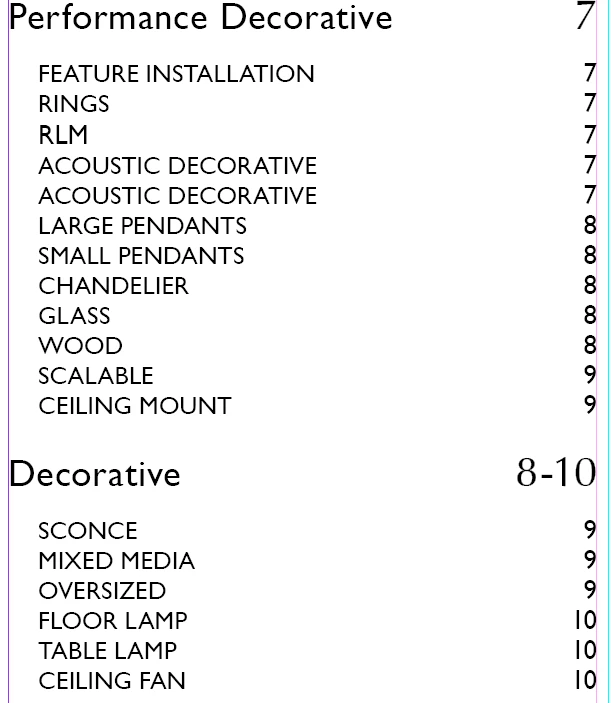
Attached I am including the Numbering and Sections Options dialogs as well as 2 of the pages.


Can someone please help me reoslve this?


<Title renamed by MOD>


This topic has been closed for replies.

2 replies

Mike Witherell
Community Expert
Community Expert
September 5, 2024

In your first screenshot, it appears that you want a section of page numbering to start on page 7; but it is set to auto numbering. Click the 2nd radio button forcing it to start numbering at 7, if that is what you want.

After doing this, go to your Table of Contents, select it, and Layout > Update Table of Contents.

Mike Witherell
Abhishek Rao
Community Manager
Community Manager
September 5, 2024

Hi @Rae5C5F,


I understand how confusing it can be when sections aren’t reflecting correctly in your Table of Contents. To help resolve this, could you please provide your InDesign version and operating system details?

In the meantime, try these steps:
1. Ensure that the section numbering and page ranges are correctly set. Go to 'Layout > Numbering & Sections' and verify the settings.
2. Go to 'Layout > Table of Contents', and check the settings to make sure that sections are correctly defined and included.


If you continue having issues, please share any screenshots of your settings for further assistance.


Looking forward to your response!


Best,  
Abhishek Rao

Rae5C5FAuthor
Participant
September 5, 2024

Hi Abhishek,


Thanks for your help, I checked the numbering including the suggestion from @Mike Witherell (Thank you as well, Mike) and am still having the issue. 


I tried to open the Numbering and Sections dialog for the 9th and 10th pages to make sure they weren't set to start a new setion and updated to no avail. It seems strange that 9th page specifically is getting split between sections.  

These are the setting I have now:


Thank you


Abhishek Rao
Community Manager
Community Manager
September 5, 2024

Hi @Rae5C5F,

Thank you for sharing the details, and I understand how frustrating it must be to still face the issue after trying the suggestions.

Here's what I recommend:
1. Restart InDesign to refresh the settings and ensure no temporary glitches are affecting the sections.
2. Go to each section and remove any existing section starts by opening the 'Numbering & Section Options' and making sure no accidental section breaks exist.
3. Double-check for hidden overrides that might be interfering with the TOC. You can review the paragraph styles and remove any overrides that may not be visible at first glance.
4. Try redefining the TOC styles to ensure they’re correctly capturing the sections as intended.


If the issue persists, feel free to share more details, and we'll continue troubleshooting together!


Best,  
Abhishek Rao