


subaG86
Known Participant
February 1, 2017
Question

Pantone color in InDesign CS6

  • February 1, 2017
  • 7 replies
  • 3152 views

Hi Folks,

There are lot discussion over there regarding Pantone color library update in InDesign CS6 and it is the correct library and so on. But we still have a confusion over how to use the color and which color output is correct (means LAB color or CMYK color).

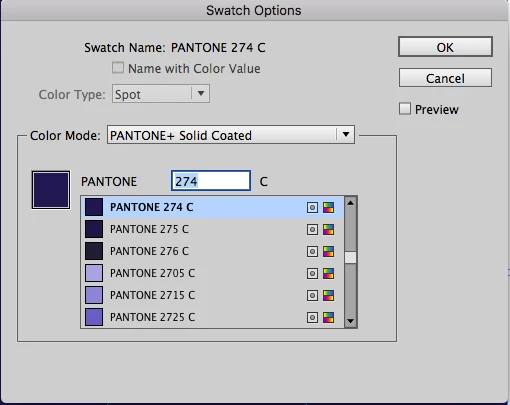
We are using Pantone 274 C in InDesign CS6 as shown in below screenshot(picture 1). It seems like purple color (picture2) in InDesign file and the same has been retained in export PDF of High quality settings. This is the setting we used to create PDF for proof stages.

For final stage, we use PDF X-1a setting as per customer requirements. But the color has been changed to dark blue (picture 3) in PDF in PDF X-1/a settings.

Please confirm which one is original color (dark blue or purple).

Picture 1:
Picture 2:

Picture 3:

    This topic has been closed for replies.

    7 replies

    Legend
    February 2, 2017

    If you are printing using a printing press - not a printer - then the person running the press will buy or mix a bucket of ink in the Pantone colour you chose. This goes with the buckets of cyan, magenta, yellow and black ink, and us why it is called five colour printing. On many digital printers and all desktop printers the screen colour is used. You MUST KNOW WHAT PRINTING TECHNOLOGY IS USED. Talk to your printer.

    Legend
    February 2, 2017

    The object inspector isn't showing the alternate colour space, or the tint transform function. These are what are used to show the on screen colour, so you can't see if (as I speculate) they changed from Lab to CMYK.

    rob day
    Community Expert
    Community Expert
    February 2, 2017

    The object inspector isn't showing the alternate colour space, or the tint transform function.

    Right, I was only using Object inspector to show that there's no difference in the separation output.

    rob day
    Community Expert
    Community Expert
    February 2, 2017

    Which version of Acrobat? Acrobat X and XI had some color management preview problems that have been fixed with D.C. A spot color's preview would have no affect on the plate output

    subaG86
    subaG86Author
    Known Participant
    February 2, 2017

    Yes, I have checked in Acrobat DC and there is no difference in color. It exactly the purple color in both the PDFs output (high quality vs. Pdf x/1a).

    Can you please confirm again whether the preview issues does not affect in printed output?

    rob day
    Community Expert
    Community Expert
    February 2, 2017

    Can you please confirm again whether the preview issues does not affect in printed output?

    If the output is to a spot plate separation the preview has no affect on the separation.

    If you are printing to a composite printer or forcing a conversion to CMYK process color you might see a difference because you would no longer be printing the actual Pantone solid ink.

    Legend
    February 2, 2017

    If it's an extra plate then surely the screen preview colour is of little importance?

    What's probably happened is that the alternate colour (IE the screen preview colour) has been converted from Lab to CMYK with a loss of gamut, because of using the old and limited PDF/X-1a.

    rob day
    Community Expert
    Community Expert
    February 2, 2017

    What's probably happened is that the alternate colour (IE the screen preview colour) has been converted from Lab to CMYK with a loss of gamut, because of using the old and limited PDF/X-1a.

    Just checked this in AcrobatDC and the X-1a preview of Lab spots is indeed different, but Object Inspector shows no difference in the color specification. Here's X-1a top vs. X4 bottom

    subaG86
    subaG86Author
    Known Participant
    February 2, 2017

    Yes, It is an extra plate. I'm getting two kind of color output in PDF in two different export settings. But the color is still a Pantone with spot plate. Please see below the Pantone color shows in PDF of Output preview mode.

    We didn't set any color conversion (spot to process) in Ink Manager and it is not required too.

    High quality settings: Purple color output

    PDF X-1/a settings: Dark blue color output

    rob day
    Community Expert
    Community Expert
    February 2, 2017

    Yes, It is an extra plate.

    Then the reference should be to the printed Pantone swatch. It will be up to the press person to correctly mix the ink and get the density right.

    The newer Pantone + solid libraries all use Lab values for screen display, which give a more accurate screen preview particularly for out-of-gamut colors, but the screen display still won't be as reliable as the swatch assuming the ink is mixed and printed correctly.

    subaG86
    subaG86Author
    Known Participant
    February 1, 2017

    Hi Rob,

    In High quality settings, there is 'No color conversion' used in Output option. But in PDF X-1/a settings, color conversion is activated by default in the settings. That's why, it changes to dark blue. My doubt is that which one is original Pantone color, purple or dark blue.

    If I'm anything wrong in your understanding, please advise.

    High Quality settings:

    PDF X-1/a settings:

    Legend
    February 1, 2017

    (Edit for spelling) The crucial question for you is whether you intend to print with a Pantone spot colour (5 colour job perhaps). If not, avoid designing with a spot colour.

    rob day
    Community Expert
    Community Expert
    February 1, 2017

    Is the color printing as an extra spot color or is it getting converted to CMYK on export via Ink Manager? If it's the latter you would expect some color shifting as the color is converted to CMYK depending on the document's assigned CMYK profile and the color settings' conversion options.