


Participating Frequently
February 22, 2018
Question

Paragraph border shows at bottom of page, regardless of end of paragraph

  • February 22, 2018
  • 2 replies
  • 2053 views

So I have a new project where I'm using the paragraph border option to put a border around certain text elements.

Only problem is, as mentioned in the title, at the bottom of a page, if the paragraph with a border on the bottom continues over to the next page. I get a bottom border at the bottom of page/text box, and at the bottom of the paragraph on the next page. (see image)
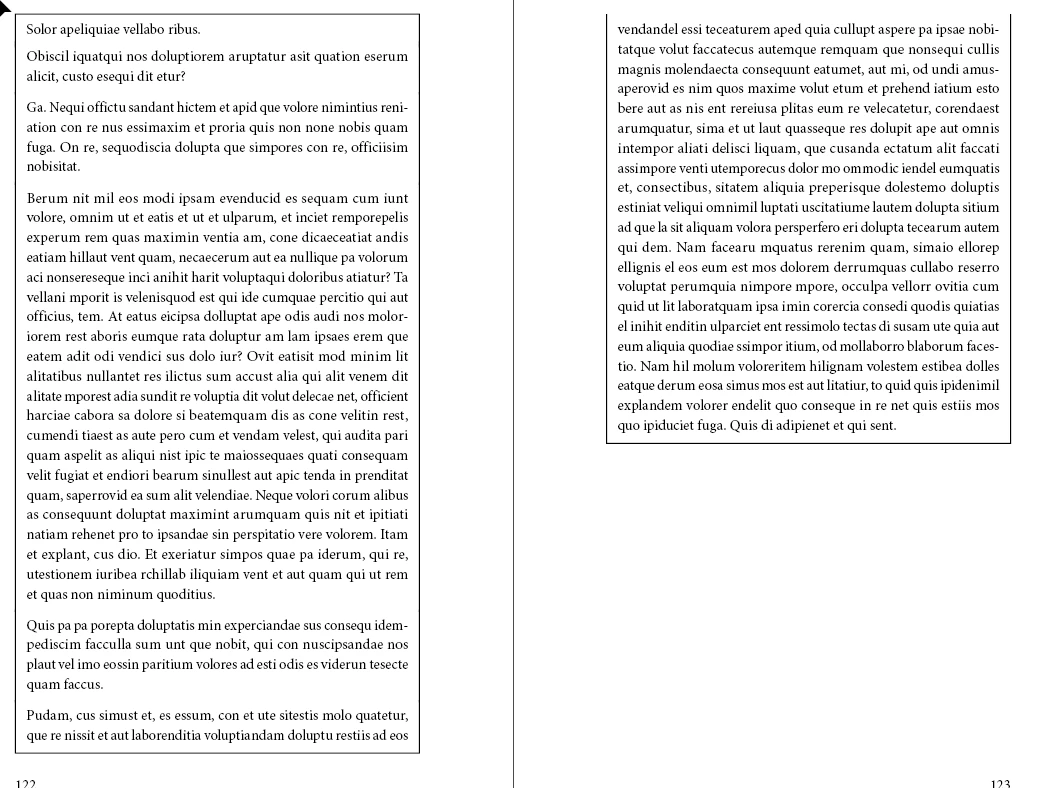
You'll notice at the bottom of p122 that, despite the paragraph not ending, it has a border line drawn under it. The actual end of the paragraph is on p123.

I'm wanting the border to only apply at the end of the paragraph. Is that at all possible? I've looked everywhere and can find nothing relating to this. I really don't want to have to jury-rig it by putting in a line break at the bottom of 122, full justify (so it looks like it's still a part of the following copy), and apply no bottom border just to make this work - it's messy and unprofessional. Not to mention annoying, as it occurs throughout the project.

This topic has been closed for replies.

2 replies

Community Expert
February 22, 2018

Hi Hoëk ,

another quick & dirty workaound:
Obscure the bottom border with a filled graphic frame.
Fill color [Paper]…

Regards,
Uwe

FRIdNGE
Inspiring
February 22, 2018

Hi Uwe,

Some days ago, I've written a script ["for free"] I could modify a little (including an UI to choose the family 'main' para style, considering all the para styles has a similar name as:

FRIdNGE_Title

FRIdNGE_CurrentText

FRIdNGE_Enum•

FRIdNGE_Enum•None

FRIdNGE_Enum–

FRIdNGE_Enum•None

All the para styles are based on the 'main' one, that is here: FRIdNGE_CurrentText

This 'main' para style includes 2 deactivated para rules (and, of course, 2 vertical borders, activated by default).

The way the Script works: it searches in the doc all the chains of consecutive paras using these para styles, deativates all the para rules then "activates" the para rule above for the first and the para below for the last one.

It's not automatic but it's just 1 click!

If the layout moves, just 1 click again! …

Best,

Michel, from FRIdNGE

Community Expert
February 23, 2018

Hi Michel,

I think, the real problem is if the last paragraph that should have the horizontal rule at the bottom will flow from one text frame to the next one or flows from one text column to the next one. Then the horizontal rule at the bottom will be rendered two times: At the bottom of frame/column where the paragraph begins and the at the bottom where the same paragraph ends. In this case you only could split the paragraphs into two or obscure the horizontal rule at the bottom of the frame/column with a filled rectangle.

Regards,
Uwe

Mike Witherell
Community Expert
Community Expert
February 22, 2018

You might consider the simplicity of a Keep Option: Keep all lines together in paragraph. The paragraph will break two lines sooner, and the boxing won't look awkward.

Mike Witherell
KalothAuthor
Participating Frequently
February 22, 2018

Hi Michael,

I had considered that in some instances, but unfortunately not all work so neatly. Often a gap larger than two lines will be left behind (5-7). As awful a solution it is, I'd rather jury-rig it with line breaks and justification than have awkward white space there.

Thanks for the suggestion, though.

Anna Lander
Inspiring
February 22, 2018

Do you need the top edge to be without stroke?

If not, you could set the border to the text frame instead of the paragraph.