



Roger Breton
Legend
October 22, 2022
Question

Paragraph Shading for "words"?

  • October 22, 2022
  • 3 replies
  • 5296 views

Is there any way I could "shade" a word or a sequence of words inside a paragraph? Like this :
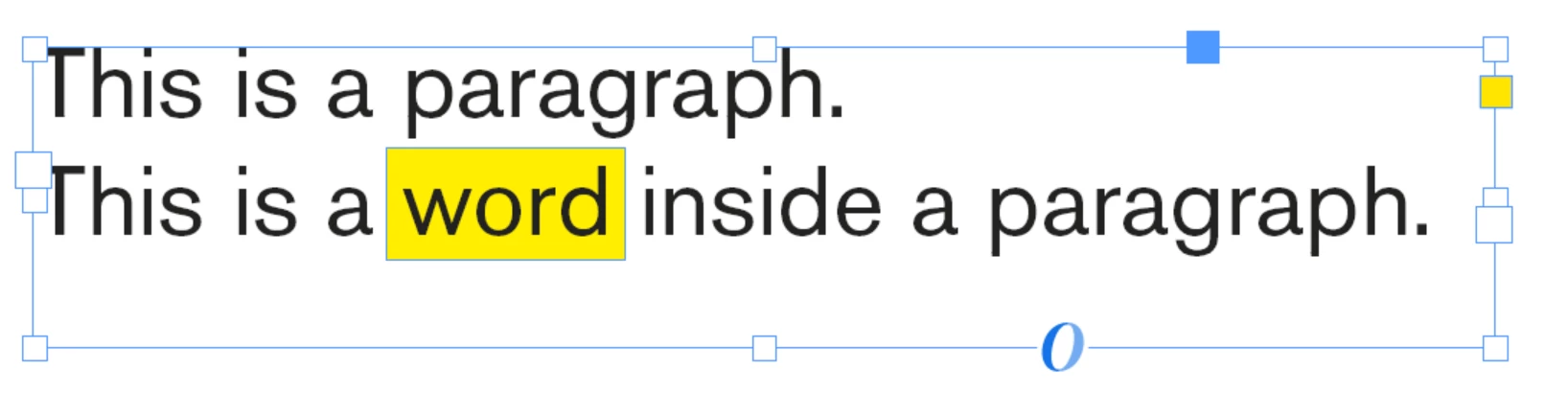
You see? I often need to "highlight" some expressions or "concepts" in my texts and I wish there was a way to quickly, simply have InDesign create a "colored area" behind words?


Suppose I double-click the word "inside" above, I'd wish for something like a "word shading" option, somwhere I could simply apply at will? 

à

I tried a Character Style but I am stuck with having a font family associated with the style, but even if I am able to specify the color, yellow, in this example, it only affects the characters. That's not it...


I was thinking of Paragraph Shading which is almost what I want...

I was thinking of "Paragraph rules" but that would be too cumbersome.


Maybe some "Object style"? I confess I haven't explored that avenue... yet...


As you can see above, in the screen capture, I drew a solid yellow rectangle and placed it behind the text frame to show you what I'm after. 

This topic has been closed for replies.

3 replies

rob day
Community Expert
Community Expert
October 22, 2022

Hi Roger, you could also try this script which creates an underline stroke relative to the text pointsize:


https://shared-assets.adobe.com/link/0f953e42-7de4-484b-4bc2-5548ee1018d0


Here‘s an example, select a range of text and run the script:


Roger Breton
Legend
October 23, 2022

Got the script, Rob -- thank you!

Looking at the code....

I may have a question or two 🙂

Dave Creamer of IDEAS
Community Expert
Community Expert
October 22, 2022

>>>I tried a Character Style but I am stuck with having a font family associated with the style, but even if I am able to specify the color, yellow, in this example, it only affects the characters. That's not it...


This confused me because if you have a paragraph style applied to the text, the character style will not fill in the font (or any settings) That way, you only need to change the settings you want to add. 


David Creamer: Community Expert (ACI and ACE 1995-2023)
Roger Breton
Legend
October 22, 2022

Silly me! As I wrote above, my gut reaction was to create the custom underline as Barb suggested but right on the characters, in the text? You know, out of laziness, to avoid having to specify "all" (there weren't that many...) the required attributes in the Create Style dialog box..... But it never occured to me that the Style does not have to be created "Live", on a given group of characters, it could simply as Barb demonstrated, be created "offline", while no characters were being selected. I feel ashame of not having thought about that ... InDesign can makes you humble 😉
Thank you for taking the time to reply, David

Robert at ID-Tasker
Legend
October 22, 2022

If you create CharacterStyle based on the selected text - as you've noticed - InDesign will use differences / overrides over ParagraphStyle as pre-set values - but you can remove them later 😉

This way you can experiment on your original text - sometimes it can be much easier than to modify "blank" CharStyle - and when you finish - just create new CharStyle 😉 

Barb Binder
Community Expert
Community Expert
October 22, 2022

Hi @Roger Breton:


Yes, you can do this with a custom underline. 

https://www.rockymountaintraining.com/adobe-indesign-highlighting-text/


~Barb

~Barb at Rocky Mountain Training
Roger Breton
Legend
October 22, 2022

Thanks for the suggestion, Barb.

It's easy enough to create but to turn it into some "style" does not seem likely? 

FRIdNGE
Inspiring
October 22, 2022

Use a "condition"!


If you associate its application to a simplistic script, you will be able to :


select text, then click (done!) … select text again, click again (done!) …


(^/)  The Jedi