


Known Participant
April 16, 2021
Answered

Paste without formatting is not available/greyed out

  • April 16, 2021
  • 2 replies
  • 7918 views

Is there any way to enable this function? When Im trying to paste contents, paste without formatting is not available or its greyed out. When choosing "paste", theres a difference from the current text format.
Correct answer Bill Silbert

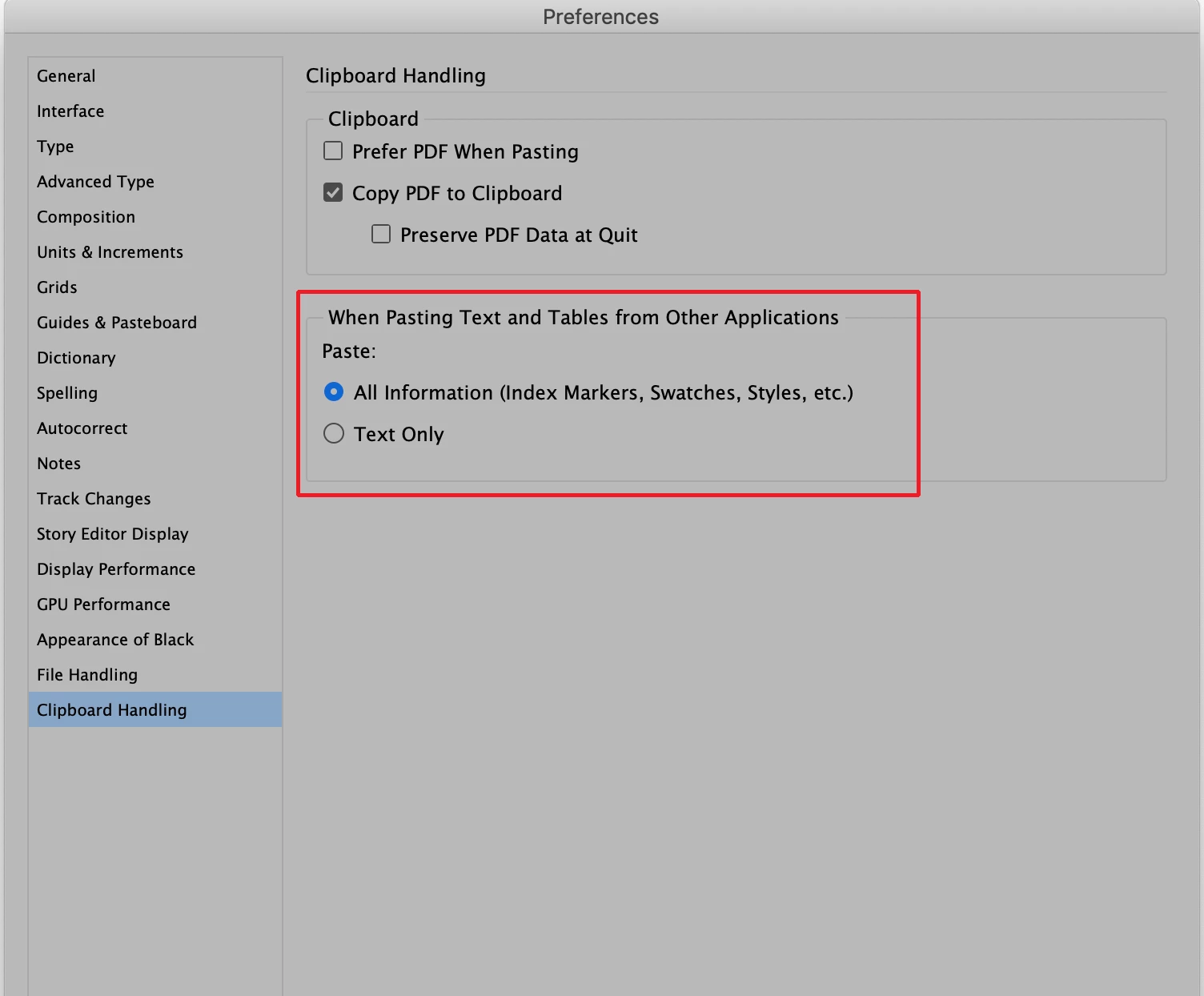
To "ungray' the paste without formatting option go into the Clipboard Handling section of your InDesign preferences and choose "All Information (Index Markers, Swatches, Styles, etc.). This will activate paste without formatting since you will now need a choice of whether pasted text should or should not be formatted. Do this with no document open and then quit the program. When you reopen it will now be the default for your version of InDesign.

2 replies

Bill Silbert
Bill SilbertCorrect answer
Community Expert
April 17, 2021

To "ungray' the paste without formatting option go into the Clipboard Handling section of your InDesign preferences and choose "All Information (Index Markers, Swatches, Styles, etc.). This will activate paste without formatting since you will now need a choice of whether pasted text should or should not be formatted. Do this with no document open and then quit the program. When you reopen it will now be the default for your version of InDesign.

New Participant
April 5, 2022

This did not work for me. Changes preferneces, paste without formatting still greyed out. Restarted, rebooted, etc. Nothing helped.

Ashutosh_Mishra
Inspiring
April 16, 2021

Hi Joseph,


Sorry to hear about your experience. I'd request you to try the suggestions on this community post(https://community.adobe.com/t5/indesign/paste-without-formatting-not-working/td-p/10746113) with a similar concern. Hope it helps.


Regards,

Ashutosh