





Answered
Place text absolutely on dialogue/panel
Although the problem surfaced with FrameMaker, it is not related to it. The script below just needs the ExtendScript ToolKit CC.
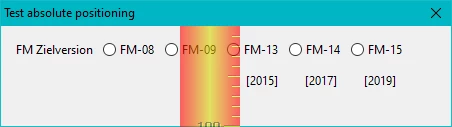
Problem: I can not find a method to place the additional text correctly (that is, close to the first paart of the button labels). For reference a pixel-ruler is overlayed in the screen shot:
// E:\_DDDprojects\FM-JsxLib\FMjsxLib\Functions\Demos\PositionAbsolute.jsx ====== UTF-8
// Test/Demo for aboslut position of text within dialogue/panel

PositionAbsolute = function (oObject, asProps, asMethods) { // ======================
  wPal = new Window('dialog', "Test absolute positioning", undefined);
  wPal.size = [450, 100];
  wPal.alignChildren = "left";
	wPal.g1 = wPal.add('group',undefined, "",{borderStyle:"black"});
	wPal.g1.margins = 0;
  	wPal.g1.st1 = wPal.g1.add('statictext',undefined,"FM Zielversion");
  	wPal.g1.rb = wPal.g1.add('group',undefined);
    	wPal.g1.rb.rb8  = wPal.g1.rb.add('radiobutton',undefined,"FM-08");
    	wPal.g1.rb.rb9  = wPal.g1.rb.add('radiobutton',undefined,"FM-09");
    	wPal.g1.rb.rb13 = wPal.g1.rb.add('radiobutton',undefined,"FM-13");
    	wPal.g1.rb.rb14 = wPal.g1.rb.add('radiobutton',undefined,"FM-14");
    	wPal.g1.rb.rb15 = wPal.g1.rb.add('radiobutton',undefined,"FM-15");
     wPal.rbtxt = wPal.add('statictext',undefined,"[2015]         [2017]         [2019]");
//   wPal.rbtxt.location = {x:230, y:30           // does nothing
//   wPal.rbtxt.location = [230, 30];             // does nothing
//   wPal.rbtxt.bounds = {x:230, y:30, width:140, height:15}; // only width is handled
     wPal.rbtxt.indent = 230;                     // ok, but not sufficient

  wPal.show();
} // --- end PositionAbsolute --------------------------------------------------

PositionAbsolute ();
Since "A RadioButton object has no creation properties", labels can not be multiline. Hence I try to place the "second line" close below - but no method works! See the commented lines towards the end of the script.
Prophylactically I have entered this as bug FRMAKER-12959 . But an expert such as Peter Kahrel know better or have a solution …
 AdChoices