
Participant
December 28, 2017
Answered

Problem removing guides

  • December 28, 2017
  • 2 replies
  • 3148 views

Hello - i've tried everything that has been posted in regards to guides that has been listed on this forum and nothing works. I am using a pre-exising document that i didn't create. When I go to drag over a new guide from the ruler, as soon as the guide hits the page, a grid appears that i did not set. These guides look different then the guides I am setting up as they don't extend beyond the page, but they also don't appear to be grids, because they only respond to the "Hide all guides" command. Any insight is appreciated.
Correct answer Barb Binder

Hi Maggie:

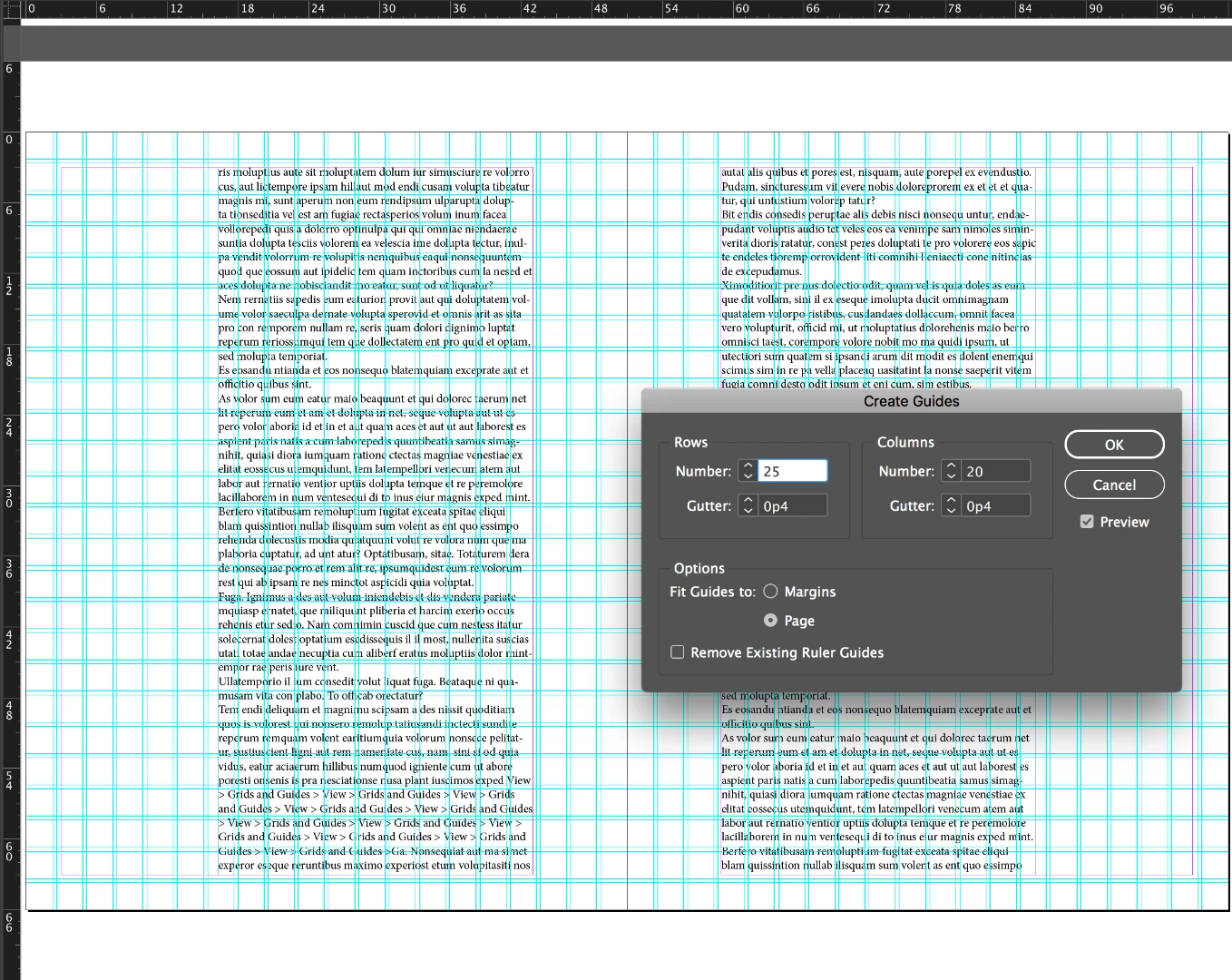
Wow. That's intense. They were likely added via Layout > Create Guides:

There is a checkbox to remove them at the bottom, but if they don't go away I bet they are on the master page. I can't see your Pages panel in your screen shot, so start on the A-Master. Once you find them you can use that checkbox or just go back to View > Grids and Guides > Delete all Guides on Spread.

On a somewhat related note, you have Baseline Grids showing, perhaps turned on by accident in your quest to delete the guides. They aren't showing up because you are zoomed out and the page is very busy, but once you get the grids off, if you suddenly see blue horizontal lines like college-ruled paper, you want want to turn them off via View > Hide Baseline Grid.

~Barb

2 replies

Stephen Marsh
Community Expert
Community Expert
December 29, 2017

Not sure where I originally found this script back in 2009, does it work for you?

var dialog = app.dialogs.add({name:"Select Guides"});

var guideTypeButtons = dialog.dialogColumns.add().radiobuttonGroups.add();

guideTypeButtons.radiobuttonControls.add({staticLabel:"All", checkedState: true});

guideTypeButtons.radiobuttonControls.add({staticLabel:"Vertical"});

guideTypeButtons.radiobuttonControls.add({staticLabel:"Horizontal"});

app.scriptPreferences.userInteractionLevel = UserInteractionLevels.interactWithAll;

if(dialog.show()){

  var guideType = guideTypeButtons.selectedButton;

  dialog.destroy();

  }else{ dialog.destroy();exit()}

var guides =[];

for (i=0;i<app.activeWindow.activeSpread.guides.length;i++){

  if((guideType != 1)&&(app.activeWindow.activeSpread.guides.orientation == HorizontalOrVertical.horizontal)){

  guides.push(app.activeWindow.activeSpread.guides);

  }else if ((guideType != 2)&&(app.activeWindow.activeSpread.guides.orientation == HorizontalOrVertical.vertical)){

  guides.push(app.activeWindow.activeSpread.guides);

  }

  }

app.select(guides);

Prepression: Downloading and Installing Adobe Scripts

Barb Binder
Community Expert
Community Expert
December 28, 2017

When you hide guides via View > Grids and Guides > Hide Guides and then add a new guide, the guides revert to showing.

You can remove guides one a a time by clicking on them (they typically turn a dark blue) and pressing Delete. Or all of them with View > Grids and Guides > Delete all Guides on Spread.

If that doesn't help, please share a screen shot with the spread visible and View > Grids and Guides open so that we can see the settings.

~Barb

~Barb at Rocky Mountain Training
Participant
December 28, 2017

These aren't standard guides. For your reference, I dragged one guide I created myself (middle of page in darker blue) in so you can see the difference. I also tried your suggestions but nothing worked. I want this gridbox to either be deleted, or when I drag in my guides, for it not to appear.

Barb Binder
Community Expert
Barb BinderCommunity ExpertCorrect answer
Community Expert
December 28, 2017

Hi Maggie:

Wow. That's intense. They were likely added via Layout > Create Guides:

There is a checkbox to remove them at the bottom, but if they don't go away I bet they are on the master page. I can't see your Pages panel in your screen shot, so start on the A-Master. Once you find them you can use that checkbox or just go back to View > Grids and Guides > Delete all Guides on Spread.

On a somewhat related note, you have Baseline Grids showing, perhaps turned on by accident in your quest to delete the guides. They aren't showing up because you are zoomed out and the page is very busy, but once you get the grids off, if you suddenly see blue horizontal lines like college-ruled paper, you want want to turn them off via View > Hide Baseline Grid.

~Barb

~Barb at Rocky Mountain Training