


Inspiring
November 2, 2018
Answered

problem with contour and pdf

  • November 2, 2018
  • 2 replies
  • 841 views

hi, we have a probleme with our indesign for windows

we create a thin contour with only 1 feature on 1 image layer

when we generate a pdf or eps file, this contour become 2 feature (internal and external)

and it s really a problem for our cut machine after

but if we do, only the cut contour, wihout image, the export pdf work fine with only 1 feature

thanks to your help
    This topic has been closed for replies.
    Correct answer Laubender

    Hi Laurence,

    yes, that could be a problem, that fill and stroke of one object will be handled as two objects in an exported EPS or PDF file.

    Or do you mean something different?

    Hm, maybe:

    Ideally there should be only one path for a single stroke. At the center of the stroke.

    I guess you see the stroke's outer contours as path?

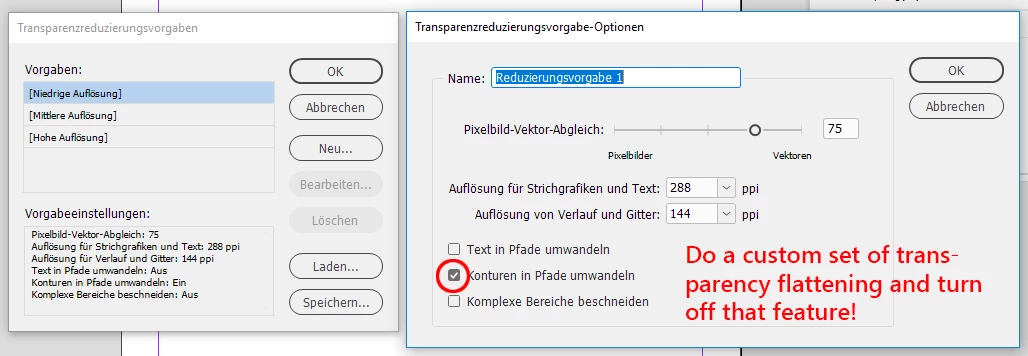
    That will happen if transparency reduction is at place and the flattening is done with "Convert Strokes to Paths" when exporting to EPS or to e.g. PDF/X-1a:

    From my German InDesign:

    Regards,
    Uwe

    2 replies

    LaubenderCorrect answer
    Community Expert
    November 2, 2018

    Hi Laurence,

    yes, that could be a problem, that fill and stroke of one object will be handled as two objects in an exported EPS or PDF file.

    Or do you mean something different?

    Hm, maybe:

    Ideally there should be only one path for a single stroke. At the center of the stroke.

    I guess you see the stroke's outer contours as path?

    That will happen if transparency reduction is at place and the flattening is done with "Convert Strokes to Paths" when exporting to EPS or to e.g. PDF/X-1a:

    From my German InDesign:

    Regards,
    Uwe

    jmlevy
    Community Expert
    November 2, 2018

    Bonjour,

    Vu le nom affiché, j'imagine que tu es francophone… Je te suggère de poster, en français, ici : Forums en français