


New Participant
August 9, 2017
Answered

Problem with numbered list- Number 1 repeats

  • August 9, 2017
  • 4 replies
  • 37793 views

Occasionally when I create numbered lists, I get all ones and can't seem to correct it unless I go into each line and tell it to continue numbering. I have other occasions when the numbering starts at the wrong place, which is not as annoying since I can just reset the first number.

I've checked the paragraph styles andean't seem to figure it out.

Any ideas?
    Correct answer barbara_a7746676

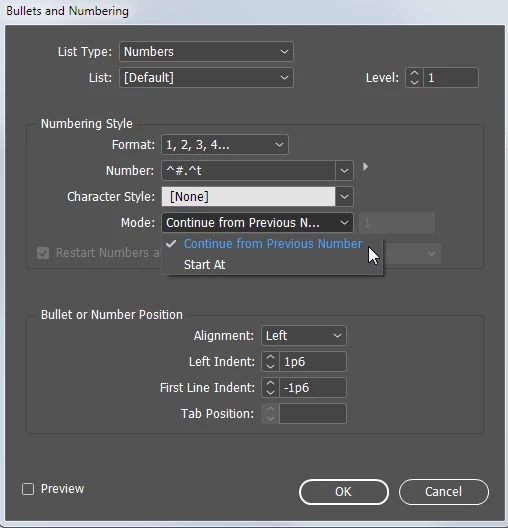
    Check that the list is set to "Continue from previous number".

    4 replies

    New Participant
    January 18, 2024

    So I saw a lot of posts replying to this, but I ended up figuring it out. I am going to explain it very clearly, because I feel like a lot of these replies are a little vague. You create two seperate paragraph styles for this number list, both with the same stylings. Then, go to the "Bullets & Numbering" section in paragraph style options. Find the "Mode" and change one to "continue from previous number," and the other to "Start from" then you input "1" as the number to start from. When applying the styles to your numbered list, you put the paragraph style that has the "start from 1" mode on the first numbered bullets, then the rest of them you place the paragraph stylings with "continue from previous number" mode attached. This will fix the problem. I know this is tedious, this just speaks to how much Adobe needs to actually fix their programs instead of investing all of their money into AI. 

    James Gifford—NitroPress
    Brainiac
    January 18, 2024

    This is an absolutely standard way to manage the issue, and in general InDesign's overall schema works much better than the MC Escher funhouse that is list numbering in Word.


    How else would you manage lists, especially ones with nested levels and that may be interrupted across intervening text?

    Participating Frequently
    December 26, 2021

    I have another problem with the numbering lists in Indesign. My new list will start on 1 and continue to number 2 and maybe 3 but then it starts to give number 6 for example and I have to convert to text to correct the numbers ----very frustrating as my lists are set up correctly. I have only had this problem with the most recen versionss of Indesign. Any ideas...?

    Community Expert
    December 28, 2021

    Hi nicob110611,

    please provide a document saved from InDesign 2022 version 17.0.1 where you see the issue.

    Also one from a previous version of InDesign where you cannot see the issue with the same setup of styles.


    Thanks,
    Uwe Laubender

    ( ACP )

    magnabos.co
    New Participant
    November 7, 2018

    Indesign 2018 Update: Click right mouse on selection and click Continue Numbering.

    TYPGroup
    New Participant
    July 15, 2019

    I can't see this in the menu in InDesign CC 2019. Did they remove it?

    barbara_a7746676
    Community Expert
    July 15, 2019

    It's there in 2019. Click your Type tool in the paragraph and right click.

    barbara_a7746676
    barbara_a7746676Correct answer
    Community Expert
    August 9, 2017

    Check that the list is set to "Continue from previous number".

    New Participant
    August 9, 2017

    Thanks, Barbara- That helps and I had tried that option, but now subsequent lists in different cells are continuing from the previous. It may have been an issue when I imported the text or something else.

    Mike Witherell
    Community Expert
    August 9, 2017

    You need to build two paragraph styles for numbered lists. 1 that says start at. 1 that says continue from previous number.

    Mike Witherell