


Participant
December 8, 2019
Answered

Problems with Links and Open Recent files in InDesign 2020 on macOS Catalina

  • December 8, 2019
  • 2 replies
  • 4276 views

Hi there, 


I hope someone might be able to help out with these two InDesign glitches that have been driving me nuts:


Background info

I'm using InDesign 2020 15.0.1 on an iMac running Mac OS Catalina 10.15.1


  • All of my files and my software are stored on a single hard drive in my Documents folder and are only accessed by me. There are no other users, no networks, no cloud storage.  
  • Both glitches are intermittent, but more common than not, I've not noticed any rhyme or reason as to when and why things work properly.
  • The glitches seemed to start when I switched from annual to monthly CC subscription. 
  • I think it may have also been around the time I updated my Mac OS


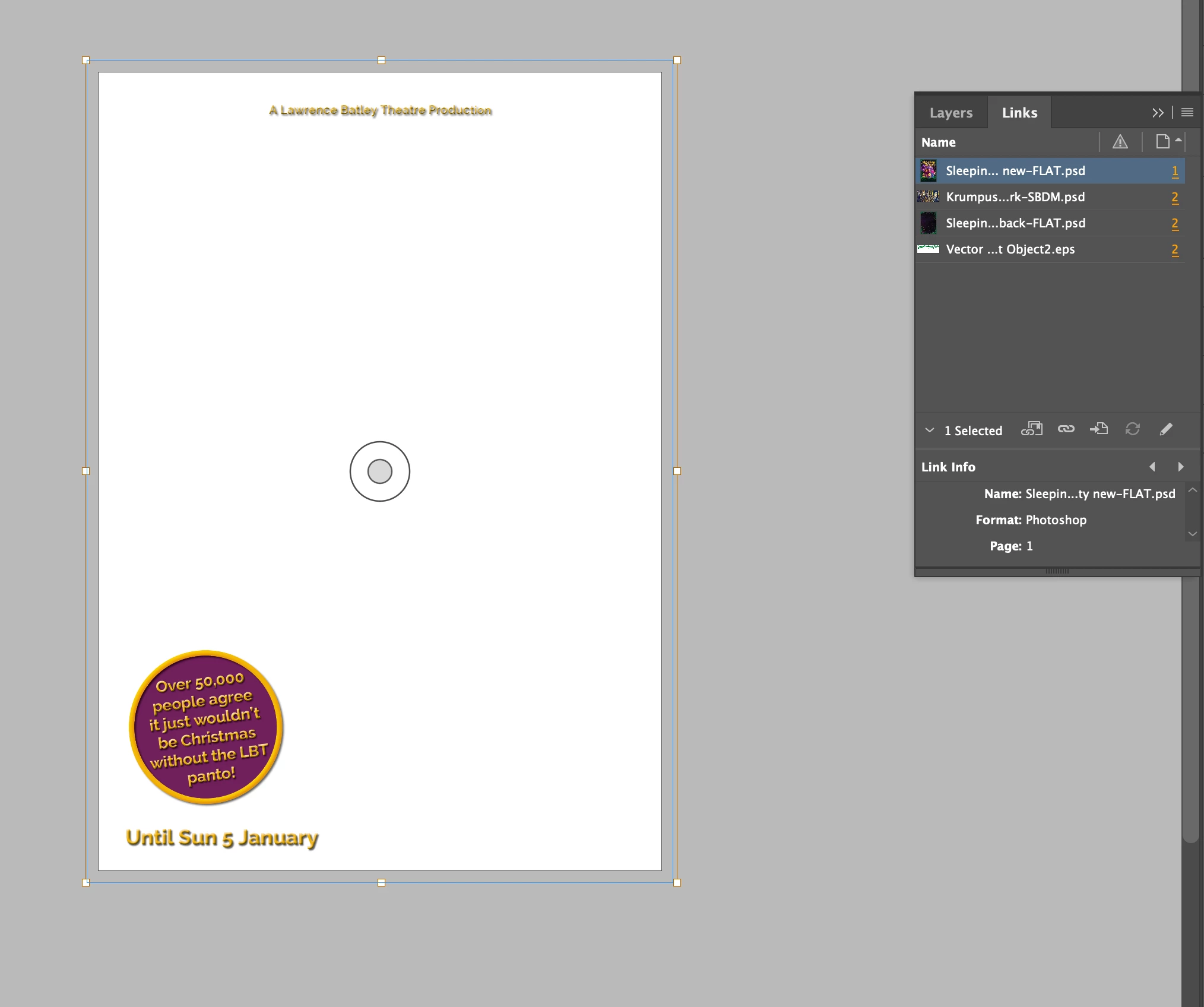
1. Links aren't previewing in files:  When I open a file the links will flash up for a second and then disappear.  They're not broken or missing - you can see the preview in the links pane, but not in the document.  They all have to be individually relinked - often even instances of the same image. Sometimes the process will result in a few images appearing, but usually not. The "find all missing links in this folder" check box is greyed out - because the links aren't missing I guess. This glitch seems to happen randomly accross documents and images within documents - sometimes some will work, sometimes they wont.  More often than not it's a treat if I don't have to relink every file every time I open a document.


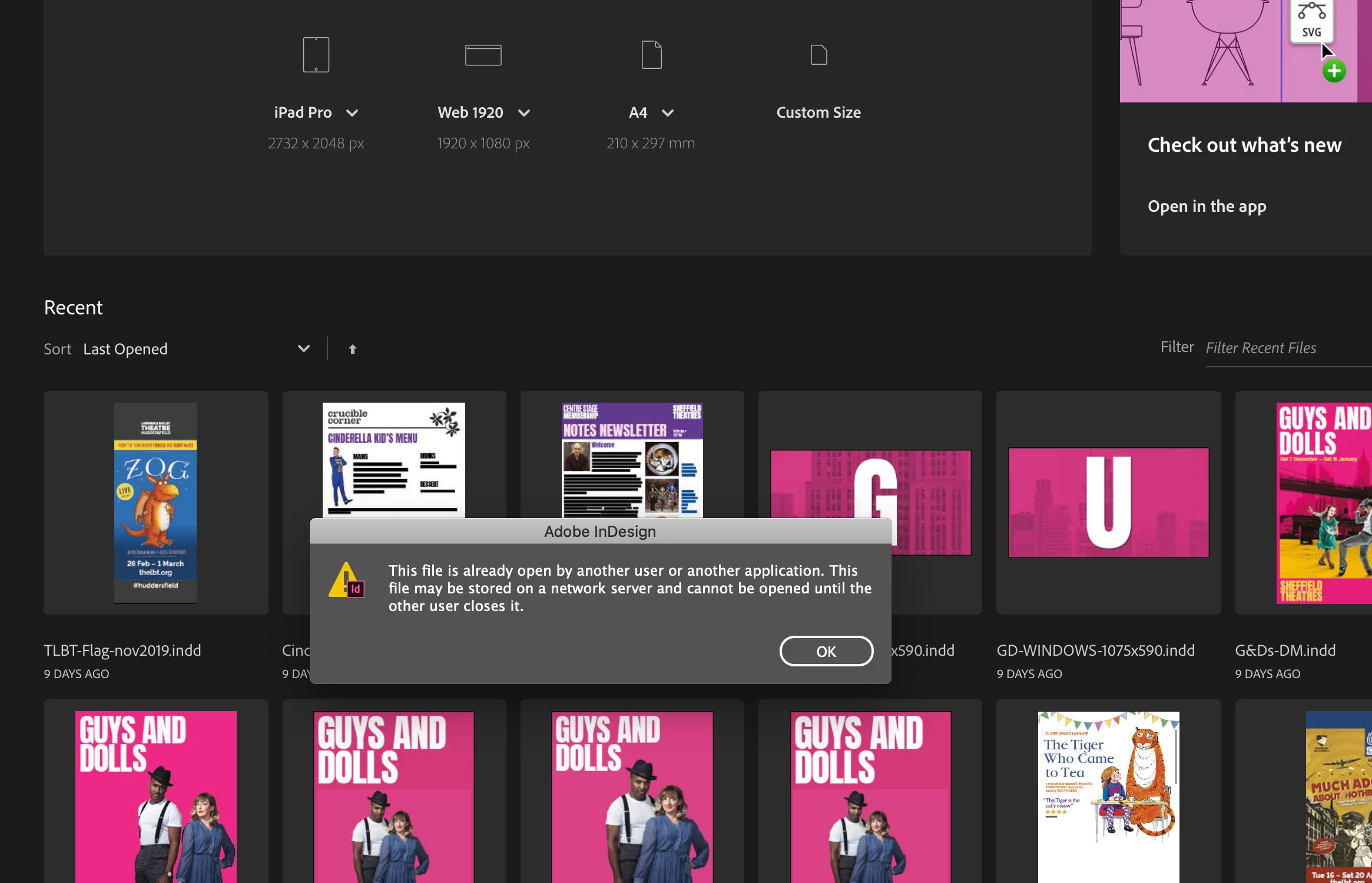
2. Open Recent doesn't work - either from the gallery or the dropdown menu.  I get this message: "This file is already open by anpther use or another application.  This file may be stored on a network server and cannot be opened untill the other user closes it." None of these things is the case.  I can open files in all the other ways, but Open Recent is a really useful tool for my workflow, so I'd like to get it going again. Every once in a while it'll work, possibly if it's the same file I've worked on a few times in one day, but there's no pattern that I've spotted to what will and won't work, it mostly just doesn't.  

I've tried:

- Updating /  Deleting and reinstalling / rolling back the software

- Removing preferences  


If anyone can help with this at all, I would be really grateful. 

Cam


{Renamed by MOD}
This topic has been closed for replies.
Correct answer angusb91658086

Hi Cam,

I upgraded both my OS and Adobe Creative Cloud over the holidays and had a similar problem with links in my existing InDesign files.

- some files looked fine when opened, others had the previews of linked files missing in the layout (after initially showing for a split second as in your case), but in all cases there was never any warning of broken links

- for those files when the link previews were showing and everything seemed fine, I only knew there was a problem when I tried to output a PDF or tried to Package the project and received a message saying there was a network connectivity problem or the links had been moved ... neither of which were the case.

- I could solve the issue by relinking the files, which is fine for one or two files but not for hundreds of existing layouts.

- Working with an Adobe virtual assistant was a very frustrating 1.5 hour experience that didn't solve anything

- I finally managed to solve my issue which may or may not be of assistance to you and your links problem.


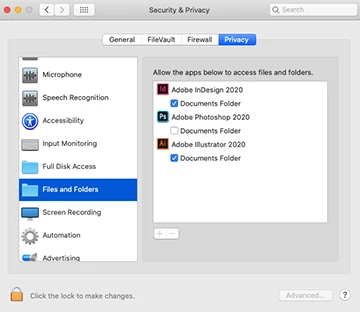
- open your OS system preferences > Security and Privacy > Privacy tab > Files and Folders

- if the box next to InDesign is NOT checked, then click on it to check (will need to close InDesign first)

- reopen InDesign and the problem was resolved


Whether this works for you or not, best of luck.

Angus

2 replies

Participant
February 27, 2022

Hi its 2022 it still Open Recent doesn't work. It is driving me crazy. And everything is up to date... 

Srishti Bali
Community Manager
Community Manager
December 26, 2019

Hi Cam, 


Sorry to hear this, that’s definitely not what should be happening. I am hopeful that the issue was fixed. If not, please share a few more details like:

  • When did this start happening? Are there any recent changes made to your system? For example, any antivirus, system updates or web extensions installed recently. 
  • Check how it works in Safe Mode (https://helpx.adobe.com/in/x-productkb/global/start-safe-boot-mode-mac.html).  It starts your system so that it performs certain checks and prevents third party software/ services from automatically loading or opening. If it works fine in Safe mode, then there is some third party service or application like antivirus, plugins or web extensions which are conflicting with the application.


Feel free to let us know if you still need assistance.


Regards,

Srishti

MwCAuthor
Participant
December 31, 2019

Hi Srishti, 


Thank you for your reply.  No the issue wasn't fixed - you're the only person who has responsded and nothing has changed since I put the post up.


I tried your suggestions - running the mac in Safe Mode, but the problem was exactly the same, and if anything the software was working worse and had additional glitches to work around (please see screen shots of the start gallery in safe mode below).


I haven't installed any third party services, plugins or extensions, but the problem started when I switched from my adobe annual membership to the monthly membership which was on the 27th Oct 2019 which, looking at software installation dates, was day that my operating system was updated to Mac OS Catalina 10.15.  I haven't seen anyone else having problems with inDesign on Catalina though?  

Since the problem started there have been some more updates, so here is what I'm running:

iMac (retina 5K 27" Late 2015)    Processor: 3.2 GHz Quad-Core intel i5.  Graphics: AMD Radeon R9 M390 2 GB

macOS Catalina 10.15.2

Adobe CC InDesign now 15.0.1 (I've tried uninstalling and reinstalling, and I've been updating with each version in the hope it would fix it).


Help would be greatly appreicated as it's a lot of money for software that doesn't work properly and I'm at a loss on what to do?

Thanks a lot!

Cam


angusb91658086Correct answer
Participant
January 10, 2020

Hi Cam,

I upgraded both my OS and Adobe Creative Cloud over the holidays and had a similar problem with links in my existing InDesign files.

- some files looked fine when opened, others had the previews of linked files missing in the layout (after initially showing for a split second as in your case), but in all cases there was never any warning of broken links

- for those files when the link previews were showing and everything seemed fine, I only knew there was a problem when I tried to output a PDF or tried to Package the project and received a message saying there was a network connectivity problem or the links had been moved ... neither of which were the case.

- I could solve the issue by relinking the files, which is fine for one or two files but not for hundreds of existing layouts.

- Working with an Adobe virtual assistant was a very frustrating 1.5 hour experience that didn't solve anything

- I finally managed to solve my issue which may or may not be of assistance to you and your links problem.


- open your OS system preferences > Security and Privacy > Privacy tab > Files and Folders

- if the box next to InDesign is NOT checked, then click on it to check (will need to close InDesign first)

- reopen InDesign and the problem was resolved


Whether this works for you or not, best of luck.

Angus