


Inspiring
March 28, 2022
Answered

Producing PDFs for viewing as spreads with cover page

  • March 28, 2022
  • 1 reply
  • 442 views

Producing PDFs for viewing as spreads with cover page for screen only, is there anything that can be done in indesign to force this without having to either [1] create it so the spreads are actually output as a single page or [b] get users to select the view options "two page view" and "Show cover page in two page view" themselves?


Relying on users selecting various options is just going to result in the DPS order being completely incorrect for casual readers who don't know much about Acrobat, right? (Though hopefully not!)


Thanks!
This topic has been closed for replies.
Correct answer BobLevine

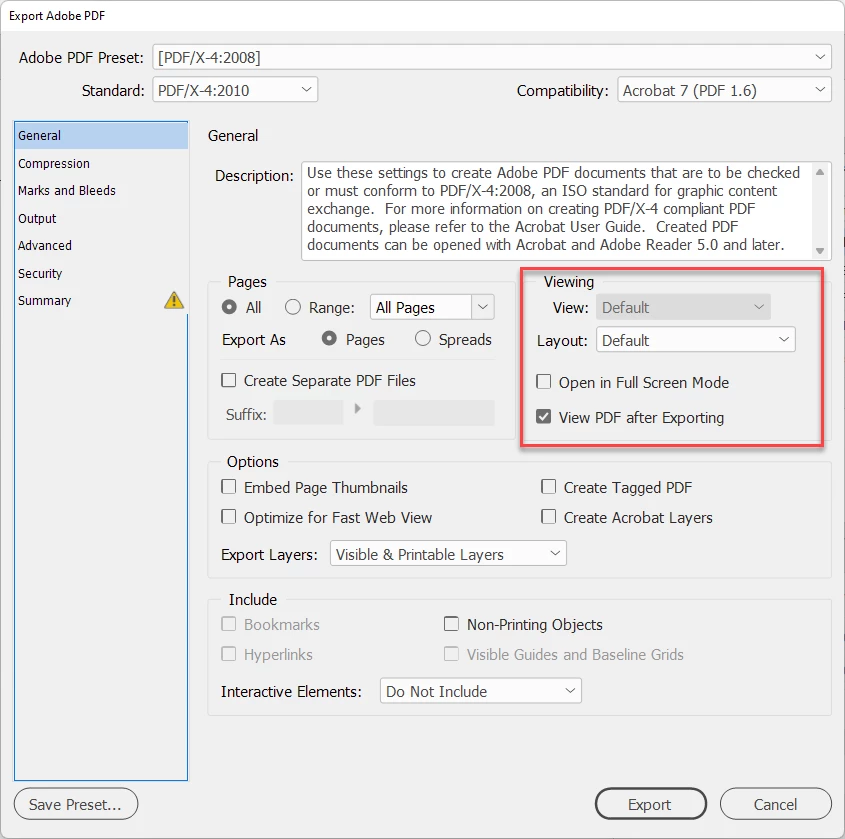
You can choose the initial display in Acrobat and save it or during the export of the PDF (see below screenshot)  but outside of Acrobat/Reader, there is no assurance that this setting will be honored.


1 reply

BobLevine
Community Expert
BobLevineCommunity ExpertCorrect answer
Community Expert
March 28, 2022

You can choose the initial display in Acrobat and save it or during the export of the PDF (see below screenshot)  but outside of Acrobat/Reader, there is no assurance that this setting will be honored.


MrZZYAuthor
Inspiring
March 28, 2022

Thanks Bob. Understood. Just want to make sure I'm not missing any tricks or assuming too much.

BobLevine
Community Expert
Community Expert
March 28, 2022

BTW, if you choose a PDF standard such as X4, the view will be disabled as you can see in the screenshot I posted.