


Participant
November 12, 2023
Question

Publish Online issue: Video progress/loading not scaled to length of UI progress bar

  • November 12, 2023
  • 1 reply
  • 376 views

Sorry for the confusing title! I'm encountering a really weird issue with videos in documents I publish online.


In the screenshot below, you can see that the video has finished, but the loading indicator (and, confusingly, the progress indicator that moves within the loading indicator) on the progress bar is only two-thirds complete. You can see the circle on the right that indicates the position in the video: this moves totally independently of the loading AND progress bars and, in any case, is only visible if you are hovered directly over the bar:

 

If your cursor is over the video rather than the progress bar itself, here's what you'd see with the video at the halfway mark:

The progress indicator is 50% of the way through the loaded indicator, which doesn't fill the UI progress bar. It's very confusing for recipients, who think the video isn't fully loaded or finished.


If I right click on the video and open its direct link the progress bar is completely normal. The video is a 1080p 24fps mp4 generated from Da Vinci Resolve and then re-encoded with handbrake. Codec details:
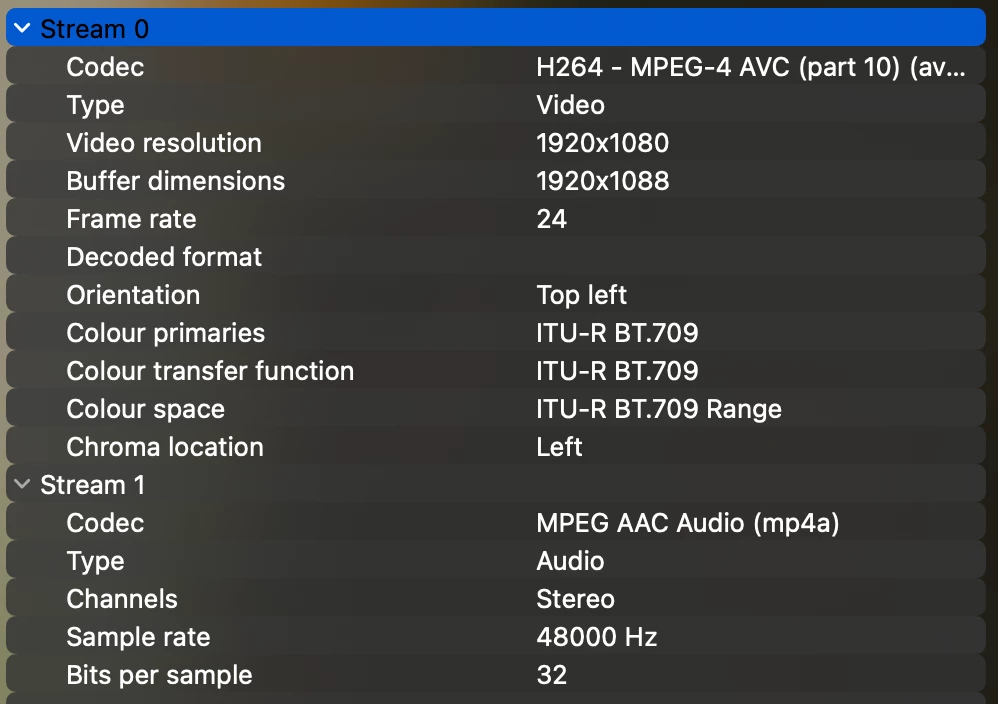
 
Has anyone encountered this or got any suggestions? The only thing I can think to do is hide the UI entirely by effectively letterboxing the video with its frame. But I'd really rather not do that.
This topic has been closed for replies.

1 reply

Rishabh_Tiwari
Community Manager
Community Manager
November 21, 2023

Hi @hieronymousgosh,


Sorry to hear about the trouble. Is this happening with this specific video or other videos as well? Please confirm the version of InDesign & OS so that I can test this on my end. 

Thanks

Rishabh

Participant
November 22, 2023

Thanks for the response 🙂

It's occurring with all the videos in the deck, but they've all come from Da Vinci Resolve and then into Handbrake. I've not tested the presentation with a different encoding process / settings yet, but I did check the encoding of a video on another presentation that doesn't have this issue and couldn't see any practical difference.


I've just generated a single-page online document that's still got the issue described. This is with the latest version of Indesign (v19.0.1) on the latest version of OSX (14.1.1) and the latest version of Chrome (v119.0.6045.159). The problem doesn't occur with Safari or Firefox, as they use a different UI for videos. Is there somewhere I can email or DM a link to the document?

Participant
November 22, 2023

Just to add: I've DMed you a link to a single-page online document that illustrates the issue.