Participating Frequently
April 12, 2021
Answered

QR-Code Generator Problems with Umlauts in vCards

  • April 12, 2021
  • 14 replies
  • 50047 views

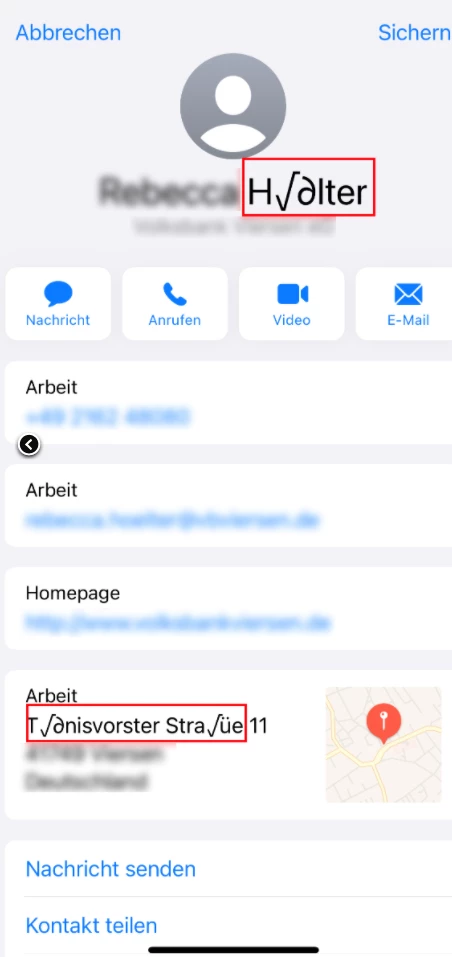
In german-language there are special Characters called "Umlaute" (ü, ö, ä) or the "sharp s" (ß). If these characters are used in an vCard generated within the buildin function from indesign, they are replaced with other symbols on the iPhone QR-Code-Camera Reader.
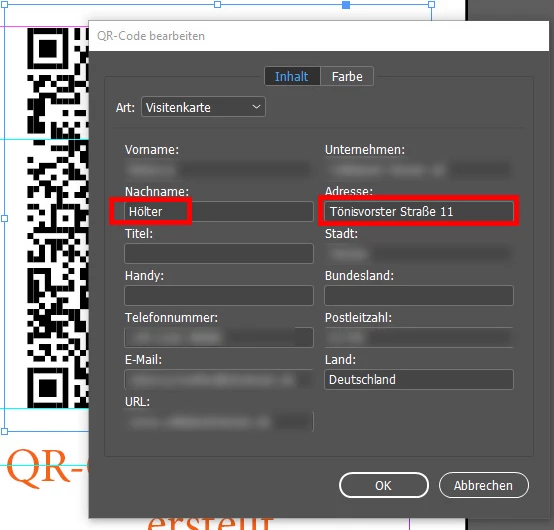


Do you know a good solution?

Correct answer Brad @ Roaring Mouse

Note: The current version of InDesign (CC2025 v20) has been upgraded to generate v3.0 vCard QR codes. This should solve the character issue going forward.

14 replies

Brad @ Roaring Mouse
Brad @ Roaring MouseCorrect answer
Adobe Expert
April 14, 2025

Note: The current version of InDesign (CC2025 v20) has been upgraded to generate v3.0 vCard QR codes. This should solve the character issue going forward.

vistic
New Participant
May 14, 2025

Unfortunately I still have the same issue 🤔 🤔 (InDesign version 20.0.1)

Robert at ID-Tasker
Brainiac
May 14, 2025
quote

Unfortunately I still have the same issue 🤔 🤔 (InDesign version 20.0.1)


By @vistic


There is 20.3.1 update - but I've no idea if it fixes this problem. 


New Participant
April 14, 2025

Falls jemand auf das gleiche Problem in 2025 stößt.


Füge "CHARSET:" vor dem Text und es sollte funktionieren.

Sollte so aussehen: 
ADR;CHARSET:;;Münwünster 99;Düsseldörf ;;40470 ;Deutschländ


Inspiring
April 25, 2025

Ja, Adobe hat mit der neuen Version von Indesign die Umlautefehler behoben und die VCARD-Version auf 3.0 erhöht. Jedoch sind immer noch nicht mehr Eingabefelder hinzugekommen. Ich habe ein Skript geschrieben, welche die Anzahl der VCARD-Felder massiv erhöht, die Werte ganz einfach eingegeben, beziehungsweise geändert werden können inklusive die Farben. Siehe hier https://steigart.ch/qr-code-mit-umlaute-fehler-in-indesign/

Die Seite und das Skript sind zwar auf Deutsch, doch sollte das kein Problem sein. Falls doch kannst Du mir das sagen, dass schreibe ich das Skript um.

Participating Frequently
November 21, 2024
James Gifford—NitroPress
Brainiac
November 21, 2024

Yes —

  • Don't use the fixed vCard form, which is locked at the obsolete version 2.1;
  • Use Plain Text for, well, pretty much everything.


This advice is given throughout the recent answers to most QR code topics here. Including above, in this one. 🙂

Inspiring
August 20, 2024

Hi there,
if this task is still current, I have an easy way to solve this. With a little javascript this should not be a problem.

See here: https://steigart.ch/qr-code-mit-umlauten-in-indesign/

Only in German at the moment, but the solution also works in English.

James Gifford—NitroPress
Brainiac
August 20, 2024

There will always be a need for solutions until Adobe updates this feature/applet, either defaulting to v3.0 or allowing an evident selection of the vCard version. The problem, though, is that many designer/users simply don't know about QR code/vCard versions and this limitation of the v2.1 standard, so having their codes fail when upper ASCII characters are used is just a mysterious glitch.


You might edit your post to describe what your solution is, to better guide future visitors.

martinfriedlin
Participating Frequently
June 19, 2024

A simple Workaround (on a Mac):


Generate your vCard in Adressbook,

drop it on your Desktop,

open the file in Textedit (or any other Texteditor of choice),

edit as you like,

copy/paste the Text in InDesign (Text only),

that's it!


Example code:


BEGIN:VCARD
VERSION:3.0
N:Müller;Rita;;;
FN:Rita Müller
ORG:Müller Schuhe;
TEL;type=pref:+41 11 200 22 22
ADR;type=WORK;type=pref:;;Schuhgasse 12;1234 Müllhausen;Schweiz
EMAIL;type=INTERNET;type=pref:mueller@muellerschuhe.ch
URL;type=WORK;type=pref:https://muellerschuhe.ch
END:VCARD

Inspiring
June 20, 2024

I tried this.

My QR-Code App do not recognize this as a vcard.

New Participant
May 28, 2024

When I import QR Codes in V3.0 "BEGIN:VCARD\nVERSION:3.0\n . . ." this codes are working with special characters on iPhone and Android.

But do not edit them in Indesign - after this the codes are corrupted, they do not work anymore.


Anybode knows why?


Indesign V. 19.4.0.63, Mac

James Gifford—NitroPress
Brainiac
May 28, 2024

What or how are you importing the codes? Are you using some third-party app or generator? Or using InDesign's 'Plain Text' mode to generate them?


And when you say "edit them in ID" — do you mean editing in the same plain text mode, or opening the vCard form and editing values there?


If the latter — there's no differnence, I believe, between creating them using the limited (v2.1) vCard form, and editing them once created; I suspect if you examine the raw code in the result, it will be either reset to v2.1 or othewise corrupted.

New Participant
March 20, 2024

Weiß jemand von euch, wie ich in einem QR Code als Text auch ein Feld für ein LinkedIn Profil und ein Feld für WeChat hinzufügen kann?

James Gifford—NitroPress
Brainiac
March 20, 2024

QR code data is almost always plain text, with a "FIELDNAME:fielddata" format. In theory, you could add a (vCard or BizCard) field with any combination of content you like, for any social media or communication channel.


Whether it would work or not, though, depends (a little, if any) on the QR code reader and how it parses the content but mostly on the destination app — if your device's "Contact" app or equivalent doesn't know what to do with a WECHAT or DISCORD or SLACK data field, it will most likely just ignore/discard it, or assign it to a text field.


Making any such extension work would have to start with seeing if the Contact app has any protocol for accepting and filing that address information, then following it with the correct field name and any peculiarities of encoding the field value.

New Participant
October 23, 2023

Ich benutze jetzt diesen hier - es wird eine vCard-Datei erstellt, die ich mit Editor öffne und bei Indesign einfüge (Objekt -> QR-Code generien -> Nur Text). Ich hoffe, dass Adobe das Problem endlich angeht.

James Gifford—NitroPress
Brainiac
October 23, 2023

There is no "problem," exactly, except that all the form-driven code creation is a bit simplified, and Adobe is chosing to use v2.1 encoding as the default. Using the plain text method, with a fuller understanding of not just vCard structure but all the other alternatives, makes the ID encoder a valuable asset, since it is secure and standalone.

New Participant
May 4, 2023

Hatte auch das Problem...

macht einfach einen QR Code als Text:


BEGIN:VCARD

VERSION:3.0

N:Zander;Björn 

FN:Björn  Zander

ORG:Musterfirma

TITLE:CEO and founder

ADR:;;Strasse 3;Bönningstedt;Schleswig Holstein;25474;Deutschland

TEL;WORK;VOICE:+49401234567

TEL;CELL:+491721234567

TEL;FAX:

EMAIL;WORK;INTERNET:hallo@mail.de

URL:www.hallo.de 

END:VCARD


Dann sollte es klappen

Gruß Björn

Inspiring
June 7, 2023

QR-Code als Text funktioniert leider nicht zuverlässig mit manchen QR-Readern auf Android-Smartphones.


Was das ganze Problem beheben würde, wäre, wenn InDesign Version 4.x vCards generieren würde. Denn diese lassen nur noch utf-8 als Kodierung zu. Ich weiß nicht, warum InDesign gerade in diesem Punkt so Rückständig ist. Das Problem ist ja schon an anderen Stellen im Forum diskutiert worden, und das letzte mal vor ca. 2 Jahren als bug gemeldet worden. Möglicherweise ist der nicht-englischsprachige Markt für Adobe vernachlässigbar klein??

James Gifford—NitroPress
Brainiac
June 7, 2023

I don't disagree. The QR generator is simple enough and encapsulated enough that it seems updates would be easy, and better support for vCard variants implemented by now.


You may find this useful as a supplement:


https://www.nitrosyncretic.com/DPR/dpr_qrcodes.php

New Participant
April 21, 2022

Hi David, 

I had the same problem. The solution is to include the charset in each line. For example

"FN;CHARSET=UTF-8:Cem Özdemir"


New Participant
August 30, 2022

hey there. Unfortunately I don´t get it. can you please tell me where to put which text in order to get working QR vcards with "Umlaute". thx