Inspiring
May 26, 2022
Answered

Quick way to find a style?

  • May 26, 2022
  • 6 replies
  • 10669 views

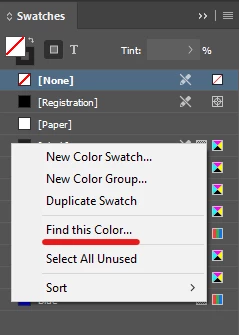
After importing from Word, I often find myself with an unneeded style that InDesign thinks is in use somewhere. I try deleting it, and it asks what style to replace it with. But since I don't know where it's applied, I don't know what to replace it with. So I have to fire up Find/Change, select the styles menu, scan through my ~100 styles and select the one to search for. Why can't we have a right-click option to "Find this style" right from the Paragraph Styles pane? We can do that for colors, why not p-styles? 

Is there any way to use scripting to accomplish this task faster than manually searching the F/C dialog every time? Maybe a script to add to the right click menu, or another way to search that would be faster. I'm curious if anyone else has a better idea for how I can accomplish this. Thanks! 

Correct answer 23121922udmu

Well, I spent a LOT of time researching and learning, but I think I've basically figured out a script solution on my own! Once the script is run, a new menu item appears in the right click menu. Clicking it will find the Paragraph Style in question and open the Find/Change dialog so that I can click "Next" to find more if need be. 


Here's the script that I patched together; I'm sure it's not perfect and could be done better, but it works for me.

//https://community.adobe.com/t5/indesign-discussions/add-script-to-context-menu-on-paragraph-or-character-styles-panel/m-p/10814711#M168839

#targetengine "session"

app.scriptPreferences.userInteractionLevel = UserInteractionLevels.INTERACT_WITH_ALL;
main();

function main(){
	// Add the new menu item
	var theRtMenuStyleListItem = app.menus.item("$ID/RtMenuStyleListItem"),
        theMenuName = "FIND this style";
	// Remove any previous versions of the menu item and actions.
	if( theRtMenuStyleListItem.menuItems.itemByName( theMenuName ).isValid ) { theRtMenuStyleListItem.menuItems.itemByName( theMenuName ).remove(); }
	if( app.scriptMenuActions.itemByName( theMenuName ).isValid ) { app.scriptMenuActions.itemByName( theMenuName ).remove(); }
	// Create the menu action, menu item, and event listener.
	var theScriptMenuAction = app.scriptMenuActions.add( theMenuName );
	var theScriptMenuItem = theRtMenuStyleListItem.menuItems.add( theScriptMenuAction, LocationOptions.AFTER, theRtMenuStyleListItem.menuItems.item(-1) );
	var theScriptEventListener = theScriptMenuAction.eventListeners.add( "onInvoke", theScriptHandler );
}

function theScriptHandler () {
    // Collect paragraph style name from context menu
	// https://developer.mozilla.org/en-US/docs/Web/JavaScript/Reference/Global_Objects/RegExp
    var selectedStyle = app.menus.itemByName('$ID/RtMenuStyleListItem').menuItems.firstItem().name.replace(/Edit "(.*?)".../, "$1");

//https://community.adobe.com/t5/indesign-discussions/script-find-paragraph-style-under-the-folder/m-p/12834067#M470616
function getByName(styles, name) {
    for (var i = 0; i < styles.length; i++)
        if (styles[i].name == name) return styles[i];
}

var doc = app.activeDocument;
app.findTextPreferences = app.changeTextPreferences = NothingEnum.nothing;
app.findTextPreferences.appliedParagraphStyle = getByName(doc.allParagraphStyles, selectedStyle);

// https://stackoverflow.com/q/41824622
var myResults = doc.findText();  
app.select(myResults[0]);

// https://community.adobe.com/t5/indesign-discussions/select-text-based-on-paragraph-style-selected-in-paragraph-styles-panel/m-p/9935498#M104979
app.activeWindow.zoomPercentage = app.activeWindow.zoomPercentage;

//http://kasyan.ho.ua/tips/indesign_script/all/open_menu_item.html
app.menuActions.itemByID(18694).invoke(); //opens Find/Change dialog
}

Please feel free to recommend any changes or enhancements if you see anything that could be done better. 

6 replies

RLChris121
Participating Frequently
December 5, 2024

To help identify text using a particular paragraph style in InDesign, you can try these techniques:


  • Highlight a text frame to search, then open "Edit"  (from pull down menu) > (select) "Edit in Story Editor".  (Or CTRL+Y). The Paragraph Style(s) in use will be listed to the left in the edit screen next to the story text using it. You can highlight the text in the editor and select the proper paragraph style from the Paragraph Style menu and you will see the syle name change in the editor.


...OR...

  • Sometimes it is easier to identify the text VISUALLY within the entire document that is using a certain paragraph style, open the paragraph style menu. (Can be found under the "Type" pull down menu.) Select the paragrah style you are trying to identify and double click to edit that style. Temporarily change an atrribute such as "Character color"  or  "Basic Character Formats". Change color to one that easily stands out on your document (from black to red for example), or change the size of the text to one that is considerably larger than the other text (from 12pt to 24pt for example) -- or change both. (I've changed both the text size and color for the word "visually".) Now I can easily find the text that has changed (like the word "VISUALLY" above) and change or replace its paragraph style to the one you desire to use. If you plan to keep the style you temporarily altered just remember to change it back after you locate and fix your text to the paragraph style(s) you wanted.


Hope that is helpful. Have a great day.

New Participant
October 2, 2024

Hey all, a sneaky way I do this without bothering with scripts etc. is to use the Table Of Contents system. Simply go to Layout > Table of Contents, then ask it to make a table of contents using only the style you're trying to locate. Make it add the page number if you wish so it's easier to find. In the example I've attached here I'm trying to locate all uses of a style called "C Head". 
Then simply click anywhere on the spread to make your TOC and it will show all instances of that style being used.
Voila!

23121922udmuAuthorCorrect answer
Inspiring
June 2, 2022

Well, I spent a LOT of time researching and learning, but I think I've basically figured out a script solution on my own! Once the script is run, a new menu item appears in the right click menu. Clicking it will find the Paragraph Style in question and open the Find/Change dialog so that I can click "Next" to find more if need be. 


Here's the script that I patched together; I'm sure it's not perfect and could be done better, but it works for me.

//https://community.adobe.com/t5/indesign-discussions/add-script-to-context-menu-on-paragraph-or-character-styles-panel/m-p/10814711#M168839

#targetengine "session"

app.scriptPreferences.userInteractionLevel = UserInteractionLevels.INTERACT_WITH_ALL;
main();

function main(){
	// Add the new menu item
	var theRtMenuStyleListItem = app.menus.item("$ID/RtMenuStyleListItem"),
        theMenuName = "FIND this style";
	// Remove any previous versions of the menu item and actions.
	if( theRtMenuStyleListItem.menuItems.itemByName( theMenuName ).isValid ) { theRtMenuStyleListItem.menuItems.itemByName( theMenuName ).remove(); }
	if( app.scriptMenuActions.itemByName( theMenuName ).isValid ) { app.scriptMenuActions.itemByName( theMenuName ).remove(); }
	// Create the menu action, menu item, and event listener.
	var theScriptMenuAction = app.scriptMenuActions.add( theMenuName );
	var theScriptMenuItem = theRtMenuStyleListItem.menuItems.add( theScriptMenuAction, LocationOptions.AFTER, theRtMenuStyleListItem.menuItems.item(-1) );
	var theScriptEventListener = theScriptMenuAction.eventListeners.add( "onInvoke", theScriptHandler );
}

function theScriptHandler () {
    // Collect paragraph style name from context menu
	// https://developer.mozilla.org/en-US/docs/Web/JavaScript/Reference/Global_Objects/RegExp
    var selectedStyle = app.menus.itemByName('$ID/RtMenuStyleListItem').menuItems.firstItem().name.replace(/Edit "(.*?)".../, "$1");

//https://community.adobe.com/t5/indesign-discussions/script-find-paragraph-style-under-the-folder/m-p/12834067#M470616
function getByName(styles, name) {
    for (var i = 0; i < styles.length; i++)
        if (styles[i].name == name) return styles[i];
}

var doc = app.activeDocument;
app.findTextPreferences = app.changeTextPreferences = NothingEnum.nothing;
app.findTextPreferences.appliedParagraphStyle = getByName(doc.allParagraphStyles, selectedStyle);

// https://stackoverflow.com/q/41824622
var myResults = doc.findText();  
app.select(myResults[0]);

// https://community.adobe.com/t5/indesign-discussions/select-text-based-on-paragraph-style-selected-in-paragraph-styles-panel/m-p/9935498#M104979
app.activeWindow.zoomPercentage = app.activeWindow.zoomPercentage;

//http://kasyan.ho.ua/tips/indesign_script/all/open_menu_item.html
app.menuActions.itemByID(18694).invoke(); //opens Find/Change dialog
}

Please feel free to recommend any changes or enhancements if you see anything that could be done better. 
TᴀW
Brainiac
June 2, 2022

Well done for putting together the script!

It's not a regular script, inasmuch as it relies heavily on invoking InDesign menu actions. Ideally, one wouldn't want to do that, but in this case there is no other way AFAIK.

The one problem with your script is that it won't work with styles in groups, because the group name doesn't appear in the menu.

I did something similar a while ago, and figured out a way around that limitation. Have a look here: https://youtu.be/Sr7qOLq_w9I

Ariel

Inspiring
June 2, 2022

Thanks! That video demonstrates exactly what I was looking for!! You showed up a little too late. 🙂 But I'm glad I'm not the only one who has a similar use case. 

Unless I'm mistaken, my script does work with styles in groups. (It has to, because most of my styles are found in groups). That's what the getByName function does; it takes the name of the style and searches through allParagraphStyles till it finds the right one. 

getByName(doc.allParagraphStyles, selectedStyle);

 One thing my script probably doesn't do properly though is handle style names that are the same but in different groups. However, that's not a problem for me, because all of my style names are unique. 

Inspiring
June 1, 2022

No more suggestions? 😞 I'm looking for a way to jump straight to an instance of a particular style, not to change its color and then go searching for it (while that idea can come in handy, that's not really what I'm looking for in this particular instance). 


This is not just for use when trying to delete unnecessary styles. I could use it all the time for locating places in my long documents that I know should have a particular style applied. I'm sure there must be a way to script it, but I haven't thought of a way to accomplish it yet. 

James Gifford—NitroPress
Brainiac
June 1, 2022

The search panel does exactly what you ask. It's just not a right-click option from the font list. I can see such a quick feature being useful, but there's only so much room on context menus and probably hundreds of "I wish" ideas for what should be there.


Is opening search, setting the format to the style you're seeking and clicking Next really all that onerous a process?


Inspiring
June 1, 2022

Not quite exactly. 🙂 When you've already got your mouse on one particular style (out of the ~100 or so in the panel) then yes, it seems a bit onerous to have to open 2 more menus and scroll through the 100 styles looking for the one I just had under my cursor. Seems like there should be a way to make things a bit more user friendly, that's all. I'm willing to take "no" for an answer if there's really no way to do it, but I'm not convinced that there isn't yet. 🙂

Willi Adelberger
Community Expert
May 26, 2022

Maybe that this style is nowhere used in the document, but is in use by another style in the document.

  1. Change the color of such a not used style.
  2. You see which other style will change their color too. Then you know what damage could be done, if this unused style is deleted. (Work on a copy of the indd file.)
James Gifford—NitroPress
Brainiac
May 26, 2022

I use Magenta. Works every time.


Dave Creamer of IDEAS
Community Expert
May 26, 2022

Or change it to a spot color and use the separation preview panel to show only that color. You can zoom out and scan a number of pages at once. 

David Creamer: Community Expert (ACI and ACE 1995-2023)
Inspiring
May 26, 2022

Here's a similar uservoice request that never got any traction, so maybe I'm asking for something that no one ever seems to need, but I could us it all the time