


Inspiring
March 1, 2024
Question

Replace not available fonts via script

  • March 1, 2024
  • 4 replies
  • 1747 views

Hi,

I'm trying to replace a not available font with another font but I fail.

As you can see in the image I have to versions of Soho Gothic font in my document, one of them is not available.
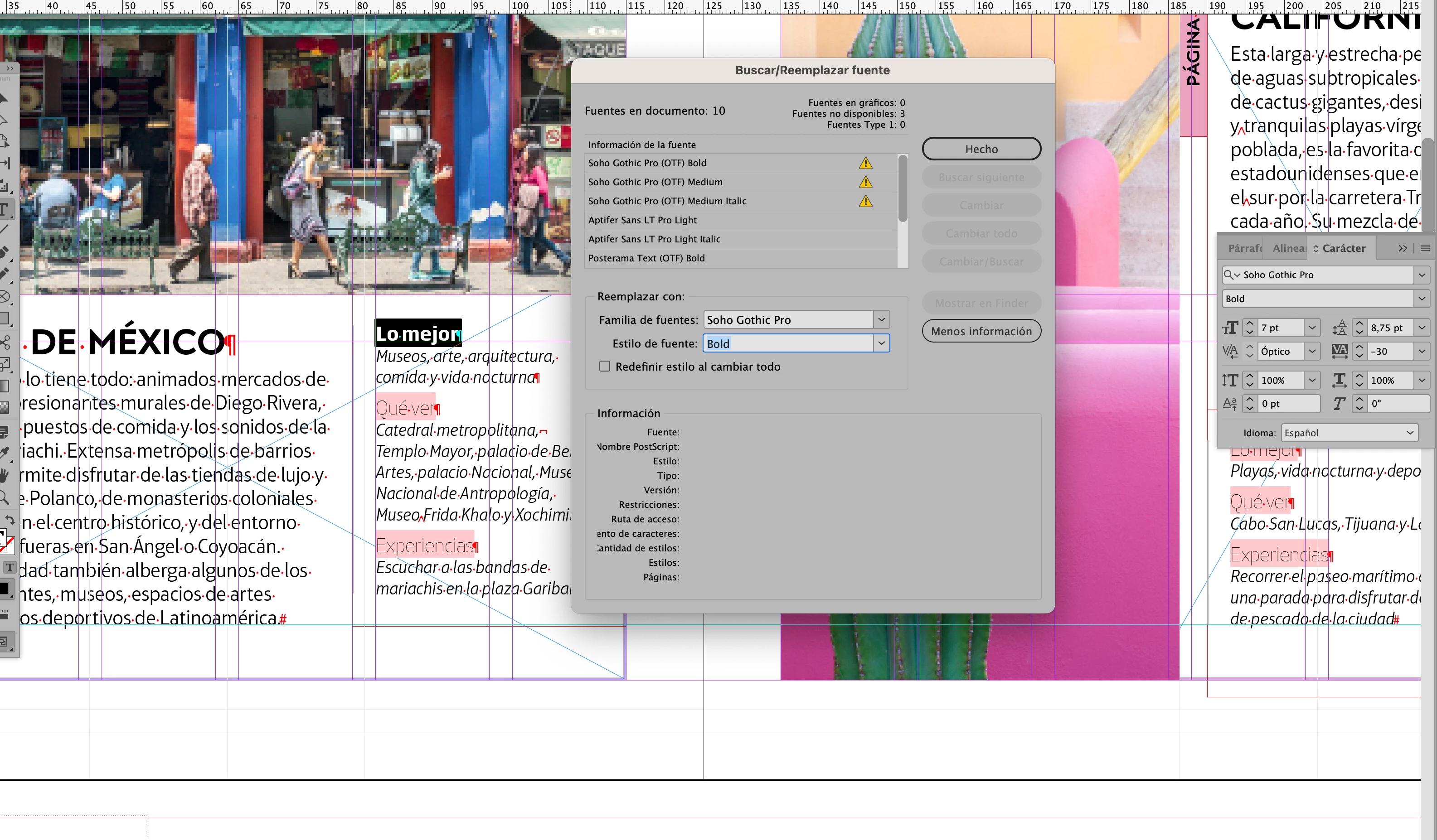
 

Here is my code

var myDoc = app.activeDocument;
var fonts = app.fonts;
var docFonts = myDoc.fonts;

replaceMissedFonts();


function notAvailableFonts() {
    var notAvailableFonts_arr = [];
    for (i = 0; i < myDoc.fonts.count(); i++) {
        if (myDoc.fonts[i].status == 1718832705) {
            notAvailableFonts_arr.push(myDoc.fonts[i])
        }
    }
    return notAvailableFonts_arr;
}

function replaceMissedFonts() {
    var notAvailableFonts_arr = notAvailableFonts();
    for (i = 0; i < notAvailableFonts_arr.length; i++) {
        if (notAvailableFonts_arr[i].isValid) {
            var font_txt = notAvailableFonts_arr[i].properties.name;
            var fontWeight = font_txt.split(/\t/);
            app.findTextPreferences = NothingEnum.nothing;
            app.changeTextPreferences = NothingEnum.nothing;
            app.findTextPreferences.appliedFont = notAvailableFonts_arr[i];
            app.findTextPreferences.fontStyle = fontWeight[1];
            var fuente = app.fonts.itemByName('Soho Gothic Pro');
            app.changeTextPreferences.appliedFont = fuente;
            app.changeTextPreferences.fontStyle = fontWeight[1];
            myDoc.changeText();
        }        
    }
}

My code works fine if I try to replace an available font.


¿any help?


Thanks in advance

This topic has been closed for replies.

4 replies

nicoshAuthor
Inspiring
March 3, 2024

Update


In this example with four fonts:

Pliego: Adobe Font

Baskerville: Locally installed Font

Soho Gothic Pro: Monotype Service Font (https://www.monotypefonts.com/)

Soho Gothic Pro (OTF): idem


I have run this code that basically write in a .txt file the properties of the font.

Called the function eigth times: four fonts, two scopes (app and document)


var myDoc = app.activeDocument;
var appFonts = app.fonts;
var docFonts = myDoc.fonts;

writeObjectProperties('~/Desktop/', 'Pliego Bold.txt', appFonts.itemByName('Pliego\tBold'));
writeObjectProperties('~/Desktop/', 'Pliego Bold Doc.txt', docFonts.itemByName('Pliego\tBold'));
writeObjectProperties('~/Desktop/', 'Baskerville Bold.txt', appFonts.itemByName('Baskerville\tBold'));
writeObjectProperties('~/Desktop/', 'Baskerville Bold Doc.txt', docFonts.itemByName('Baskerville\tBold'));
writeObjectProperties('~/Desktop/', 'Soho Gothic Pro Bold.txt', appFonts.itemByName('Soho Gothic Pro\tBold'));
writeObjectProperties('~/Desktop/', 'Soho Gothic Pro Bold Doc.txt', docFonts.itemByName('Soho Gothic Pro\tBold'));
writeObjectProperties('~/Desktop/', 'Soho Gothic Pro Bold (OTF).txt', appFonts.itemByName('Soho Gothic Pro (OTF)\tBold'));
writeObjectProperties('~/Desktop/', 'Soho Gothic Pro Bold (OTF) Doc.txt', docFonts.itemByName('Soho Gothic Pro (OTF)\tBold'));

function writeObjectProperties(path, fileName, object) {
    var property;
    var file = new File(path + fileName);
    file.encoding = 'UTF-8';
    file.open('a');
    for (var key in object) {
        if (Object.hasOwnProperty.call(object, key)) {
            try {
                var index = file.read();
                property = key + ': ' + object[key] + '\r';
                file.seek(index);
                file.write(property);
            } catch (error) {
                var index = file.read();
                property = key + ': ' + 'Non valid property\r';
                file.seek(index);
                file.write(property);
            }
        }
    }
    file.close();
}


Results:

1. Adobe font and Locally installed font: no problem. Same properties except parent property, obviously.

2. Both Soho fonts, scope Application: Both fonts property "isValid", true. Unique difference, font family property. Curiouslly the location is the same file.

3. Soho Gothic Pro, isValid = false!!!!;

4. Soho Gothic Pro (OTF), isValid = true!!!

WTF!! (What the fonts)!!


Details in the .txt attached files


Thank you @Eugene Tyson @Manan Joshi and @Peter Kahrel 

Community Expert
March 2, 2024

findText() and changeText() don't see  fonts that are set in a style which is not used in the document. So in addition to what you did, you also need to check the document's paragraph and character styles.

nicoshAuthor
Inspiring
March 3, 2024

I have checked and it's ok.

I think there is a problem with Monotype Font service and inDesign.

Surprisingly both fonts are installed in my computer.

I wrote a script that creates a file with the properties of the font and I realize that "Soho Gothic Pro (OTF)" (the non-available font) is inside the same folder that "Soho Gothic Pro" and the only difference is the fontFamity property.

This is the code

var myDoc = app.activeDocument;
var appFonts = app.fonts;
var docFonts = myDoc.fonts;

writeObjectProperties('~/Desktop/', 'Soho Gothic Pro (OTF) Bold.txt', appFonts.itemByName('Soho Gothic Pro (OTF)\tBold'));

writeObjectProperties('~/Desktop/', 'Soho Gothic Pro Bold.txt', appFonts.itemByName('Soho Gothic Pro\tBold'));

function writeObjectProperties(path, fileName, object) {
    var property;
    var file = new File(path + fileName);
    file.encoding = 'UTF-8';
    file.open('a');
    for (var key in object) {
        if (Object.hasOwnProperty.call(object, key)) {
            try {
                var index = file.read();
                property = key + ': ' + object[key] + '\r';
                file.seek(index);
                file.write(property);
            } catch (error) {
                var index = file.read();
                property = key + ': ' + 'Non valid property\r';
                file.seek(index);
                file.write(property);
            }
        }
    }
    file.close();
}

 Attached the text files with the properties.

I give up, thank you all

Community Expert
March 2, 2024

Can you share a sample document for us to check your code against?

Also, run the script for one iteration, it should populate the fields in the find/change dialog. Use the dialog to see if it is able to find the occurences or not. If not then the arguments you set are not correct tweak them to work so that you have an idea on what to fix

-Manan

Community Expert
March 2, 2024
nicoshAuthor
Inspiring
March 3, 2024

Thank you for your suggestion.

In the scripts that you suggest the fonts has to be installed in the OS fonts folder or inDesign fonts folder. Unfortunately the fonts are from Monotype Cloud Service.