


Participating Frequently
June 2, 2010
Question

Resizing of Rotated Frames in InDesign CS4

  • June 2, 2010
  • 1 reply
  • 1068 views

Hi All,

I have one group frame which contains one rotated image frame (with 30 degree) and one empy frame at zero degree.

Programmatically when I set a new width size to the group frame in InDesign Desktop application it sets the new width properly to the group frame, but it does not retain the angles of the image which is inside frame.
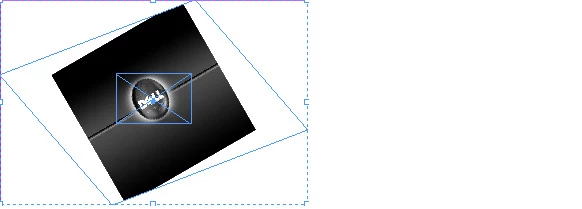
When we ungroup the frame it shows result like below one
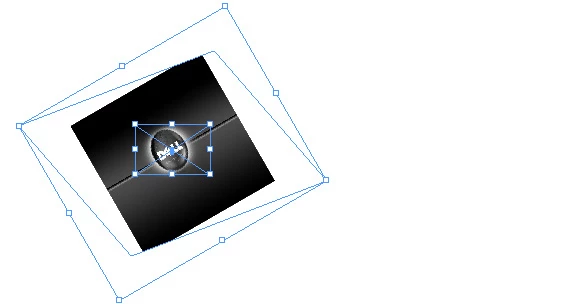
Even if I try this manually I get the same results.

Please help me into this issue. Its very urgent.

Thanks in advance & Regards,

Santosh Kadam.

This topic has been closed for replies.

1 reply

Jongware
Community Expert
June 3, 2010

This is to be expected. Applying transformations to an entire group work on all objects. To have your transformation work only on, say, the outer frame, apply it just to that -- not on the entire group.

This seems normal to me. Can you explain what behaviour you expected?

Participating Frequently
June 3, 2010

Hi,

Thanks for your quick response.

1.  I have a group frame having size  409 X 409.  When I try to set the new width which is double of old width then it sets the group size to  818 X 409.

This is correct. But it does not retain the angles of image as mentioned earlier.

2. Instead of resizing the whole group frame, I have resized child frames individually.  In this condition I have set new width which is double of old width i.e 818.  It retains the proper image angle but the new size of group frame is 669 X 559 which is incorrect. It should be 818 X 409.

Thanks in Advance,

Santosh Kadam.

Jongware
Community Expert
June 3, 2010

I still think this is Basic Maths. You cannot scale an angled frame in one direction only and have that keep the same angles. In essence:

Perhaps this is what you intend?

1. Rotate the entire group backwards, so your image is upright.

2. Scale horizontally with a value targetWidth * cos(angle)/originalWidth

3. Scale vertically with a value targetHeight * sin(angle)/originalHeight

4. Rotate group back to original angle.

or at least something similar to this -- basic Pythagoran calculations.