


Known Participant
January 23, 2018
Answered

Right to left text selection with cursor keys

  • January 23, 2018
  • 6 replies
  • 4645 views

InDesign 2015, Windows 10, in Urdu (right to left) text, if I try to select a character or word using cursor key, it select to wrong direction, i.e. Shift + Left cursor key selects character on right, Preference>Right-to-Left>Cursor Control>Cursor Movement is already set to 'Visual' and it work well for cursor movement.
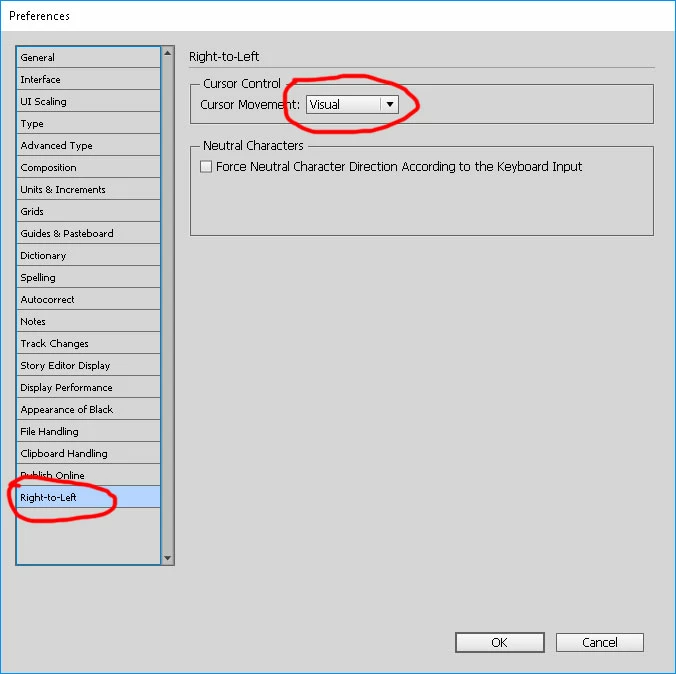
Edit: Just checked similar situation in Word 2016, there's no such problem, right to left text selection with cursor key working fine.

    This topic has been closed for replies.
    Correct answer Zaid Al Hilali

    Even though this bug is not Adobe's fault to start with, they inherited it from Winsoft time when Winsoft used to localize Adobe applications for many years. However this is still a bug and it's about time we take it to Adobe through proper channels unlike previous times when we spoke about it verbally to Adobe staff.

    I reported this bug and if you wish, you can vote for it to grab attention.

    6 replies

    New Participant
    April 24, 2024

    this was very good inforamtion. it worked for me. Thank you very much. 

    New Participant
    December 24, 2022

    THIS IS STILL A PROBLEM IN 2022 - absurd

    manal shanableh
    Adobe Expert
    February 22, 2020

    Hi,
    you have to use ME type tool  

    all languages that writes from right to left like arabic, urdu must use this tool, if you use Type tool the highlight and selection will be from left to right and also the direction.


    you must setup your CC for this.

    from creative cloud app, preferences,

    يدعم العربية


    New Participant
    October 1, 2019

    Hi,

    How can I do it Adobe InDesign CC 2019? 
    Known Participant
    January 24, 2018

    It should be B but it is selecting A, if you press Ctrl+Left Arrow key it move cursor one word left, that is correct behavior, while for selecting it move to wrong direction.

    Zaid Al Hilali
    Zaid Al HilaliCorrect answer
    Adobe Expert
    February 13, 2018

    Even though this bug is not Adobe's fault to start with, they inherited it from Winsoft time when Winsoft used to localize Adobe applications for many years. However this is still a bug and it's about time we take it to Adobe through proper channels unlike previous times when we spoke about it verbally to Adobe staff.

    I reported this bug and if you wish, you can vote for it to grab attention.

    Graphicati
    New Participant
    February 22, 2020

    Hi Zaid,

    I hope my message find you well,

    Thank you for your great post, and it helped to fix the cursor behavior in InDesign. I'm still having the same issue in PS and AI, have these software solved it or not yet?


    If yes "as I hope" please share the solution with us. If not "we will live with it" as you said 🙂


    BR

    amaarora
    Community Manager
    Community Manager
    January 23, 2018

    Hi,

    That it because you are writing in right to left direction, the selection is also done in that direction.

    -Aman

    Known Participant
    January 23, 2018

    Sorry Aman, you didn't get my point, let me explain

    in right to left text, cursor is here

    Now if you press Shift+Ctrl+Left Arrow, what selection do you expect A or B

    A)

    B)