


Answered
RTL text with bullets on right
As the subject suggests, I'm having difficulty getting bullets on the right side of the page while working with the Arabic language.
Some things I've done:
- Changed default install language to English with RTL support. I have tried both of these options, and I have tried closing/reopening InDesign between each attempt


- I've set the paragraph to be RTL.
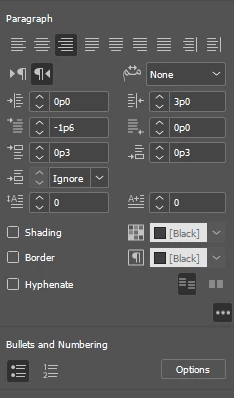
- In the Bullets and Numbering window, I set the Alignment to right. Setting it to center or left doesn't seem to do much of anything.
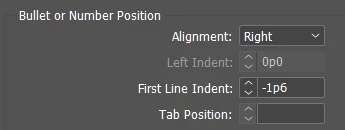
- I have paragraph styles set up from the English version of this book, I have tried setting the paragraph styles. I have also tried manually setting this up through the paragraph.
This might be complicated by the fact I'm copying/pasting from Microsoft Word.
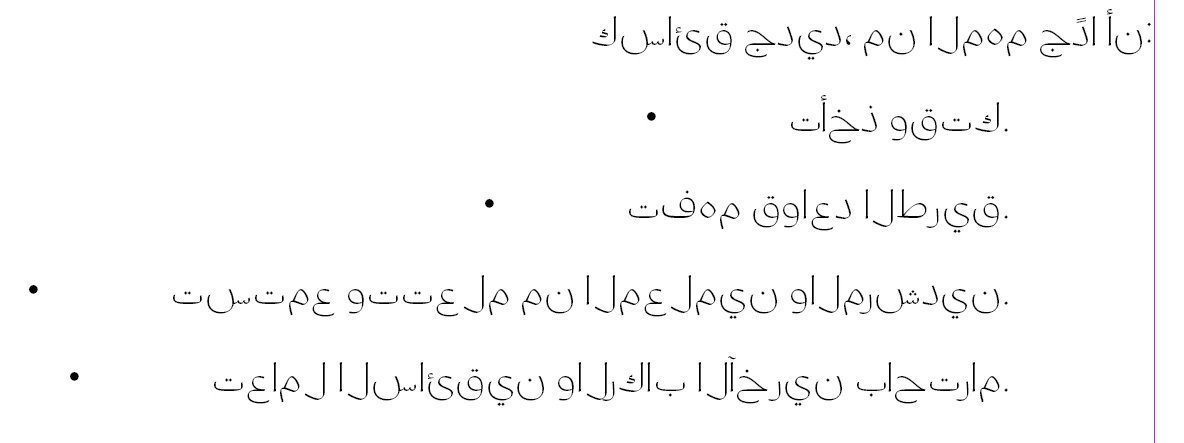
Here is how the bullets are displaying in InDesign
compared to how it is in Word
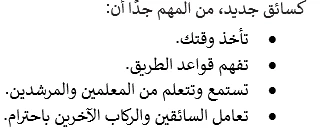
with the punctuation on the left.
What am I doing wrong here?
 AdChoices