


Participant
February 12, 2025
Answered

Running out of options need help with bleed marks exporting

  • February 12, 2025
  • 1 reply
  • 934 views

Hello, I am trying to get some posters printed and the printing people are saying that my file is not set up the way that they need, I have exported the file as press quality and added bleed marks in my document 0.125 on all sides I have tried so many ways but it always exports with this white border- when I send it to the printing people they are saying thats not bleed it has a white border, can someone help me out with not having this white border when exporting from indesign to pdf print? ( I thought white border is okay since thats getting cut off, am I wrong)
Correct answer Peter Spier

but isnt that what he should be seeing, just crop marks?


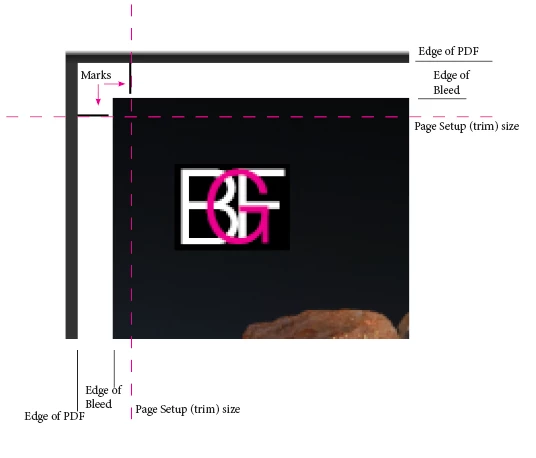
In your original PDF you had just bleed marks showing, not crop marks.  Notice in this image that the crop marks are set away from the corners, not aligned with them.

1 reply

Peter Spier
Community Expert
Community Expert
February 12, 2025

There's a difference between Crop marks (which show where to trim) and Bleed marks (which show the outside of the bleed area). Bleed marks are generally pretty useless.

As far as whether you actually have set up with bleed, we would need to see the document setup. Bleed is an additional area outside the finished (trimmed) size of the document into which you extend and onbject that are supposed to extend all the way to the edge. That area is to allow for misalignments in printing or trimming and is cut off after printing.

As far as the white border, that always gets added when you include marks  -- they have to go someplace and your PDF is increased in size to accomdate them.

Participant
February 12, 2025

thanks for that, I have attached the settings, so basically the white border is okay?

Peter Spier
Community Expert
Community Expert
February 12, 2025

Yiour first attachment hasn't worked, apparently, but from the export settings it looks like you've set a bleed in the document setup. Oddly, though, you've got both bleed and crop marks enabled in the screen capture, but only the bleed marks are showing in your initial post screen shot. Did you have them enabled then as well? I've checked the dimensions in the PDF and if as the title indicates this is an 11 x 17 page, then you do indeed have the correct bleeds and it's just the wrong marks which are causing confusion at the printer. Use crop marks,  not bleed marks, and they should be happy.

And yes, if you want marks (whcih you do) you have to have the white border.