


New Participant
July 11, 2022
Answered

[Script] Cannot set an object style as a default frame style if this style is inside a folder

  • July 11, 2022
  • 4 replies
  • 906 views

I have a simple script:


var doc = app.activeDocument;

var myStyle = doc.objectStyleGroups.itemByName('My Group1').objectStyles.itemByName('My Style1');

doc.pageItemDefaults.appliedTextObjectStyle = myStyle;


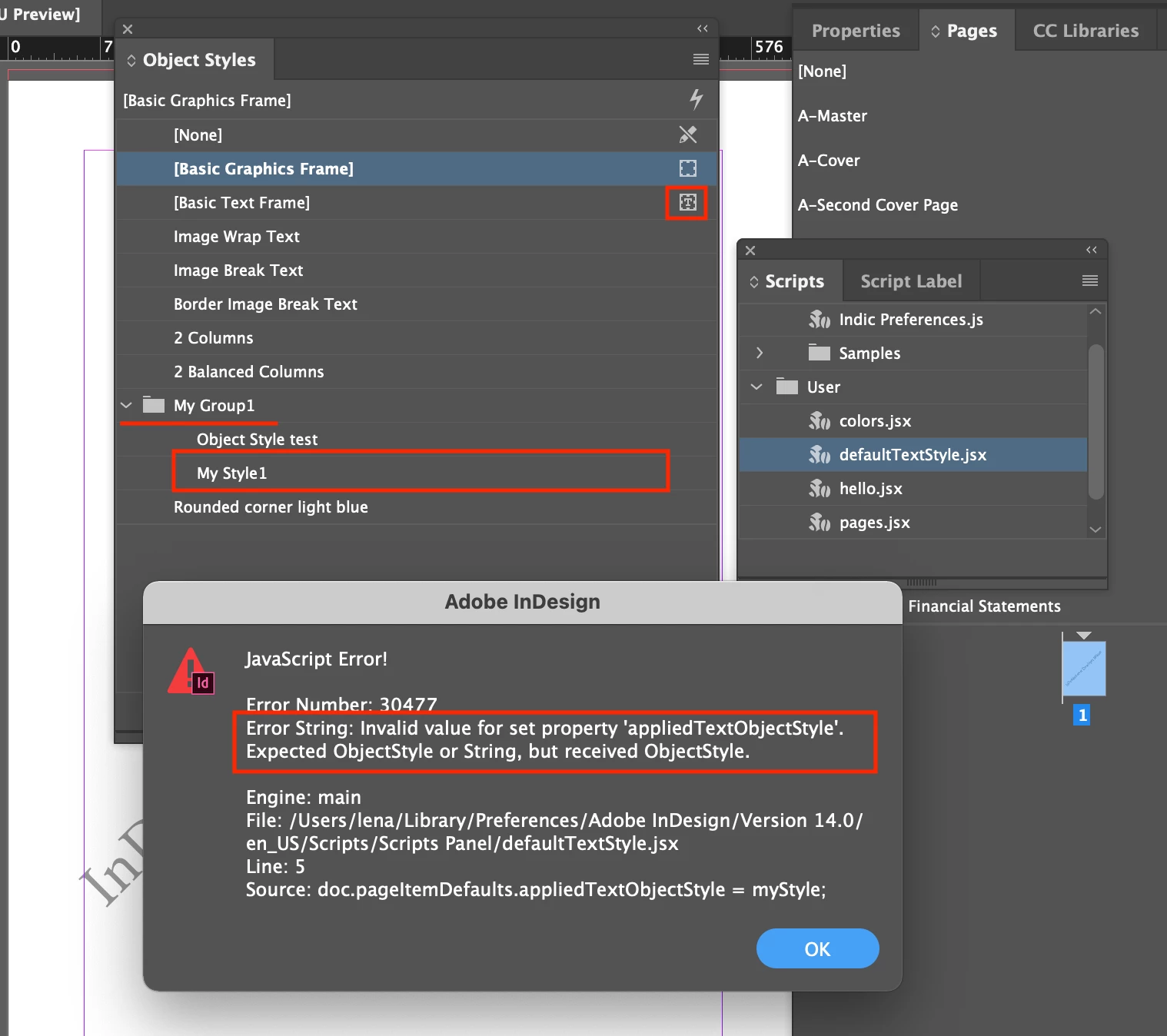
I'd like to set "My Style1" as a default text frame style. But when this style is inside a folder - I get this error:

Invalid value for set property 'appliedTextObjectStyle'. Expected ObjectStyle or String, but received ObjectStyle


The following piece of code - where target style is at the first level, outside folders - works fine:

var doc = app.activeDocument;
var myStyle = doc.objectStyles.itemByName('2 Columns');
doc.pageItemDefaults.appliedTextObjectStyle = myStyle;


Does anyone know how I can set a style from the folder as a default text/graphic frame style ?
 

This topic has been closed for replies.
Correct answer Laubender

Hi together,

I can re-create the issue as well on my German InDesign 2022 on Windows 10.

Tried it with the doc.allObjectStyles array. This failed when the object style was nested in an object style group and is clearly working when the object style is in the root of the Object Styles panel.


The workaround would be:

[1] Move the style to the root.

[2] Apply it to the pageItemDefaults

[3] Move it back to the group


if( myStyle.parent.constructor.name != "Document" )
{
	var objStyleGroup = myStyle.parent;
	myStyle.move( LocationOptions.AT_END , doc );
	doc.pageItemDefaults.appliedTextObjectStyle = myStyle;
	myStyle.move( LocationOptions.AT_END , objStyleGroup );
}
else
{
	doc.pageItemDefaults.appliedTextObjectStyle = myStyle;
};


Note: You need perhaps another check for the name of the object style, because there could be a style in the root with the same name.


Regards,
Uwe Laubender
( Adobe Community Professional )

4 replies

brian_p_dts
Community Expert
July 12, 2022

I have submitted the bug to InDesign User Voice: https://indesign.uservoice.com/forums/601180-adobe-indesign-bugs/suggestions/45417503-object-styles-within-object-style-groups-cannot-be


Please vote to increase visibility. 

Community Expert
July 12, 2022

Hi Brian,

thank you very much. I voted for fixing the bug.


Regards,
Uwe Laubender
( Adobe Community Professional )


Community Expert
July 12, 2022

Another note:
I can see the issue already with InDesign CS6 version 8.1 on Windows 10.


Regards,
Uwe Laubender
( Adobe Community Professional )

LaubenderCorrect answer
Community Expert
July 12, 2022

Hi together,

I can re-create the issue as well on my German InDesign 2022 on Windows 10.

Tried it with the doc.allObjectStyles array. This failed when the object style was nested in an object style group and is clearly working when the object style is in the root of the Object Styles panel.


The workaround would be:

[1] Move the style to the root.

[2] Apply it to the pageItemDefaults

[3] Move it back to the group


if( myStyle.parent.constructor.name != "Document" )
{
	var objStyleGroup = myStyle.parent;
	myStyle.move( LocationOptions.AT_END , doc );
	doc.pageItemDefaults.appliedTextObjectStyle = myStyle;
	myStyle.move( LocationOptions.AT_END , objStyleGroup );
}
else
{
	doc.pageItemDefaults.appliedTextObjectStyle = myStyle;
};


Note: You need perhaps another check for the name of the object style, because there could be a style in the root with the same name.


Regards,
Uwe Laubender
( Adobe Community Professional )

New Participant
July 12, 2022

Hi @Laubender

Thanks a lot! It works and solves my problem.

brian_p_dts
Community Expert
July 11, 2022

Hmm, seems like a bug. I was able to re-create on my Windows 11 running ID 17.3. I'll let others weigh in; I haven't worked much with doc.pageItemDefaults so maybe there's a gotcha there. 

Kasyan Servetsky
Brainiac
July 12, 2022

The same here in Indy 15.0.3 and 17.2.1, Win 10.

Definitely a bug!