


New Participant
March 22, 2023
Answered

Script for grouping paragraphs under common heading

  • March 22, 2023
  • 6 replies
  • 1195 views

Hi All Scripting Gurus!


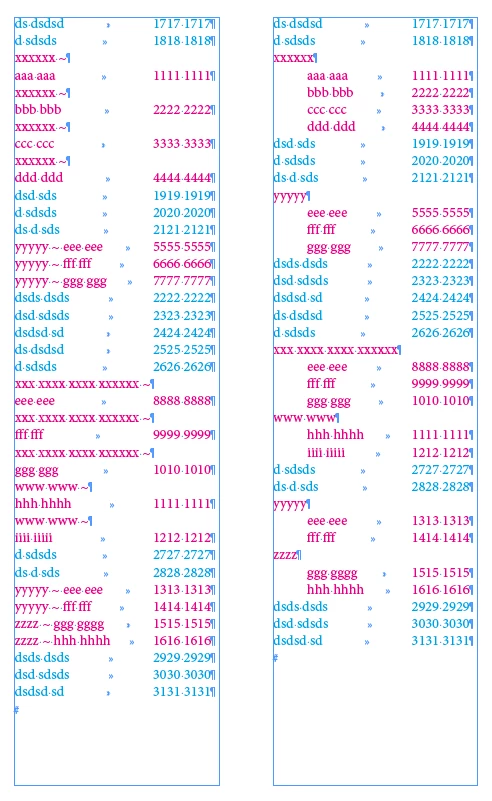
I am doing a telephone/business directory. The data is imported from an Excel spreadsheet. Some businesses/organizations have multiple entries. I would like to be able to group them under a common heading. Please see attached files. A semi-automatic script, say, highlight a selection manually, then execute the script working only on this selection, would do the trick. A fully automatic one processing the whole document would be fantastic!

Thank you!
 

This topic has been closed for replies.
Correct answer FRIdNGE

More compact! …


// by FRIdNGE, Michel Allio [24/03/2023]

// Place The Cursor in The Text To Be Treated!
var myToc = app.selection[0].parentStory;
var NoIndent = 0, Indent = 10;
// 1
app.findGrepPreferences = app.changeGrepPreferences = null;
app.findGrepPreferences.findWhat = "(~\\r\\K.)|(~\\h)";
app.changeGrepPreferences.leftIndent = Indent;
myToc.changeGrep();
// 2A
app.findGrepPreferences.findWhat = "(^.+~\\r).+\\r\\K(?=\\1)";
myFound = myToc.findGrep();
for ( var f = myFound.length-1; f >= 0; f-- ) myFound[f].paragraphs[0].remove();
// 2B
app.findGrepPreferences.findWhat = "(^.+~\\h).+\\r\\K(?=\\1)";
myFound = myToc.findGrep();
app.findGrepPreferences = app.changeGrepPreferences = null;
for ( var f = myFound.length-1; f >= 0; f-- ) {
	app.findGrepPreferences.findWhat = "^.+~\\h";
	app.changeGrepPreferences.changeTo = "";
	myFound[f].paragraphs[0].changeGrep();
}
app.findGrepPreferences.findWhat = "~\\K\\h";
app.changeGrepPreferences.changeTo = "\r";
myToc.changeGrep();
app.findGrepPreferences.findWhat = "(.)\\h~$";
app.changeGrepPreferences.changeTo = "$1";
app.changeGrepPreferences.leftIndent = NoIndent;
myToc.changeGrep();
app.findGrepPreferences = app.changeGrepPreferences = null;

alert("Youpi! …")


(^/)

6 replies

FRIdNGE
FRIdNGECorrect answer
Inspiring
March 27, 2023

More compact! …


// by FRIdNGE, Michel Allio [24/03/2023]

// Place The Cursor in The Text To Be Treated!
var myToc = app.selection[0].parentStory;
var NoIndent = 0, Indent = 10;
// 1
app.findGrepPreferences = app.changeGrepPreferences = null;
app.findGrepPreferences.findWhat = "(~\\r\\K.)|(~\\h)";
app.changeGrepPreferences.leftIndent = Indent;
myToc.changeGrep();
// 2A
app.findGrepPreferences.findWhat = "(^.+~\\r).+\\r\\K(?=\\1)";
myFound = myToc.findGrep();
for ( var f = myFound.length-1; f >= 0; f-- ) myFound[f].paragraphs[0].remove();
// 2B
app.findGrepPreferences.findWhat = "(^.+~\\h).+\\r\\K(?=\\1)";
myFound = myToc.findGrep();
app.findGrepPreferences = app.changeGrepPreferences = null;
for ( var f = myFound.length-1; f >= 0; f-- ) {
	app.findGrepPreferences.findWhat = "^.+~\\h";
	app.changeGrepPreferences.changeTo = "";
	myFound[f].paragraphs[0].changeGrep();
}
app.findGrepPreferences.findWhat = "~\\K\\h";
app.changeGrepPreferences.changeTo = "\r";
myToc.changeGrep();
app.findGrepPreferences.findWhat = "(.)\\h~$";
app.changeGrepPreferences.changeTo = "$1";
app.changeGrepPreferences.leftIndent = NoIndent;
myToc.changeGrep();
app.findGrepPreferences = app.changeGrepPreferences = null;

alert("Youpi! …")


(^/)

m1b
Community Expert
March 23, 2023

Hi @nickg86903597, this probably won't work straight away, because I don't know all the parameters around what characters your text is using, but here is a starting point. See script below.


I have made a couple of assumptions:

1. That single entity, non-duplicated entries use linefeeds, not carriage returns (see ATM Batteries & Tyres).

2. That you will use a paragraph style that indents subsequent lines.


I've set up a paragraph style here that shows the entity name in bold.:


/**
 * Clean up Duplicated Company Details
 * @author m1b
 * @version 2023-03-23
 * @discussion https://community.adobe.com/t5/indesign-discussions/script-for-grouping-paragraphs-under-common-heading/m-p/13669481
 */
function main() {

    // this regex parses the first line,
    // eg. 'Company Name ~ 123 Sample Street'
    // into array with company name as element 1
    // and address/phone details as element 2.
    var lineParser = /^([^~]+)\s?~\s*\n?(.+)/,

        doc = app.activeDocument,
        cleaner = /(^\s+|[\s\n]+$)/g,
        text = doc.selection[0];

    if (
        text == undefined
        || !text.hasOwnProperty('paragraphs')
        || text.paragraphs.length < 2
    ) {
        alert('Please select multiple paragraphs and try again.');
        return;
    }

    var paras = text.paragraphs,
        currentPara,
        currentMatch,

        // the company/person name
        contentsName,
        // the address/phone details
        contentsDetails;

    for (var i = paras.length - 1; i > 0; i--) {

        currentPara = paras[i];
        currentMatch = currentPara.contents.match(lineParser);

        if (currentMatch == null)
            continue;

        if (currentMatch.length >= 1) {

            contentsName = currentMatch[1].replace(cleaner, '');

            if (currentMatch.length >= 2)
                contentsDetails = currentMatch[2].replace(cleaner, '');
            else
                contentsDetails = '';

        }

        var p, matchCount = 0;

        matchPreviousLines:
        while (p = paras[i - 1].contents.match(lineParser)) {

            var matchedContents = p[1].replace(cleaner, '');

            if (matchedContents == contentsName) {

                // matched
                contentsDetails = p[2].replace(cleaner, '') + '\u000A' + contentsDetails;
                i--;
                matchCount++;

                continue matchPreviousLines;

            }

            else {

                // no match
                break matchPreviousLines;

            }

        }

        if (matchCount > 1) {

            // combine the paragraphs
            currentPara.contents = contentsName + ' ~\u000A' + contentsDetails + '\u000D';
            while (matchCount--)
                paras[i + matchCount].remove();

        }

    }

}

app.doScript(main, ScriptLanguage.JAVASCRIPT, undefined, UndoModes.ENTIRE_SCRIPT, 'Clean up Duplicated Company Details');


FRIdNGE
Inspiring
March 24, 2023

Simplistically, a funny game for Grep! …


Before/After:


// by FRIdNGE, Michel Allio [24/03/2023]

// Place The Cursor in The Text To Be Treated!
var myToc = app.selection[0].parentStory;
var NoIndent = 0, Indent = 10;
// 1a
app.findGrepPreferences = app.changeGrepPreferences = null;
app.findGrepPreferences.findWhat = "~\\r\\K.";
app.changeGrepPreferences.leftIndent = Indent;
myToc.changeGrep();
// 1b
app.findGrepPreferences.findWhat = "(^.+~\\r).+\\r\\K(?=\\1)";
myFound = myToc.findGrep();
for ( var f = myFound.length-1; f >= 0; f-- ) myFound[f].paragraphs[0].remove();
// 2a
app.findGrepPreferences.findWhat = "~\\h";
app.changeGrepPreferences.leftIndent = Indent;
myToc.changeGrep();
// 2b
app.findGrepPreferences.findWhat = "(^.+~\\h).+\\r\\K(?=\\1)";
myFound = myToc.findGrep();
app.findGrepPreferences = app.changeGrepPreferences = null;
for ( var f = myFound.length-1; f >= 0; f-- ) {
	app.findGrepPreferences.findWhat = "^.+~\\h";
    app.changeGrepPreferences.changeTo = "";
	myFound[f].paragraphs[0].changeGrep();
}
// 2c
app.findGrepPreferences.findWhat = "~\\K\\h";
app.changeGrepPreferences.changeTo = "\r";
myToc.changeGrep();
// 2d
app.findGrepPreferences.findWhat = "(.)\\h~$";
app.changeGrepPreferences.changeTo = "$1";
app.changeGrepPreferences.leftIndent = NoIndent;
myToc.changeGrep();
app.findGrepPreferences = app.changeGrepPreferences = null;

alert("Youpi! …")


(^/)  The Jedi

m1b
Community Expert
March 22, 2023

Just wanted to endorse what both @Willi Adelberger and @Robert at ID-Tasker are saying: it's better to organise your *data* (in Excel) that to organise your presentation (in Indesign). That way if you (or client) makes changes to the data, you won't have to do this again each time. A database would be even better, because you can have a "company" entity with multiple addresses/phone numbers.


That said, I am assuming at this point that making the adjustments in Indesign is makes sense, in your particular case.

- Mark

Robert at ID-Tasker
Brainiac
March 22, 2023

Why can't you do it in the Excel first? 


Willi Adelberger
Community Expert
March 22, 2023

I would work with a second level headline. Normally I have additional columns in Excel to sort, order and put to level all entries. They can be deleted or otherwise become invisible at the end, but during formatting they are very helpful and fastforward.

m1b
Community Expert
March 22, 2023

Hi @nickg86903597, could you please post a sample .indd file with a page or two so we can see actual details, like line break chars etc? It shouldn't be hard to script this.

- Mark