


Answered
Script says group with image plus another item contains 3 items? Please help
Hello,
I have a script which counts how many things are in a group.
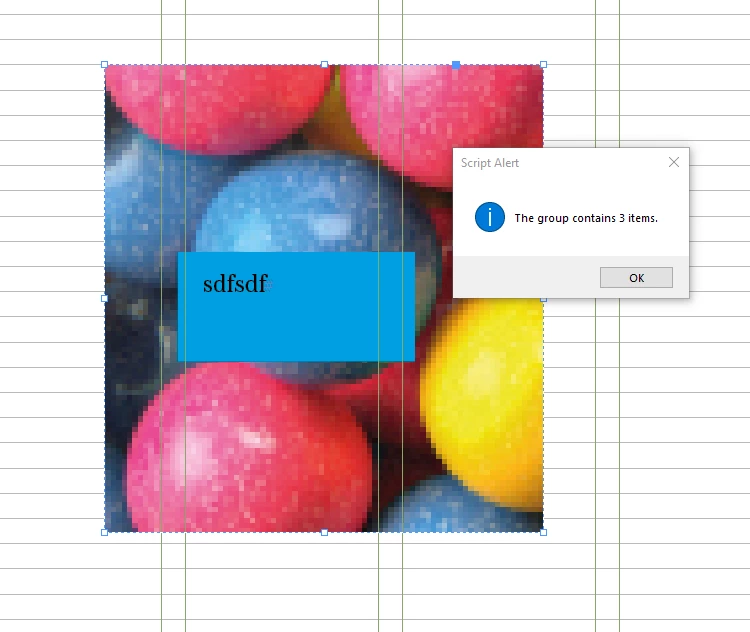
Is it becuase indesign is reading a parent bound plus the image inside the rectangle, PLUS the blue box, so there is three things?
I have the following code and am struggling to know how to intergrate a group which has an image and another thing
My thought was to adjust this part
if (item instanceof Group && item.allPageItems.length === 2) to have OR group selection of image, bounding rectangle, and other thing then ... but I'm just not getting anywhere
Any advice would be great
Thanks
Smyth
app.doScript(function() {
    // Get the active document
    var doc = app.activeDocument;

    // Get document grid preferences
    var gridPreferences = doc.gridPreferences;
    var baselineIncrement = gridPreferences.baselineDivision;

    // Add a precision threshold to handle floating-point precision issues
    var precisionThreshold = 0.1; // This helps to avoid errors when height is close to baselineIncrement

    // Function to adjust height
    function adjustHeight(item) {
        var currentHeight = item.geometricBounds[2] - item.geometricBounds[0];

        if (currentHeight > baselineIncrement + precisionThreshold) {
            // Reduce the bottom edge to shrink the height
            if (item instanceof Image && item.parent instanceof Rectangle) {
                adjustHeight(item.parent); // Adjust the height of the parent frame, not the image itself
            } else {
                item.geometricBounds = [
                    item.geometricBounds[0],
                    item.geometricBounds[1],
                    item.geometricBounds[2] - baselineIncrement,
                    item.geometricBounds[3]
                ];
            }
        } else {
            // Move the item upwards if its height is equal to or less than one baseline (within threshold)
            var moveAmount = Math.abs(baselineIncrement); // Ensure positive value

            item.geometricBounds = [
                item.geometricBounds[0] - moveAmount,
                item.geometricBounds[1],
                item.geometricBounds[2] - moveAmount,
                item.geometricBounds[3]
            ];
        }
    }

    // Function to find and assign smaller and larger items in a group of two
    function findSmallerGroupItem(group) {
        var groupItem1 = group.allPageItems[0];
        var groupItem2 = group.allPageItems[1];

        var heightItem1 = groupItem1.geometricBounds[2] - groupItem1.geometricBounds[0];
        var heightItem2 = groupItem2.geometricBounds[2] - groupItem2.geometricBounds[0];

        var smallGroupItem, largeGroupItem;

        // Compare heights and assign smaller and larger
        if (heightItem1 < heightItem2) {
            smallGroupItem = groupItem1;
            largeGroupItem = groupItem2;
        } else {
            smallGroupItem = groupItem2;
            largeGroupItem = groupItem1;
        }

        return {
            smallGroupItem: smallGroupItem,
            largeGroupItem: largeGroupItem
        };
    }

    // Function to resize and center the smaller group item
    function resizeAndCenterSmallerGroupItem(smallGroupItem, largeGroupItem) {
        var largeTop = largeGroupItem.geometricBounds[0];
        var largeBottom = largeGroupItem.geometricBounds[2];
        var largeCenter = (largeTop + largeBottom) / 2;

        // Calculate the new height and top position for the smaller item
        var smallWidth = smallGroupItem.geometricBounds[3] - smallGroupItem.geometricBounds[1];
        var smallNewTop = largeCenter - (baselineIncrement / 2);

        // Resize the smaller item to match baseline increment
        smallGroupItem.geometricBounds = [
            smallNewTop,
            smallGroupItem.geometricBounds[1],
            smallNewTop + baselineIncrement,
            smallGroupItem.geometricBounds[3]
        ];

        // Adjust the smaller item’s horizontal position if necessary
        var currentBounds = smallGroupItem.geometricBounds;
        smallGroupItem.geometricBounds = [
            currentBounds[0],
            currentBounds[1],
            currentBounds[2],
            currentBounds[3] // No horizontal adjustment needed in this case
        ];
    }

    // Function to process each item or group recursively
    function processItem(item) {
        if (item instanceof Group && item.allPageItems.length === 2) {
            // If the item is a group with exactly two items, find smaller and larger items
            var groupItems = findSmallerGroupItem(item);

            // Resize and center the smaller item within the larger item
            resizeAndCenterSmallerGroupItem(groupItems.smallGroupItem, groupItems.largeGroupItem);

            // Now adjust the height of the larger item as well
            adjustHeight(groupItems.largeGroupItem);

        } else if (item instanceof GraphicLine || item instanceof TextFrame || item instanceof Rectangle) {
            adjustHeight(item);
        } else if (item instanceof Group) {
            for (var j = 0; j < item.allPageItems.length; j++) {
                processItem(item.allPageItems[j]);
            }
        } else if (item instanceof Image) {
            // Check if the image is inside a rectangle (frame)
            var parent = item.parent;
            if (parent instanceof Rectangle) {
                adjustHeight(parent);
            } else {
                adjustHeight(item);
            }
        } else {
            alert("Selection contains unsupported items. Please select only vertical rules, text frames, picture boxes, or groups.");
        }
    }

    // Check if there are any selected objects
    if (app.selection.length === 0) {
        alert("Please select one or more vertical rules, text frames, picture boxes, or groups.");
    } else {
        // Iterate over all selected objects
        for (var i = 0; i < app.selection.length; i++) {
            processItem(app.selection[i]);
        }
    }
}, ScriptLanguage.JAVASCRIPT, null, UndoModes.ENTIRE_SCRIPT, "Adjust Item Height Based on Baseline Increment");

 AdChoices