Barry23053734dbr6
Inspiring
February 24, 2023
Answered

Script to automatically assign existing text hyperlinks to the text frame they reside within instead

  • February 24, 2023
  • 3 replies
  • 4743 views

Hi,

I've used the 'convert URL's to hyperlinks' command in InDeign to convert multiple URL's, all in their own text frames, to Hyperlinks. I'd rather the hyperlinks were assigned to the actual frames themselves, rather than the URL text within them. Is there a way to do this with a script?

I did find this script: https://community.adobe.com/t5/indesign-discussions/how-to-change-automatically-frame-with-hyperlink-text-into-hyperlinked-frame/td-p/10438408 which says it will do this but it doesn't work (i get a string error). Can anyone help?

Thanks
This topic has been closed for replies.
Correct answer Kasyan Servetsky

There's a mistake in the code. Here's a fixed version. I tried to make it more easy to understand.


if (app.documents.length > 0) main();

function main() {
	var hyperlink, sourceText, textFrame, storedName, newSource, newHyperlink,
	doc = app.activeDocument,	
	hyperlinks = doc.hyperlinks.everyItem().getElements();

	for (var i = 0; i < hyperlinks.length; i++) {
		hyperlink =hyperlinks[i];

		if (!hyperlink.source.hasOwnProperty("sourceText") || hyperlink.source.sourceText == undefined) continue;
		sourceText = hyperlink.source.sourceText;		
	
		textFrame = sourceText.parentTextFrames[0];
		storedName = hyperlink.name;
		newSource = doc.hyperlinkPageItemSources.add(textFrame);
		newHyperlink = doc.hyperlinks.add(newSource, hyperlink.destination);
		hyperlink.remove();
		
		 // clear the "Hyperlink" char style
		if (sourceText.appliedCharacterStyle.name == "Hyperlink") {
			sourceText.appliedCharacterStyle = doc.characterStyles.item("[None]");
			sourceText.clearOverrides();
		}
	
		newHyperlink.name = storedName;
	}
}


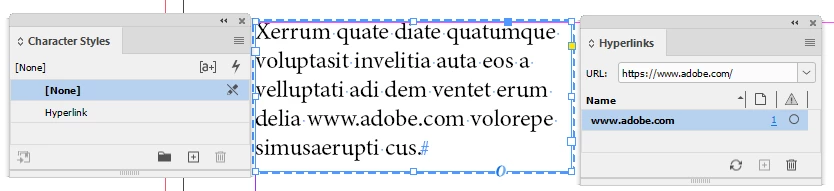
Before

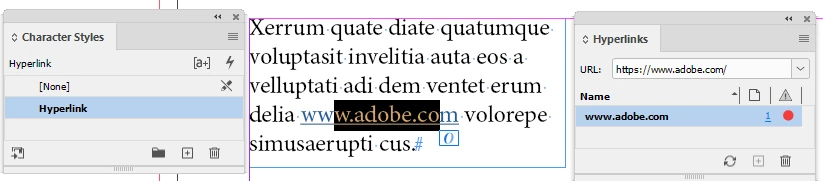
After

3 replies

Kasyan Servetsky
Legend
February 28, 2023

I reworked the script a little and posted it here on my site.

  1. Now it marks — via insertLabel() — ‘processed’ text frames so if a frame has 2+ hyperlinks it won’t throw an error.
  2. Enclosed adding a new source into a try-catch block to avoid “The object you have chosen is already in use by another hyperlink.” errors.
Robert at ID-Tasker
Legend
October 4, 2023

If I may pitch in - I think you should do re-processing of the already processed TextFrame - in case link in the text has been changed?


Unless you switch from using hidden Label - Insert/ExtractLabel - to the visible one so user can remove it manually and re-run script? 


Kasyan Servetsky
Kasyan ServetskyCorrect answer
Legend
February 24, 2023

There's a mistake in the code. Here's a fixed version. I tried to make it more easy to understand.


if (app.documents.length > 0) main();

function main() {
	var hyperlink, sourceText, textFrame, storedName, newSource, newHyperlink,
	doc = app.activeDocument,	
	hyperlinks = doc.hyperlinks.everyItem().getElements();

	for (var i = 0; i < hyperlinks.length; i++) {
		hyperlink =hyperlinks[i];

		if (!hyperlink.source.hasOwnProperty("sourceText") || hyperlink.source.sourceText == undefined) continue;
		sourceText = hyperlink.source.sourceText;		
	
		textFrame = sourceText.parentTextFrames[0];
		storedName = hyperlink.name;
		newSource = doc.hyperlinkPageItemSources.add(textFrame);
		newHyperlink = doc.hyperlinks.add(newSource, hyperlink.destination);
		hyperlink.remove();
		
		 // clear the "Hyperlink" char style
		if (sourceText.appliedCharacterStyle.name == "Hyperlink") {
			sourceText.appliedCharacterStyle = doc.characterStyles.item("[None]");
			sourceText.clearOverrides();
		}
	
		newHyperlink.name = storedName;
	}
}


Before

After

Barry23053734dbr6
Inspiring
February 24, 2023

Thanks for that Kasyan.

Got this error now.

Kasyan Servetsky
Legend
February 24, 2023

This is not a start up script! Move it from the "Startup Scripts" to the "Scripts Panel" folder.

Robert at ID-Tasker
Legend
February 24, 2023

If you give us the error you are receiving - then maybe someone will be able to help you... we are not mind readers... 


Barry23053734dbr6
Inspiring
February 24, 2023

Sorry, here it is: