

Inspiring
December 11, 2023
Answered

Script to change the color of the border and shading of a paragraph

  • December 11, 2023
  • 6 replies
  • 1880 views

Hello
I need help with a script for Adobe Indesign which must change the border color and shading in a specific paragraph called offer_module
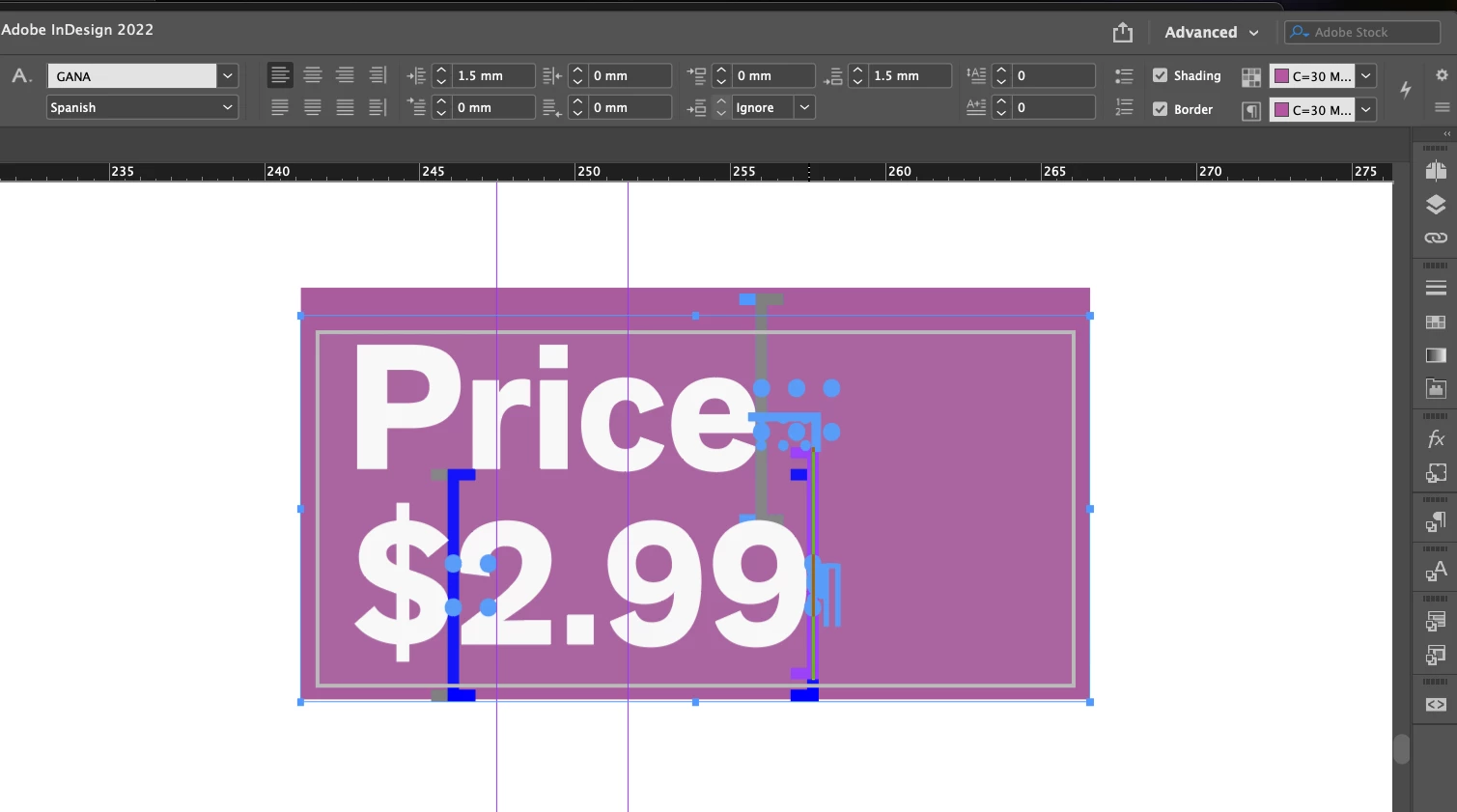

This topic has been closed for replies.
Correct answer qwermk

Hello.

I cannot send the code I am working on since it is very extensive and executes several tasks that have nothing to do with the problem I am presenting, so I sent an example code. I reviewed the code I had sent them and it had errors, I corrected them and found how to change the color of the shading and the border of the paragraph.


#targetengine "session"
main();
function main(){
  snippet();
}

function snippet(){
  var layoutContextMenu = app.menus.item("$ID/RtMouseLayout");
  layoutContextMenu.addEventListener("beforeDisplay", beforeDisplayHandler, false);
}


function beforeDisplayHandler(event){
  var textContextMenu = app.menus.item("$ID/RtMouseLayout");
  menu6Name = "Color offer module"
  if(checkForMenuItem(textContextMenu, menu6Name) == false ){
    k = changeStoryColors;
    makeLabelGraphicMenuItem(menu6Name, k );
  }
}


function checkForMenuItem(mn, str){
  var result = false;
  try{
    var mnItem = mn.menuItems.item(str);
    mnItem.name;
    result = true
  }
  catch(error){}
  // alert("Menu item found? " + result);
  return result;
}

function makeLabelGraphicMenuItem(menu6Name, k ){
  if(checkForScriptMenuItem(menu6Name) == false){
    labelGraphicMenuAction = app.scriptMenuActions.add(menu6Name);
    labelGraphicEventListener = labelGraphicMenuAction.eventListeners.add("onInvoke", k, false);
  }
 
  var rMouseMnu = app.menus.item("$ID/RtMouseLayout");
  var mName6 = app.scriptMenuActions.item(menu6Name);

  var mElement1 = rMouseMnu.menuItems.add(mName6, LocationOptions.AT_BEGINNING );
  rMouseMnu.menuSeparators.add(LocationOptions.AFTER, mElement1);

}


function checkForScriptMenuItem(str){
  var result = false;
  try{
    var scriptMenuAction = app.scriptMenuActions.item(str);
    scriptMenuAction.name;
    result = true
  }
  catch(error){}
  // alert("Script menu action found? " + result);
  return result;
}


function changeStoryColors(){
  
  var myDocument = app.activeDocument;

  var values = [];
  for(sw= 0; sw< myDocument.swatches.length; sw++){
    values.push(myDocument.swatches[sw].name);
  }

  var w = new Window ('dialog', "Change colors");
  var main = w.add ("group");

  main.add ("statictext", undefined, "Color Module Offer: ");
  var lBox  = main.add ("dropdownlist", undefined, values);


  var main3 = w.add ("group");
  var imp = main3.add ("button", undefined, "OK");
  var btnClose = main3.add('button', undefined, 'Close');

  var userSelection;

  btnClose.size = [60, 20];

  imp.onClick = function (){

    userSelection = lBox.selection.text;

    if(userSelection == null ){
      alert('Select a color')
    }
    else{
      try{
        w.close(1);
        }
        catch(e){
          alert(e.message)
        }
    }
  }

  btnClose.onClick = function(){w.close();}

  var wResults = w.show();

  if(wResults === 1){

    var userColor = app.activeDocument.swatches.item(userSelection);

    var storiesLenght = app.selection.length;

    for(x=0; x<storiesLenght; x++){
      var storySelected = app.selection[x];
      if(storySelected.associatedXMLElement != null){
        var STRStoryTreeElements = storySelected.associatedXMLElement.xmlElements;


        for(d=0; d<STRStoryTreeElements.length; d++){
          with(STRStoryTreeElements.item(d)){

            if(markupTag.name == "offer_module"){
              with(xmlElements){
                texts[0].paragraphs[0].paragraphBorderColor = userColor;
                texts[0].paragraphs[0].paragraphShadingColor = userColor;
              }
            }
          }
        }
      }
    }
  }
  
}


When one or more text boxes are selected and right-clicked, a tab called 'Color offer module' is displayed in the menu. When it is executed, it shows the list of colors that are saved in the document, then you select the color by which you want to change the color of the shading and the paragraph of all the boxes that contain an xml object called 'offer_module'.


I performed tests on the code I am making and it works without problems.


There are times when creating scripts for indesign I have had problems because the documentation is not very detailed, especially when it is the part of how to work with XML objects in inDesign.

Anyway, thank you all very much for your collaboration.


6 replies

qwermkAuthorCorrect answer
Inspiring
December 14, 2023

Hello.

I cannot send the code I am working on since it is very extensive and executes several tasks that have nothing to do with the problem I am presenting, so I sent an example code. I reviewed the code I had sent them and it had errors, I corrected them and found how to change the color of the shading and the border of the paragraph.


#targetengine "session"
main();
function main(){
  snippet();
}

function snippet(){
  var layoutContextMenu = app.menus.item("$ID/RtMouseLayout");
  layoutContextMenu.addEventListener("beforeDisplay", beforeDisplayHandler, false);
}


function beforeDisplayHandler(event){
  var textContextMenu = app.menus.item("$ID/RtMouseLayout");
  menu6Name = "Color offer module"
  if(checkForMenuItem(textContextMenu, menu6Name) == false ){
    k = changeStoryColors;
    makeLabelGraphicMenuItem(menu6Name, k );
  }
}


function checkForMenuItem(mn, str){
  var result = false;
  try{
    var mnItem = mn.menuItems.item(str);
    mnItem.name;
    result = true
  }
  catch(error){}
  // alert("Menu item found? " + result);
  return result;
}

function makeLabelGraphicMenuItem(menu6Name, k ){
  if(checkForScriptMenuItem(menu6Name) == false){
    labelGraphicMenuAction = app.scriptMenuActions.add(menu6Name);
    labelGraphicEventListener = labelGraphicMenuAction.eventListeners.add("onInvoke", k, false);
  }
 
  var rMouseMnu = app.menus.item("$ID/RtMouseLayout");
  var mName6 = app.scriptMenuActions.item(menu6Name);

  var mElement1 = rMouseMnu.menuItems.add(mName6, LocationOptions.AT_BEGINNING );
  rMouseMnu.menuSeparators.add(LocationOptions.AFTER, mElement1);

}


function checkForScriptMenuItem(str){
  var result = false;
  try{
    var scriptMenuAction = app.scriptMenuActions.item(str);
    scriptMenuAction.name;
    result = true
  }
  catch(error){}
  // alert("Script menu action found? " + result);
  return result;
}


function changeStoryColors(){
  
  var myDocument = app.activeDocument;

  var values = [];
  for(sw= 0; sw< myDocument.swatches.length; sw++){
    values.push(myDocument.swatches[sw].name);
  }

  var w = new Window ('dialog', "Change colors");
  var main = w.add ("group");

  main.add ("statictext", undefined, "Color Module Offer: ");
  var lBox  = main.add ("dropdownlist", undefined, values);


  var main3 = w.add ("group");
  var imp = main3.add ("button", undefined, "OK");
  var btnClose = main3.add('button', undefined, 'Close');

  var userSelection;

  btnClose.size = [60, 20];

  imp.onClick = function (){

    userSelection = lBox.selection.text;

    if(userSelection == null ){
      alert('Select a color')
    }
    else{
      try{
        w.close(1);
        }
        catch(e){
          alert(e.message)
        }
    }
  }

  btnClose.onClick = function(){w.close();}

  var wResults = w.show();

  if(wResults === 1){

    var userColor = app.activeDocument.swatches.item(userSelection);

    var storiesLenght = app.selection.length;

    for(x=0; x<storiesLenght; x++){
      var storySelected = app.selection[x];
      if(storySelected.associatedXMLElement != null){
        var STRStoryTreeElements = storySelected.associatedXMLElement.xmlElements;


        for(d=0; d<STRStoryTreeElements.length; d++){
          with(STRStoryTreeElements.item(d)){

            if(markupTag.name == "offer_module"){
              with(xmlElements){
                texts[0].paragraphs[0].paragraphBorderColor = userColor;
                texts[0].paragraphs[0].paragraphShadingColor = userColor;
              }
            }
          }
        }
      }
    }
  }
  
}


When one or more text boxes are selected and right-clicked, a tab called 'Color offer module' is displayed in the menu. When it is executed, it shows the list of colors that are saved in the document, then you select the color by which you want to change the color of the shading and the paragraph of all the boxes that contain an xml object called 'offer_module'.


I performed tests on the code I am making and it works without problems.


There are times when creating scripts for indesign I have had problems because the documentation is not very detailed, especially when it is the part of how to work with XML objects in inDesign.

Anyway, thank you all very much for your collaboration.


Willi Adelberger
Community Expert
Community Expert
December 14, 2023

Why are you not simple change the paragraph style. No need to use a script if you can apply program functionality much faster. 

qwermkAuthor
Inspiring
December 14, 2023

The program I am developing creates text boxes from data in an XML file. One of the options that the program has is so that the user can change one or more text boxes (according to their criteria) the background color of the 'offer_module' paragraph. I cannot fit the color of 'offer_module' throughout the document since the data with which I load the data of 'offer_module' comes from an XML.

I understand that it could be easier if you have several paragraph styles (for example: offer_module1, offer_module2) that have predefined different background colors, but due to client specifications, that data must always be called 'offer_module' and the designer changes to your criterion the background value.

qwermkAuthor
Inspiring
December 12, 2023

Cherney, sorry if my question is not important enough to express it in a post in this community, I am not trying to get you to do my job, in fact it seems disrespectful to me because of what you say.

I created the post due to the little information there is about ExtendScript and the code I sent was an example to be able to express with a little more clarity the problem I have. The example code that I sent was based on an example of the scripts that are in the Adobe Indesign SDK. I tried to make an example similar to the one I am working on, since I am not going to send my code.

On the other hand, it really seems very bad for me to answer something like that, since if it is someone so expert on this topic and I ask a question (even if it is the simplest question) it is no way to answer someone. If I turned to this community, it is because the information on ExtendScript is very little.

If there is someone who can give me more detailed information about the Paragraph object and how to change the shading and border from a script. I would be very grateful.

Again, sorry if I take up a little of your time.

Robert at ID-Tasker
Legend
December 12, 2023

You can start here:


https://www.indesignjs.de/extendscriptAPI/indesign-latest/#about.html 


But if you'll keep giving us botched code examples - both loops checking for swatches are wrong as there is no return after 1st found item so only LAST found item will be always "returned" (*) - you won't get too far... 


(*) And what is the point of first adding them to an array and then processing this array again? 


And should be getOfFer - not getOfTer... 


If you need our help - you need to show us REAL code... 


qwermkAuthor
Inspiring
December 12, 2023

Hello, thanks for your answers. The script I have is so that when a user selects one or more text boxes, it allows them to change the color of the texts and the color of the border and shading of the 'offer_module' paragraph style. I send an example of the code:

main();
function main(){
  snippet();
}

function snippet(){

  var myLayoutContextMenu = app.menus.item("$ID/RtMouseLayout");
  myLayoutContextMenu.addEventListener("beforeDisplay", beforeDisplayHandler, false);

}

function beforeDisplayHandler(myEvent){

  var myTextContextMenu = app.menus.item("$ID/RtMouseLayout");

  menu2Name = "Color Module Offer"

  if(checkForMenuItem( checkForMenuItem(myTextContextMenu, menu2Name) == false ){
    g = changeStoryColors;
    myMakeLabelGraphicMenuItem(menu2Name, g );
  }
}

function checkForMenuItem(myMenu, myString){
  var myResult = false;
  try{
    var myMenuItem = myMenu.menuItems.item(myString);
    myMenuItem.name;
    myResult = true
  }
  catch(myError){}
  return myResult;
}

function myMakeLabelGraphicMenuItem(menu1Name, g ){
  
  if(myCheckForScriptMenuItem(menu1Name) == false){
      myLabelGraphicMenuAction = app.scriptMenuActions.add(menu1Name);
      myLabelGraphicEventListener = myLabelGraphicMenuAction.eventListeners.add("onInvoke", g, false);
  }

  var rMouseMnu = app.menus.item("$ID/RtMouseLayout");
  var mName = app.scriptMenuActions.item(menu1Name);

  rMouseMnu.menuItems.add(mName, LocationOptions.AT_BEGINNING );

}


function myCheckForScriptMenuItem(myString){
  var myResult = false;
  try{
      var myScriptMenuAction = app.scriptMenuActions.item(myString);
      myScriptMenuAction.name;
      myResult = true
  }
  catch(myError){}
  return myResult;
}


function changeStoryColors(){

    
  var myDocument = app.activeDocument;
  
  var values = [];
  for(sw= 0; sw< myDocument.swatches.length; sw++){
    values.push(myDocument.swatches[sw].name);
  }


  getOfter = 0
  for(sw2= 0; sw2< values.length; sw2++){
    if(values[sw2] == 'Color_Module_Offer'){
      getOfter = sw2;
    }
  }

  getBlack = 0
  for(sw3= 0; sw3< values.length; sw3++){
    if(values[sw3] == 'Black'){
      getBlack = sw3;
    }
  }


  var w = new Window ('dialog', "Change Colors");

  var main = w.add ("group");
  main.add ("statictext", undefined, "Text Color: ");
  var lBox  = main.add ("dropdownlist", undefined, values);
  lBox.selection = getBlack;


  main.add ("statictext", undefined, "Color Module offer: ");
  var lBox2  = main.add ("dropdownlist", undefined, values);
  lBox2.selection = getOfter;


  var main3 = w.add ("group");
  var imp = main3.add ("button", undefined, "OK");
  var btnClose = main3.add('button', undefined, 'Close');

  var userSelection;
  var userSelection2;


  btnClose.size = [60, 20];

  imp.onClick = function (){

    userSelection = lBox.selection.text;
    userSelection2 = lBox2.selection.text;

    if(userSelection == null && userSelection2 == 'None' ){
      alert('Select a color')
    }
    else{
      try{
        w.close(1);
        }
        catch(e){
          alert(e.message)
        }
    }
  }

  btnClose.onClick = function(){w.close();}

  var wResults = w.show();

  if(wResults === 1){
    //User selected colors
    var userColor = app.activeDocument.swatches.item(userSelection);
    var userColor2 = app.activeDocument.swatches.item(userSelection2);

    var storiesLenght = app.selection.length;

    for(x=0; x<storiesLenght; x++){
      var storySelected = app.selection[x];
      if(storySelected.associatedXMLElement != null){
        var STRStoryTreeElements = storySelected.associatedXMLElement.xmlElements;

        for(d=0; d<STRStoryTreeElements.length; d++){
          with(STRStoryTreeElements.item(d)){
          
            if(markupTag.name == "offer_module"){
              with(xmlElements){
                for (var i = 0; i < length; i++) {
                  //Change the color of the title, currency and price character styles that are within the offer_module paragraph style
                  if (item(i).markupTag.name == 'title' || item(i).markupTag.name == 'currency' || item(i).markupTag.name == 'price') {
                    item(i).texts.item(0).fillColor = userColor;
                  }
                } 

                //In this part, change the color of the shading and border of the offer_module paragraph style to the color selected by the user (userColor2)


              }
            }

          }
        }
      }

    }
  }


}
qwermkAuthor
Inspiring
December 12, 2023

I looked for information on the indesign ExtendScript Paragraph object that is described on the page https://www.indesignjs.de/extendscriptAPI/indesign-latest/#Paragraph.html and there is a property called paragraphShadingColor, but I try to execute it in the script and I get an error that said property is not in the Paragraph object.

Joel Cherney
Community Expert
Community Expert
December 12, 2023

Are you perhaps using a version of InDesign before paragraph shading was introduced?


If not, then I think we'd need to see the snippet of code that you're running to generate that error. The code I posted in my original response to you worked just fine on a paragraph style named "offer_module"; I could post a complete example with InDesign doc, script, and accompanying animation, if that would be helpful. 


Robert at ID-Tasker
Legend
December 11, 2023

From your screenshot - it's a single TextFrame with two line Paragraph? Can't you apply ObjectStyle to the TF?


Joel Cherney
Community Expert
Community Expert
December 11, 2023

There must be at least three other ways that would make more sense to achieve the same ends, but I have a distinct feeling that we're being asked to help with someone's homework, here. 🙂

Joel Cherney
Community Expert
Community Expert
December 11, 2023

How much Javascript do you know? To change one paragraph style, the syntax is pretty straightforward. Here's something to get you started:


app.activeDocument.paragraphStyles.itemByName("offer_module").properties = {
	paragraphShadingOn: true, 
	paragraphShadingColor: "C=0 M=0 Y=100 K=0", 
	paragraphBorderOn: true,
	paragraphBorderColor: "C=15 M=100 Y=100 K=0",
};


Note that the color statements aren't just CMYK values, they're actually named swatches, so you'd need to put your swatch names in and ensure that the script contents matched your swatch name perfectly. Also there are lots of other values you could change in this way; find them all here and adjust them until you get the effect you're looking for. 

GNDGN
Inspiring
December 11, 2023

Could you please provide a sample file?

____________________Robotic Process Automation in Desktop Publishing (Book): https://doi.org/10.1007/978-3-658-39375-5