Oh but I have documents with 100 different pages so I don't think this can work for it
By @Lital5E82
Here is script for you:
var doc = app.activeDocument;
var myTF = '';
var myName = 'Page Size';
try
{
   doc.layers.itemByName(myName).locked = false;
   doc.layers.itemByName(myName).remove();
}
catch (e) {};
try
{
   var myLayer = doc.layers.add({name:myName});
}
catch (e)
{
   var myLayer = doc.layers.itemByName(myName);
};

try
{
   var myObjStyle = doc.objectStyles.add({name:myName});
}
catch (e)
{
   var myObjStyle = doc.objectStyles.itemByName(myName);
};

doc.viewPreferences.horizontalMeasurementUnits = MeasurementUnits.inches;
doc.viewPreferences.verticalMeasurementUnits = MeasurementUnits.inches
var myDocRulerOrigin = doc.viewPreferences.rulerOrigin;
doc.viewPreferences.rulerOrigin = RulerOrigin.PAGE_ORIGIN;
var myDocZeroPoint = doc.zeroPoint;
doc.zeroPoint = [0,0];
for(var i =0;i<doc.pages.length;i++)
{
   myTF = doc.pages[i].textFrames.add(myLayer);
   myTF.geometricBounds = [-1,0,-0.5,1];
   myTF.parentStory.contents = doc.pages[i].bounds[2].toFixed(3) + "in x " + doc.pages[i].bounds[3].toFixed(3) + "in";
   myTF.appliedObjectStyle = myObjStyle;
}
doc.zeroPoint = myDocZeroPoint;
doc.viewPreferences.rulerOrigin = myDocRulerOrigin;
doc.layers.itemByName(myName).locked = true;
var myLayerName = 'Page Size';
name of the Layer your TFs will be placed on - you can change to whatever you prefer.
Script will DELETE this Layer every time you run script - so you don't have to remove it manually - but it also means that you SHOULDN'T put there your own objects.
But, just in case, script is locking this Layer - for your convenience.
This line defines size and location of the TFs:
myTF.geometricBounds = [0,0,1,2];
In [ ] you can enter your own location and size:
[top, left, bottom, right]
Those are absolute coordinates - not (x,y) and (width,height).
Script will apply ObjectStyle - same name as your Layer - and also preserve ZeroPoint and RulerOrigin - so your TFs are always in the top-left corner of the page - but as mentioned above - you can set your own values for the location and size.
This:
myTF.geometricBounds = [-1,0,-0.5,1];
will give you this:
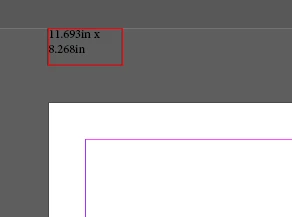
- one inch above the page,
- aligned with the left edge of the page,
- bottom of the TF will be half inch above the top edge of the page,
- right edge of the TF will be one inch from the left edge of the page.
So in the end - half inch high and one inch wide.
Forgot to mention - thanks to the ObjectStyle - you can set your own properties, including ParaStyle to format text.




 AdChoices