


Inspiring
July 17, 2020
Answered

Script to set combobox default choice in InDesign CC 2018

  • July 17, 2020
  • 3 replies
  • 1616 views
Hello,
I'm using a script to add combo boxes in InDesign CC 2018, but have no idea how to set the first item on the list as the default choice.  I can set the default choice manually in the Buttons and Forms panel by clicking the first item on the list, but would like the script to handle this selection automatically.
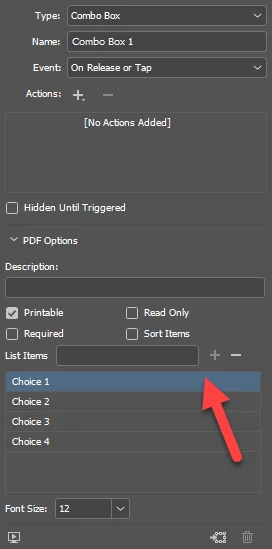
Looking at the InDesign Object Reference, the combobox class includes a comprehensive list of properties, however, setting a default choice doesn't seem to be one of them. 
Is this selection possible through scripting?
Thanks
This topic has been closed for replies.
Correct answer Nelway

Thanks to @brianp311 for his feedback.  I think we arrived to the conclusion that setting the default choice for comboboxes through scripting is not currently possible in InDesign.  I will have to continue doing this task manually.

3 replies

Ashutosh_Mishra
Inspiring
July 25, 2020

Hi there,


Thanks for reaching out. I hope your issue is resolved now. We'd appreciate if you can mark the appropriate answer correct.

If you used any other method, please share it here. It'll help other users having similar concern.

If you still have issues, let us know. We'll be happy to help.


Regards,

Ashutosh

NelwayAuthorCorrect answer
Inspiring
July 25, 2020

Thanks to @brianp311 for his feedback.  I think we arrived to the conclusion that setting the default choice for comboboxes through scripting is not currently possible in InDesign.  I will have to continue doing this task manually.

Brainiac
July 18, 2020

Hello Nelway


Can you post your script for us to look at?

Regards

Mike

NelwayAuthor
Inspiring
July 18, 2020

Hello Mike,

The script I'm using is as follows:

var cBox = app.selection[0].comboboxes.add();
cBox.geometricBounds = [0, 0, 0.25, 2];
cBox.choiceList = ['Choice 1', 'Choice 2', 'Choice 3', 'Choice 4'];

I'm unable to find a property (for instance, "defaultChoice") that could be used for selecting the first choice as default.  For example:

cBox.defaultChoice = cBox.choiceList[0];

Thanks

brian_p_dts
Community Expert
July 18, 2020

I haven't worked with comboBoxes, but have you tried looking at comboBox.choiceList, as in setting the choice to comboBox.choiceList[0]; or something similar?

NelwayAuthor
Inspiring
July 18, 2020

Hello Brian,

I wish the combobox class would include a property that would accept the choiceList index you mentioned.  Something like "defaultChoice" below:


comboBox.defaultChoice = comboBox.choiceList[0];


So far I haven't been able to find such a property.

Thanks

brian_p_dts
Community Expert
July 20, 2020

Hmmm... once the choiceList array for the combobox is created,

cBox.choiceList = ['Choice 1', 'Choice 2', 'Choice 3', 'Choice 4'];

I'm not able to modify the array elements, either by using unshift(), or any other methods like push(), pop(), etc.  The only way I can do this is by declaring a new array and adding new elements.

The other thing I've noticed is that the combobox in the published interactive PDF does not default to any of the choices (it's completely blank).

The only way I've found to set the default choice is to manually click an option in the Buttons and Forms panel.

Could it be possible that we're discussing two different versions of InDesign here?  Like I said earlier, I'm using InDesign CC 2018.


I don't think it's a versioning issue. You're right on not being able to manipulate the array as I thought. I was able to set the default only after selecting the item in the list. What option are you clicking in the panel to set it? Or are you just clicking on the item? 

After poking around some more, I think you're probably out of luck, or would need to script something in Acrobat. Sorry if I got your hopes up.