


Known Participant
February 11, 2021
Answered

script to write to PDF metadata upon export

  • February 11, 2021
  • 2 replies
  • 4216 views

I want to adjust this script so it saves the INDD filename to the PDF 'Subject' (or keywords, copyright... anything really), not title. What needs to change? The reason is that our filenames are often edited prior to being hosted online, losing our file references, and the Title is edited so it displays as required when selected online. I want to retain our original filename (from the export) so we can trace it at a later date. Ideally, this would be for INDD and AI.


The script was posted by JamesHaney here: https://community.adobe.com/t5/indesign/indesign-filename-into-the-meta-data-automatically/td-p/7020770

–––––––––––––––––––––––––––––––––––––––––


#targetengine 'session'


var myEventListener = app.addEventListener("beforeSave", function (myEvent) {

var doc = app.documents[0];

var docTitle = (doc.name);

var myDocXMP = app.activeDocument.metadataPreferences;

var destNamespace = "http://ns.adobe.com/xap/1.0/";

var destNodeName = "InDesignFileName";

var nodeValue = docTitle;

myDocXMP.setProperty(destNamespace, destNodeName, nodeValue);

}

).name = "storeTitleXMP";
This topic has been closed for replies.
Correct answer rob day

The text editor has to save the code as plain text.  Also, make sure you quit InDesign before putting the script in your startup folder, maybe even restart your computer. 


Plain text editors can be tricky—here are compiled scripts. 


https://shared-assets.adobe.com/link/27806554-f525-44e5-7a20-fcd41d09ff81


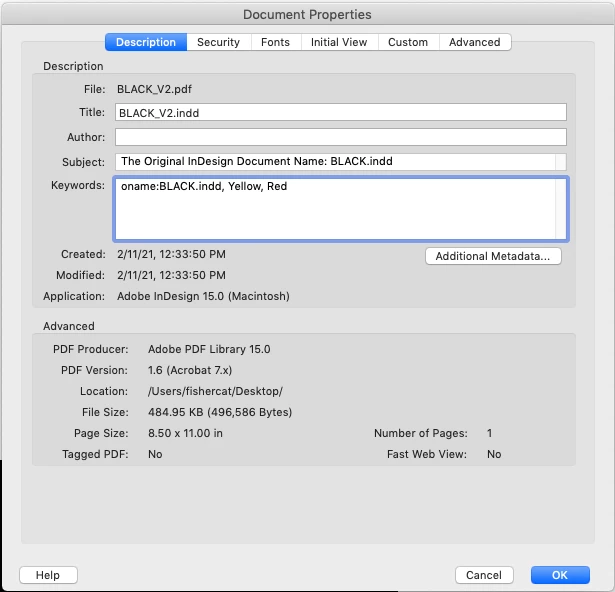
I also added an alternate that uses the Keyword array. The original name is the first keyword with a "oname:" prefix:


2 replies

rob day
Adobe Expert
February 11, 2021

the INDD filename to the PDF 'Subject' (or keywords, copyright... anything really), not title


The script is executing before every save event, I wonder if you want it to be before an export? The metadata in InDesign’s description field shows in the PDF’s Subject field. This checks if the Description field is empty, and if it is inserts some text with the document’s name:


//startup script
#targetengine "session"

var el = app.eventListeners.add("beforeExport", onExport );

/**
* Function to run before an Export
*  the event 
*/
function onExport(evt){
    var md = app.activeDocument.metadataPreferences.description
    if (md == "") {
        md = "Original InDesign Document Name: " + evt.parent.name
    } 
}


Known Participant
February 11, 2021

Hey Rob,


That looks like it'd be perfect but when I paste that into a text file and save with a jsx extension, then put it in my startup scripts folder, it doesn't see to write anything to the subject field as it has in your screenshot. The steps I take are:

Open indesign

New file

Save as 'blue.indd'

Export PDF as blue.pdf

tap on that PDF and rename 'red'


The properties of that pdf now show the new file, old title (which we'll have to rename) and nothing else. Any ideas what I'm doing wrong?

rob day
rob dayCorrect answer
Adobe Expert
February 11, 2021

The text editor has to save the code as plain text.  Also, make sure you quit InDesign before putting the script in your startup folder, maybe even restart your computer. 


Plain text editors can be tricky—here are compiled scripts. 


https://shared-assets.adobe.com/link/27806554-f525-44e5-7a20-fcd41d09ff81


I also added an alternate that uses the Keyword array. The original name is the first keyword with a "oname:" prefix:


BarlaeDC
Adobe Expert
February 11, 2021

Hi,


The easiest method would just be to change destNodeName to whatever value you would like.


for example - "ANewNodeName"

or add it as a new node

var myEventListener = app.addEventListener("beforeSave", function (myEvent) {

var doc = app.documents[0];

var docTitle = (doc.name);

var myDocXMP = app.activeDocument.metadataPreferences;

var destNamespace = "http://ns.adobe.com/xap/1.0/";

var destNodeName = "InDesignFileName";
var destNodeName2 = "OriginalInDesignFileName";

var nodeValue = docTitle;

myDocXMP.setProperty(destNamespace, destNodeName, nodeValue);
myDocXMP.setProperty(destNamespace, destNodeName2, nodeValue);
}

).name = "storeTitleXMP";


Malcolm

Known Participant
February 11, 2021

Hey Malcom, thanks for the reply!


I've pasted the below into the script, made a new document called 'ONE', exported a PDF (called ONE), then renamed the PDF via finder to 'TWO' and edited the title in the properties to 'THREE'. I'm then looking for the name 'ONE' somewhere else in the metadata and can't see it.


Really just playing by ear as I don't script generally, so apologies for the nonsensical message 😄


BarlaeDC
Adobe Expert
February 11, 2021

Hi,


Can you upload the document?


Malcolm