


New Participant
November 16, 2023
Question

scripting for CSV to Indd template

  • November 16, 2023
  • 1 reply
  • 379 views

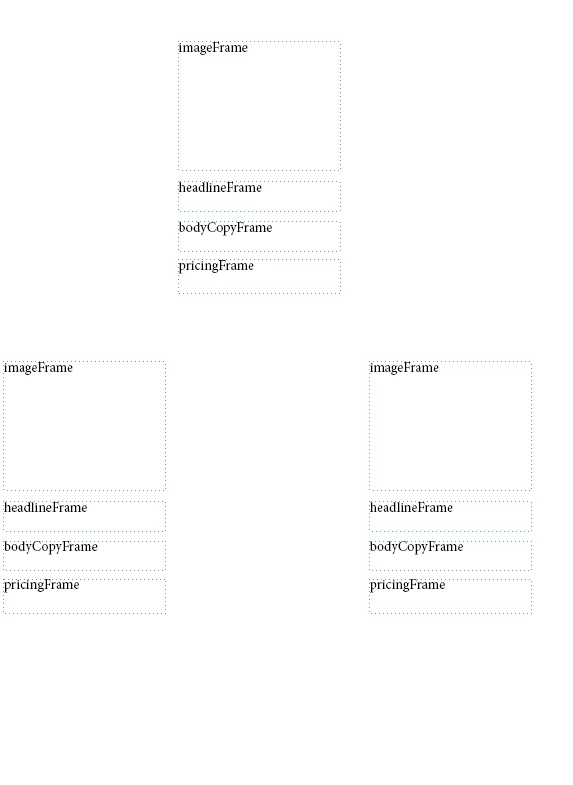
Hi all, I'm having a CSV file which has 4 rows for the respective template in the attached file. But when i try to run the script it is not placing row1 in one frames and row2 in other. Could any suggest whats the best way to do this.. Thank you
 

This topic has been closed for replies.

1 reply

m1b
Adobe Expert
November 16, 2023

Hi @Pradeep Reddy33668770rus6, please post the script and a demo .indd file so we can see what's going wrong.

- Mark

New Participant
November 16, 2023

Below is the code, CSV and indd template. Thank you


var myDocument = app.open(File("C:\\Users\\Prade\\Desktop\\DataMerge\\POC3.indd"));

// Define the data source (CSV file) and open it
var csvFile = File("C:\\Users\\Prade\\Desktop\\DataMerge\\Book2.csv");
if (!csvFile.exists) {
    alert("File does not exist: " + csvFilePath);
    exit();
}

// Open the CSV file
try {
    csvFile.open("r");
    var csvData = csvFile.read();
    csvFile.close();
} catch (e) {
    alert("Error reading the file: " + e.message);
    exit();
}
//csvFile.open("r");
//var csvData = csvFile.read();
//csvFile.close();

// Split the CSV data into an array of rows
var csvRows = csvData.split("\n");

// Loop through the rows and populate the template
for (var i = 1; i < csvRows.length - 1; i++) {
    var rowData = csvRows[i].split(",");
   
    // Extract data from the CSV rows (adjust the indices accordingly)
    var image = rowData[0];
    var Headline = rowData[1];
    var Body = rowData[2];
    var Price = rowData[3];

    // Place the data into the InDesign template (adjust the coordinates and text frames)
    var imageFrame = myDocument.pages[0].rectangles[0];
    var headlineFrame = myDocument.pages[0].textFrames[0];
    var bodyCopyFrame = myDocument.pages[0].textFrames[1];
    var pricingFrame = myDocument.pages[0].textFrames[2];

    imageFrame.place(File(image));
    imageFrame.fit(FitOptions.PROPORTIONALLY);
    imageFrame.fit(FitOptions.CENTER_CONTENT);
    headlineFrame.contents = Headline;
    bodyCopyFrame.contents = Body;
    pricingFrame.contents = Price;

   
    if (i < csvRows.length - 1) {
        myDocument.pages.add();
    }
}

// Export the document to PDF-X1A format
var exportFile = File("C:\\Users\\Prade\\Desktop\\DataMerge\\POC.pdf");
var presetName = "[PDF/X-1a:2001]";
var exportPreset;
if (app.pdfExportPresets.itemByName(presetName).isValid) {
    exportPreset = app.pdfExportPresets.itemByName(presetName);
} else {
   
    alert("Preset not found!");
   
    exportPreset = app.pdfExportPresets.item(0);
}
//var exportPreset = app.pdfExportPresets.itemByName("PDF/X-1a");

myDocument.exportFile(ExportFormat.PDF_TYPE, exportFile, false, exportPreset);

// Close the InDesign document
myDocument.close(SaveOptions.NO);

alert("PDF generation complete!");
New Participant
November 16, 2023

I'm unable to think of a way where i could fill CSV rows into particular template. Please advice if you know ay. Thank you