
Participant
April 26, 2022
Answered

Show Import Options on Place Command Not working?

  • April 26, 2022
  • 1 reply
  • 907 views

Hi adobe brain trust, 

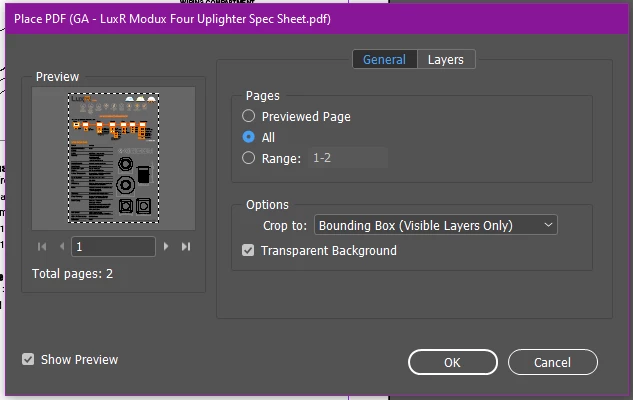
For years I've been using the "show import options" check box on the 'Place' command to insert all pages of a PDF, or just a few select pages into empty frames. When I select either "All" or "Range" the dialog accepts that option - and in the past I've been able to place all the pages in rapid succession, in frames that have already been set up.


Recently I am only able to place the first page in that range and then the command aborts. 

The command DOES still work, if I click anyone outside a frame. 


I'm wondering if anyone else has this issue, or it's just me? Either way, does anyone have insight?  


Thanks! 


Correct answer Steve Werner

You didn't mention what version of InDesign you're using but I'd bet it's InDesign 17.2.


That version has a bug which produces that result you're seeing. It will be fixed this week when version 17.2.1 arrives. If you need that feature before it arrives, you need to back down to 17.1 (which can be installed from the Creative Cloud desktop app):


https://helpx.adobe.com/indesign/kb/fixed-issues.html


1 reply

Steve Werner
Community Expert
Steve WernerCommunity ExpertCorrect answer
Community Expert
April 26, 2022

You didn't mention what version of InDesign you're using but I'd bet it's InDesign 17.2.


That version has a bug which produces that result you're seeing. It will be fixed this week when version 17.2.1 arrives. If you need that feature before it arrives, you need to back down to 17.1 (which can be installed from the Creative Cloud desktop app):


https://helpx.adobe.com/indesign/kb/fixed-issues.html


Participating Frequently
July 16, 2025

This issue is showing up again - 20.4.1 -  Coincidentally I came across this thread because another thread related is also happening. Where library items have lost transparency settings and suggest it is a last use show imports issue - of course-  there are no import settings available so I can't fix either 🙂. I lied - import options are present for file types other than the object I am importing. 

Anubhav M
Community Manager
Community Manager
July 16, 2025

Hello @Nick294723919ryr,

I am sorry to hear about your experience. Could you share more details, like the version of the OS installed on your computer and if this happens with specific files or file formats along with a small screen recording of the problem (if possible), so I can check this with the team?

Looking forward to hearing from you.

Anubhav