


Participant
July 8, 2025
Answered

Simple example of modal dialog for UXP

  • July 8, 2025
  • 3 replies
  • 849 views

Hello everyone,

I am currently trying to evaluate converting an internally used ExtendScript plugin to UXP. The plugin uses ScriptUI to display a modal configuration dialog, which is not supported any more in UXP (I think?).

I tried to use UXP to create a modal dialog, but I could not find a complete example on how to do so.

Here is what I have got so far:
index.htm:

<!DOCTYPE html>
<html>
<head>
  <script src="main.js"></script>
</head>
<style>
  dialog {
    background-color: var(--uxp-host-background-color);
    color: var(--uxp-host-text-color);
    border-color: var(--uxp-host-border-color);
    font-size: var(--uxp-host-font-size);
  }

  #sampleDialog>div {
    display: flex;
    flex-direction: column;
    height: 300px;
    width: 400px;
    align-items: center;
  }

  #sampleDialog>div>p {
    margin-top: 30px;
  }
</style>

<body>
  <dialog id="sampleDialog">
    <div>
      <h1>Well hello!</h1>
      <sp-banner>
        <div slot="header">Header text</div>
        <div slot="content">Content of the banner</div>
      </sp-banner>
      <sp-button variant="primary">I'm a button</sp-button>
    </div>
  </dialog>
</body>
</html>

 js to display the dialog:

let result = await document.getElementById("sampleDialog").show();

This does display a dialog with a fixed width, and gray text on gray background that is not readable. Furthermore, there is no visible button:
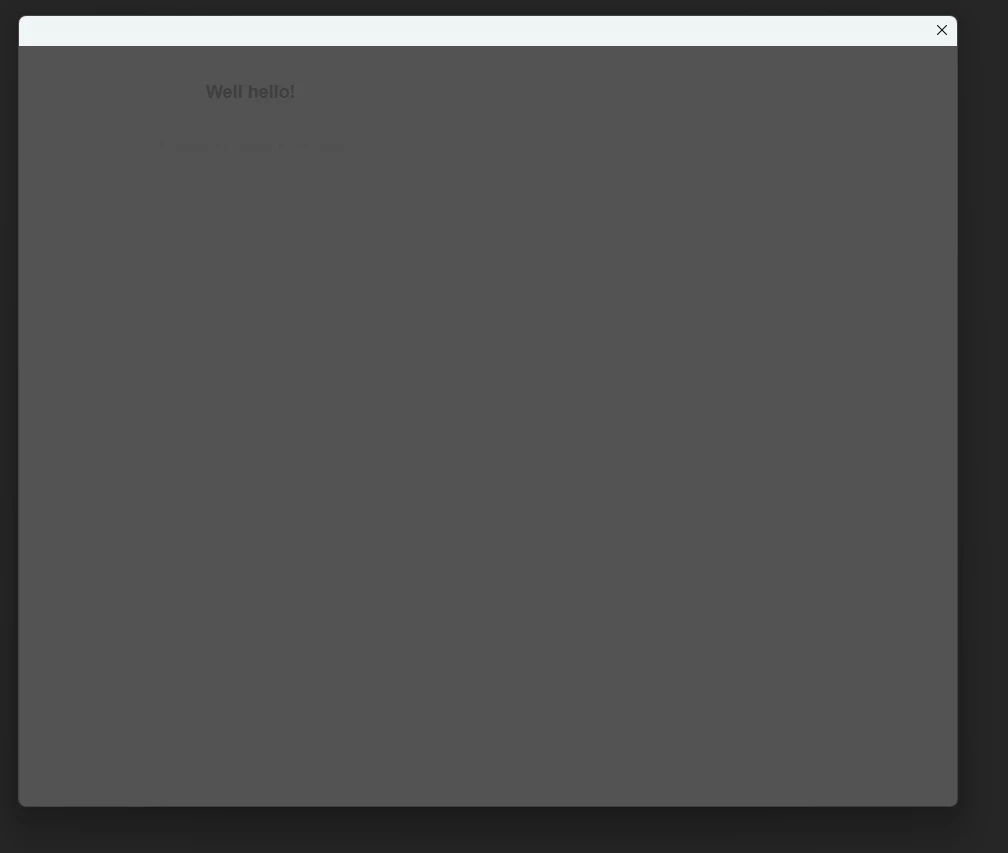
Is there anything I am missing? Do I need to include a special stylesheet?

Thanks in advance!

Best regards,
Christoph

Correct answer Peter Kahrel

For UXP scripting, especially dialogs, you're (still) better off here:

https://forums.creativeclouddeveloper.com/c/indesign


3 replies

Legend
July 8, 2025

The stylesheet for spectrum should be included and working by default.


First thing I'm missing is a class=wrapper, that is frequently used in examples to specify dimensions via css.

Don't limit your search to InDesign, for more examples include Photoshopand and XD.

That should yield a dlg.showModal()


Also watch out for other examples that pass an object to show(). Useful properties include title: "Yadda", resize: "both", size : {width: … height: … }, minSize, maxSize.


Don't forget to test with various UI scalings …

Legend
July 8, 2025

Looking back at your sample, the #sampleDialog>div gets close to the #wrapper, but it also attempts to set up a flex element. Separate that flex into a nested element. E.g. the flex could be asking its parent for dimensions, and taking generous defaults as there are none. Pure speculation, most of my css knowledge dates back to another century.


Don't skip over the hint on UI scalings. I found the hard way that specified sizes inside can vastly differ from the outside ({size:…}) and anything in between might not factor that in accordingly.

Peter KahrelCommunity ExpertCorrect answer
Community Expert
July 8, 2025

For UXP scripting, especially dialogs, you're (still) better off here:

https://forums.creativeclouddeveloper.com/c/indesign


CeeKay234Author
Participant
July 8, 2025
kakachiex
Participant
October 14, 2025

Here is a full UXP Template Script with UI elements using spectrum web components hope is helpful for everyone.

https://community.adobe.com/t5/photoshop-ecosystem-discussions/all-my-script-snip-and-tools-experiment-while-lerning/td-p/15491598 


m1b
Community Expert
Community Expert
July 8, 2025

I'm not experienced with UXP, but my guess is that unless you have loaded the spectrum components via react or similar, then the <sp-> elements will probably be ignored, being non-standard. Your screenshot seems to show this has happened. Change the <sp-button> to <button> and see if it at least works as a normal button.

- Mark

CeeKay234Author
Participant
July 8, 2025

Thank you for your response. If I understood the reference  correctly, UXP should provide builtin spectrum UXP components, and the web components are currently in beta.

The issue with the wrong text colors does however also occur in the <h1> heading, so it is not (just) a problem with the spectrum components.

m1b
Community Expert
Community Expert
July 8, 2025

Ah, okay you're right, it definitely says they are built-in. Hopefully someone knowledgable will chime in shortly with an answer for you.