



Inspiring
March 21, 2025
Answered
Simple UI Fix to Speed Up Workflow -- One Click Should Select the Whole Field
- March 21, 2025
- 1 reply
- 812 views
One small tweak that would significantly improve efficiency:
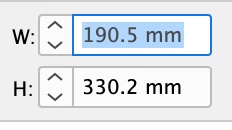
When clicking into an input field in the toolbar, the entire value should be automatically selected.
Right now, clicking into a field just places the cursor at the end of the number. This means we have to either:
- Manually delete the existing value before typing a new one.
- Double-click to select the whole field, then type the new value.
Instead, the default behavior should be that a single click highlights the entire field, so we can immediately type in a new value and press Enter.
This would eliminate unnecessary clicks and make input adjustments much faster.
It should also be an easy fix in the code!
 AdChoices