

SPK JAARS
New Participant
October 6, 2017
Answered

Slash Zero

  • October 6, 2017
  • 5 replies
  • 28907 views

Whats the command to type a slash zero (number)?

    Correct answer Barb Binder

    I do want to point out the request is for a slashed zero and not a slashed letter O. Opt Sh O is the letter.
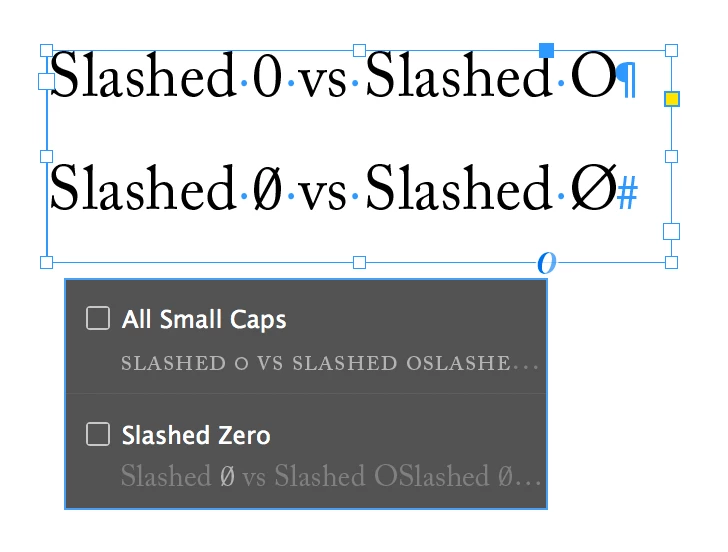
    If you prep your files in Word:

    • Click the cursor where you want the slashed zero to appear.
    • Press Ctrl+F9. You'll see brackets appear.
    • Type the following (or copy and paste it from this post): eq o (0,/)
    • Press Shift+F9. The code should resolve itself into a slashed zero.

    In InDesign, follow Aman's advice and use the OpenType slashed font feature. You can select a zero and click the  blue line underneath or click the little O under the frame. Not all fonts support slashed zeros. I'm using Adobe Caslon above.

    5 replies

    Barb Binder
    Barb BinderCorrect answer
    Community Expert
    October 6, 2017

    I do want to point out the request is for a slashed zero and not a slashed letter O. Opt Sh O is the letter.

    If you prep your files in Word:

    • Click the cursor where you want the slashed zero to appear.
    • Press Ctrl+F9. You'll see brackets appear.
    • Type the following (or copy and paste it from this post): eq o (0,/)
    • Press Shift+F9. The code should resolve itself into a slashed zero.

    In InDesign, follow Aman's advice and use the OpenType slashed font feature. You can select a zero and click the  blue line underneath or click the little O under the frame. Not all fonts support slashed zeros. I'm using Adobe Caslon above.

    ~Barb at Rocky Mountain Training
    Dan Rodney
    Community Expert
    October 6, 2017

    Man what a brain fart of me (number vs letter). Sorry . Barb is right!

    — Adobe Certified Expert & Instructor at Noble Desktop | Web Developer, Designer, InDesign Scriptor
    Participating Frequently
    August 2, 2023

    Microsoft has quietly — silently — removed many features and capabilities from MS Office apps, especially Word, in the last few releases. Many shortcuts and alternate methods no longer work; there are entire categories of macro/VBA features that simply no longer exist. So it's become essential to make sure you are working with (1) advice that applies to your specific version/generation of Word, and (2) is coming from a conscientious MS 'expert' who is not simply regurgitating old knowledge to a new question. I found examples of this out there, fresh ones, in just a quick search for an answer.


    There may well be a (different) shortcut or quick-type option for slash-zero... but it's not your fault the longstanding approach gosharoonie no longer works.


    To summarize: @James Gifford—NitroPress - Great advice re. the fonts.


    Use MS Word Consolas font which has a slashed zero. This is from the MS forums. There may be other fonts that work, but that's the end of my research for now.

    Reason: this appears to be the best solution since both methods, "Alt+0216" and  "Use Insert | Symbol > Latin Capital Letter O with Stroke" yield a letter, like this: Ø . See attachment.


    @Barb Binder thank you so much for your help.


    Sue

    Derek Cross
    Community Expert
    October 6, 2017

    A glyph is an individual character. It might be a letter, an accented letter, a ligature, a punctuation mark, a dingbat, etc. A font is a digital file which is used to display a typeface, which contains the entire upper- and lowercase alphabet as well as punctuation, numbers, and other special characters.

    In InDesign: Type > Glyphs

    amaarora
    Community Manager
    Community Manager
    October 6, 2017

    Hi,

    Do you mean the OpenType property slashed zero?

    If yes, then:

    1. If you are on version CC 2017.0 or higher

    a. type the normal 0 select it and click on the "O"

    b. If the font supports this open type property it will appear on the menu and you can apply it by simply clicking on it

    2. If you are on a lower version

    a. Type the normal 0 select it and open the character panel

    b. Click on the panel menu and from open type property select slashed 0

    -Aman

    SPK JAARS
    SPK JAARSAuthor
    New Participant
    October 6, 2017

    G'day Dan,

    Is Glyphs a font, if so I will need to download.

    Dan Rodney
    Community Expert
    October 6, 2017

    InDesign's Glyphs panel shows all the characters in a font. No need to download anything!

    Just go into the Type menu and choose Glyphs to open the Glyphs panel.

    As Derek said, a glyph is a charter within a font.

    — Adobe Certified Expert & Instructor at Noble Desktop | Web Developer, Designer, InDesign Scriptor
    Dan Rodney
    Community Expert
    October 6, 2017

    If you don't know the keystroke for a character (and not all have keystrokes) you can:

    1. Put the cursor into a text frame.
    2. Go into Type > Glyphs.
    3. Double-click on the desired character.

    You type Ø by hitting Option-Shift-O (that's the letter O not a zero) on the Mac. On Windows I believe you hold Alt, type 157 and release Alt (but haven't tested it).

    You type ø by hitting Option-O (that's the letter O not a zero) on the Mac. On Windows I believe you hold Alt, type 155 and release Alt (but haven't tested it).

    — Adobe Certified Expert & Instructor at Noble Desktop | Web Developer, Designer, InDesign Scriptor
    New Participant
    October 18, 2024

    If you don't know the shortcut for a character  (and not all characters have shortcuts), you can:

    Place the cursor in a text frame.
    Go to Type > Glyphs.
    Double-click the desired character.
    You type Ø by pressing Option-Shift-O (the letter O, not a zero) on a Mac. On Windows, I believe you hold Alt, type 157, and release Alt (but I haven't tested this).

    You type ø by pressing Option-O (the letter O, not a zero) on a Mac. On Windows, I believe you hold Alt, type 155, then release Alt (but I haven't tested this).

    New Participant
    October 19, 2024

    If you don't know the shortcut for a character  (and not all characters have shortcuts), you can:

    Place the cursor in a text frame.
    Go to Type > Glyphs.
    Double-click the desired character.
    You type Ø by pressing Option-Shift-O (the letter O, not a zero) on a Mac. On Windows, I believe you hold Alt, type 157, and release Alt (but I haven't tested this).

    You type ø by pressing Option-O (the letter O, not a zero) on a Mac. On Windows, I believe you hold Alt, type 155, then release Alt (but I haven't tested this)