


Inspiring
March 15, 2024
Answered

Small caps in Text variable

  • March 15, 2024
  • 3 replies
  • 2040 views


Hi everyone !

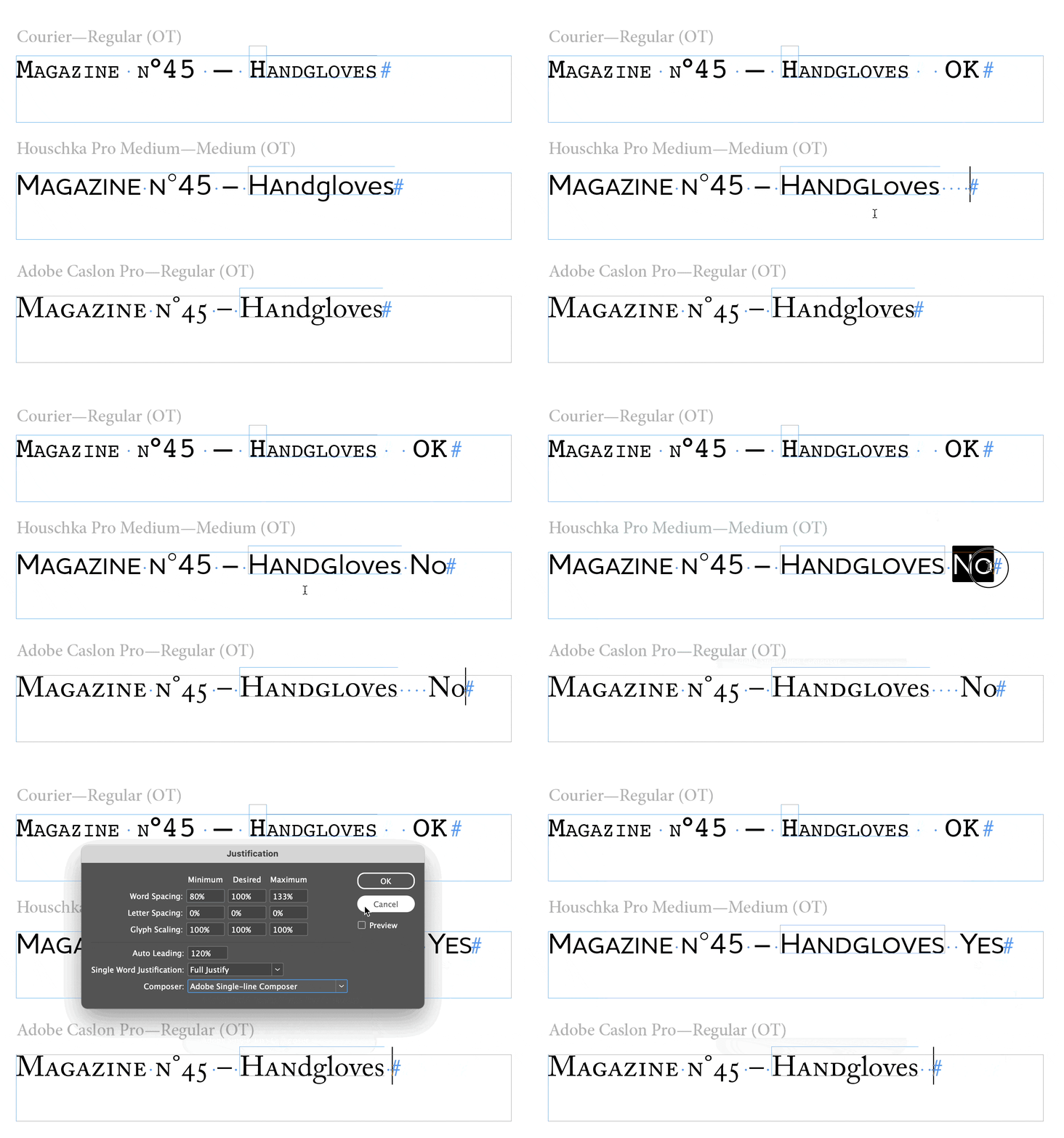
I have a text variable to which I have applied a character style. With this style my text should be in small caps, but when I use it on the text variable the small caps don't work. Only the first 2 letters are in small capitals, the rest is in lower case. Do you see the same problems? Could anyone help me? Maybe I miss something. Thanks !
 

This topic has been closed for replies.
Correct answer m1b

Hi @oups_, okay sorry, it took me a while to look into this properly. I have determined that this is a real bug and I've lodged a bug report—please vote here.


The easiest workaround is to change the composer to a non-world-ready composer. That makes the problem go away. See my video below.

- Mark


3 replies

m1b
m1bCorrect answer
Braniac
March 21, 2024

Hi @oups_, okay sorry, it took me a while to look into this properly. I have determined that this is a real bug and I've lodged a bug report—please vote here.


The easiest workaround is to change the composer to a non-world-ready composer. That makes the problem go away. See my video below.

- Mark


oups_Author
Inspiring
March 21, 2024

Hi @m1b ,

Indeed, everything works normally when I change the composer.

Thank you so much !

I voted for the reported bug.

Braniac
March 16, 2024

Same results for me - works ok 

Some fonts  don't have the glyphs for the small caps


Most do 

Try reinstall the font - or reactivate in Adobe Fonts.

oups_Author
Inspiring
March 18, 2024

Thank you for your answers.
I deleted then re-installed the font,
I recreated a paragraph and character style to make sure there are no interferences:
It still does not work 😞
Here is my demo .indd file, and a photo of what is displayed on my screen (in case you don't have the same result with my file on your computer)
On the first line: we see that without using the text variable, small caps work normally with this font.
And on the 2nd line, with text variable: it no longer works.

Braniac
March 20, 2024

Thanks, I've never used cross references before.
It works but seems more complex to set up than the text variable, too bad that one doesn't work as I would like.
I understand your theory on the text variable considered as a single character, but what is curious is that with others fonts like Arial, the small caps work normally on the entire text variable.


Could be a limitation of the font itself - I don't have a direct answer for you - but if it works on some and not others then I can only assume it's a limitation of how Small Caps are being accessed in the font itself.


Cross References are a bit difficult at first, but it does work for you - and once setup it's easy enough to replicate throughout. 

m1b
Braniac
March 15, 2024

Hi @oups_, that is quite strange. Can you share your demo .indd document?


When I try the same it seems to work fine.

- Mark

oups_Author
Inspiring
March 15, 2024

After reading your answer, I tried with a different font, and small capitals operate normally !

The problem therefore seems to come from the font used : Houschka Pro 


What's strange is that small capitals work perfectly with this font on "standard" text.

The problem only appears in text variables. 🤨


Is there a solution to conturn the problem ? (I can't change the font)

m1b
Braniac
March 16, 2024

Hi @oups_, I tried with Houschka Pro and it worked fine for me. Could you please check that you don't have a nested style or grep style in your Paragraph Style? Maybe try setting it in another Paragraph Style and just changing the font and see if that works. Otherwise, it's very strange situation. Let me know if you can notice anything.

- Mark