



deborrah120
Known Participant
January 29, 2020
Answered

Smart Text Reflow Correct Settings in Dialog Box for Primary Text Frames

  • January 29, 2020
  • 1 reply
  • 1848 views

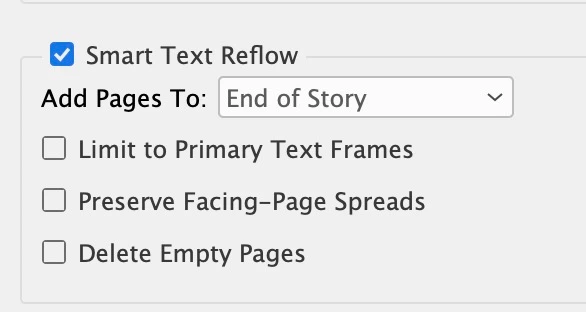
I'm working on a design for a 256pg book. I'm using A-Master and setting up Primary Text Frames. I want my text to flow through the book in those text frames, as I add and resize 200 photos. I'll also be applying Master Pages for the Chapter Openings, 17 in all. I'm not sure what settings to use for the Smart Text Reflow Dialog Box. Any suggestions? Thank you so much for any help!


This topic has been closed for replies.
Correct answer Steve Werner

Hi and thank for that recommendation! Unless I'm reading it wrong, there is no option for breaking a thread and everything stays put. For example, I want to unthread between Chapter 1 and the rest of the chapters. I want everything to stay in place. Then I want to unthread between Chapter 2 and the rest of the chapters and so on until Chapter 17. 


I don't want to remove any text, I just want each chapter to be its own story. Right now the copy is one long thread of 142 pages, 17 chapters, with no images yet placed.


thanks for your help.


There may be a script for doing what you want. Read this InDesignSecrets.com article and read about the StorySplitter script.


https://indesignsecrets.com/how-to-split-long-story-into-smaller-pieces-unthreading-middle-story.php


1 reply

Steve Werner
Community Expert
January 29, 2020

See this Help file (in the Smart Text Reflow section) for a description of each of those choices. 


https://helpx.adobe.com/indesign/using/threading-text.html#use_smart_text_reflow


The Add Pages to menu gives three choices—end of story, end of section and end of document so it depends on where you want the adding or deleting of pages to occur (we can't see you layout so need to figure this out).


I would usually want to turn on the Delete Empty Pages option, if you want unused pages to go away when you remove your photos in the layout process.


deborrah120
Known Participant
January 29, 2020

How does Adobe define End of Story? Would it be the end of a Chapter?

Should I consider the Preserve Facing Page Spreads checkbox?

If I only use Primary Frames should I check that box?

Thanks, Steve!

Steve Werner
Steve WernerCorrect answer
Community Expert
January 30, 2020

Hi and thank for that recommendation! Unless I'm reading it wrong, there is no option for breaking a thread and everything stays put. For example, I want to unthread between Chapter 1 and the rest of the chapters. I want everything to stay in place. Then I want to unthread between Chapter 2 and the rest of the chapters and so on until Chapter 17. 


I don't want to remove any text, I just want each chapter to be its own story. Right now the copy is one long thread of 142 pages, 17 chapters, with no images yet placed.


thanks for your help.


There may be a script for doing what you want. Read this InDesignSecrets.com article and read about the StorySplitter script.


https://indesignsecrets.com/how-to-split-long-story-into-smaller-pieces-unthreading-middle-story.php