wmrowen
Known Participant
September 11, 2020
Answered

Spell check asks to capitalize after abbreviations like "etc."

  • September 11, 2020
  • 2 replies
  • 827 views

I have a document with lots of abbreviations that end in a period. I realize that it could find some cases that might (rarely) be in legitmate need of capitalization but most are just the abbreviations. Is there a way to "add" words like "etc." to stop it or at least pause its hypervigilance until I have been through the more substantial typos? Thanks!

This topic has been closed for replies.
Correct answer Randy Hagan

You can add etc. to your dictionary, but I don't think it's going to help you much ...
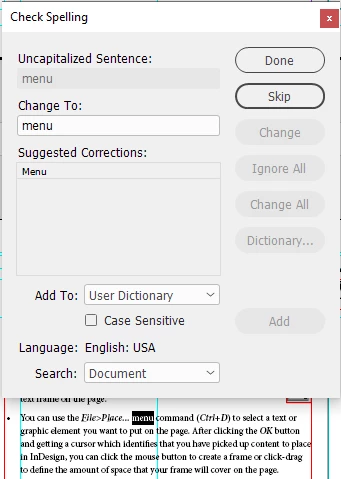
 

It's relatively easy to add words to your User Dictionary. Just go to to your Edit>Spelling>User Dictionary menu command to open/create a user dictionary for your language, then add the word. Double- and triple-check, though, that the word you enter is absolutely spelled correctly. Or you'll be misspelling it the same way forevermore.


But the problem is that it isn't alerting to the word etc. It's alerting to the period character itself. Like in the example shown at left, the word menu is causing an alert, even though the word Place is in fact part of the English: USA H&J dictionary as shown below the dialog box, because the last period in the ellipse is what's causing the false alert on the spell-checker.


It sucks, but unfortunately that's just the way it is. I just mutter and cuss a little under my breath and deal with it.


Sorry I don't have a better answer for you, but it's the true one.


Randy

2 replies

Randy HaganCommunity ExpertCorrect answer
Community Expert
September 11, 2020

You can add etc. to your dictionary, but I don't think it's going to help you much ...


It's relatively easy to add words to your User Dictionary. Just go to to your Edit>Spelling>User Dictionary menu command to open/create a user dictionary for your language, then add the word. Double- and triple-check, though, that the word you enter is absolutely spelled correctly. Or you'll be misspelling it the same way forevermore.


But the problem is that it isn't alerting to the word etc. It's alerting to the period character itself. Like in the example shown at left, the word menu is causing an alert, even though the word Place is in fact part of the English: USA H&J dictionary as shown below the dialog box, because the last period in the ellipse is what's causing the false alert on the spell-checker.


It sucks, but unfortunately that's just the way it is. I just mutter and cuss a little under my breath and deal with it.


Sorry I don't have a better answer for you, but it's the true one.


Randy

wmrowen
wmrowenAuthor
Known Participant
September 11, 2020

Thanks Randy. I was afraid of that. But worth asking about.

wmrowen
wmrowenAuthor
Known Participant
October 27, 2021

I have since discovered (from another Discussion) that one can turn off Capitalization (and Repeated words) in Preferences > Spelling once you are satisfied that the instances of those are acceptable as is.

wmrowen
wmrowenAuthor
Known Participant
September 11, 2020

This also seems to happen to manually hyphenated words.

Community Expert
September 11, 2020

With the manually hyphenated words, you can sidestep the issue by using discretionary hyphens — Type>Insert Special Character>Hyphens and Dashes>Discretionary Hyphen. If you do this a lot, you'll likely quickly learn the keyboard shortcut Cmd/Ctrl+Shift+-, depending on whether you're using a Mac or a Windows system, respectively. This places a hyphen to break a line only if it's needed, and isn't read in your spell-checker as an artificial line break.


If you ever read a newspaper or magazine and wondered how the heck did that hyphen end up in the middle of a line, it's because the writer/editor/designer didn't know that little trick above.


Randy

wmrowen
wmrowenAuthor
Known Participant
September 11, 2020

Thanks!!!