


New Participant
August 23, 2017
Question

Split Text frame in 2. Header on the Left, Paragraph on Right. (image inc)

  • August 23, 2017
  • 4 replies
  • 2948 views

Hey All

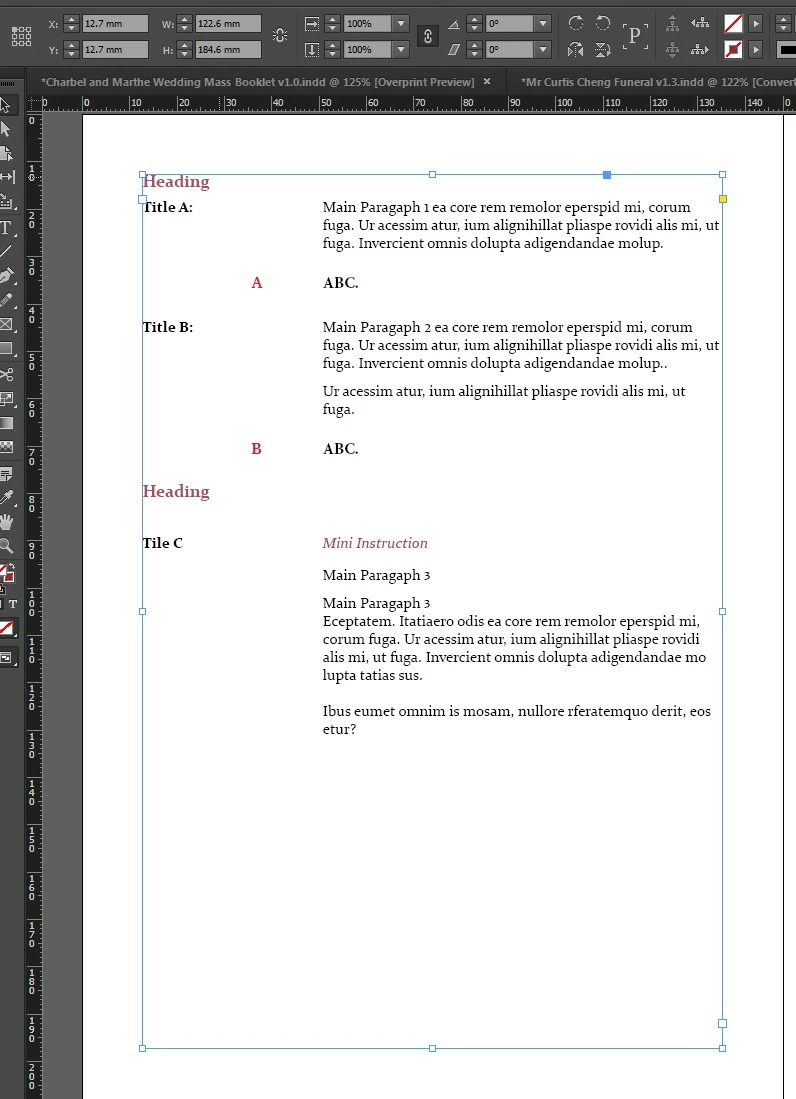
Trying to set up my text box where I can have my main Headers on the left of the text frame

and my paragraph/text for that header to be on the right side of it.

I must be continous and not split into columns.

Ive included a pic to try illustrate what i need.

As you can see i have Title A and the Main Text on the right side of it with a bit of space between.

It should all flow continuously.
4 replies

Barb Binder
Community Expert
August 24, 2017

I'm just going to point out that this layout option has always been available via a feature called "Sideheads" in FrameMaker, Adobe's other page layout program. Isn't it time to add it to InDesign? Consider logging in a feature request here. Adobe InDesign Feedback

~Barb at Rocky Mountain Training
tazkerah
Known Participant
August 24, 2017

i'll quote "zero is my hero"

1. put the headings in their on paragraph and sit the leading to zero, and allign left

2. put the body text in other paragraph with generous left indent

it's unconventional , but work fine in pdf

davidblatner
Community Expert
August 23, 2017

While it seems like this should be very simple to accomplish, it isn't. One old method is to set the heading paragraph style to have a negative baseline shift — literally just pushing it down a full line to align with the text to the right. (The main paragraph text would have a large left indent, of course.)

Another option is to put the headings and paragraphs in a table (the heading in the left column, the paragraphs in the second column). Or you can put the headings in anchored frames.

davidblatner
Community Expert
August 23, 2017

Of course, if the headings can actually be built into the same paragraph as the main text, then it is much easier! In other words, you can just type "Heading[tab]paragraph text" and then add two bits of formatting to the paragraph: a nested style that applies the heading formatting "up to" the tab, and a hanging indent. (A hanging indent is a large positive left indent coupled with a negative First Line indent. For example, you could make the left indent 10p and then the First Line indent –10p.

Obi-wan Kenobi
Brainiac
August 23, 2017

Some years ago! [March 2014]

A simple para style!

(^/)

amaarora
Community Manager
Community Manager
August 23, 2017

Hi,

Did you try using a 2 column table for the same?

-Aman

Caz81Author
New Participant
August 23, 2017

Hi Amaarora

I tried it, its the same concept but seems to be a messy way of doing it.

I need to write up a fairly long booklet with the same style on all pages, so laying it out in a text frame would be the preferred and neater way.

Ive include the same pic but this time highlighting the text to try and show the flow.