


Known Participant
May 20, 2025
Question

STIX two text font activation issue because of supplemental font folder

  • May 20, 2025
  • 4 replies
  • 756 views

Hi


I am working in latest mac os 15.4.1 (24E263) and InDesign 2024 version. As per customer request we need to use STIX two text regular and italic font. I Download the fonts from Google fonts and placed in Documents font folder where my InDesign located. 
But InDesign not taking the fonts from documents fonts instead of its taking the fonts from System--Library--Fonts--Supplemental font folder. The STIX font regular font are variable font in that supplemental folder. We not to use variable font.


There is any possible way to activate my Documents font?


I also tried to activate cloud font becuase of font in supplemental folder, cloud font shows conflict for STIX regular and italic font.


Let us know you thought on this.
I have 2 option 
1. Fonts downloaded from Google fonts

2. Activate from CC fonts


But both the option is not working, it taking fonts from system folder
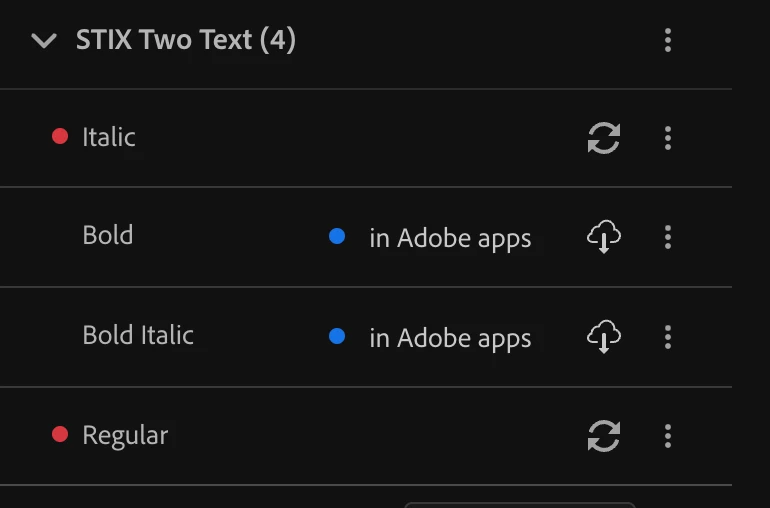
 

Thanks

Ganesh.R

4 replies

Mike Witherell
Community Expert
Community Expert
May 21, 2025

So, Ganesh, I have questions:

I now understand that Styx is a macOS system font that you cannot either delete nor deactivate.

Normally, when I install a font on macOS, I use FontBook, and the typeface ends up installed here:

/Users/<username>/Library/Fonts/

<guess>Have you tried installing the font thru FontBook to see if it changes anything? (And of course, removing the same font from anywhere else (except System / Supplemental where you cannot) ?

Is there some way you could adapt to using the variable font demanded by the macOS?


Mike Witherell
Known Participant
June 10, 2025

Hi Mike


Apologies for late response.
As you said we are installing through font book only, However it taking font from supplemental folder. The fonts under supplemental folder STIX is variable font that we suppose not to use in our project. 


Thanks

Ganesh.R

rob day
Community Expert
Community Expert
May 21, 2025

Hi @ganesh_2836 , Make sure that you are not trying to mix locally installed and cloud activated versions of the same named font—trying to use both will create a conflict. This has come up a lot lately with Google fonts conflicting with Adobe Fonts with the same name.


Either remove (deactivate) STIX from your Adobe Fonts account, or activate STIX at the Adobe Fonts site and remove all vesions from your local font folders.


Known Participant
May 21, 2025

Hi Rob 


I remove the SITX font family from Adobe cloud font, and have only local font "Document fonts", but still it taking the fonts from the Supplemental font folder.

Mike Witherell
Community Expert
Community Expert
May 21, 2025

Hi Ganesh,

Could you identify more precisely the folders you mean?

Where is System~~Fonts~~Supplemental folder?

Where exactly is the folder you call "document fonts folder"?

Mike Witherell
Known Participant
May 21, 2025

Hi Mike
I am working in MAC latest version OS
I attached the exact location of font taken from supplemental folder


I placed my font under the folder name "Document fonts" folder where i have my InDesign file. 


Thanks

Ganesh.R


Known Participant
May 21, 2025

I want InDesign to activate the fonts from my Document fonts folder, but instead of that it taking from above supplemental folder. In lower mac OS I can able to disable the SITX Two text font or remove it, but in latest OS i can't able to disable SITX two text font or remove it.

Mike Witherell
Community Expert
Community Expert
May 20, 2025

Hi Ganesh,

You cannot have the same font in 3 or 4 places. It will confuse InDesign. Decide on the one place to install the font, and delete the font from the other two or three places. Restart and test.

You don't make it clear: Did you download and install the fonts in the Application's internal fonts folder? Or into a subfolder named "Document fonts"?

Mike Witherell
Known Participant
May 20, 2025

Hi Mike
I installed the font in one place only, but my issue is it taking the fonts from System--- fonts-- Supplemental folder only, Fonts need to be taken from documents fonts folder


Ganesh.R

BobLevine
Community Expert
Community Expert
May 21, 2025

The InDesign file will only see that font if it's in a document fonts folder within the same folder as the INDD file. You may need to restart InDesign after copying the font to that folder. But why aren't you installing the font as the system level? If they came from Google Fonts they are fully licensed for that.