


Known Participant
June 20, 2019
Answered

Strange First Line Indent bug in Indesign

  • June 20, 2019
  • 8 replies
  • 3181 views

Hi Experts,

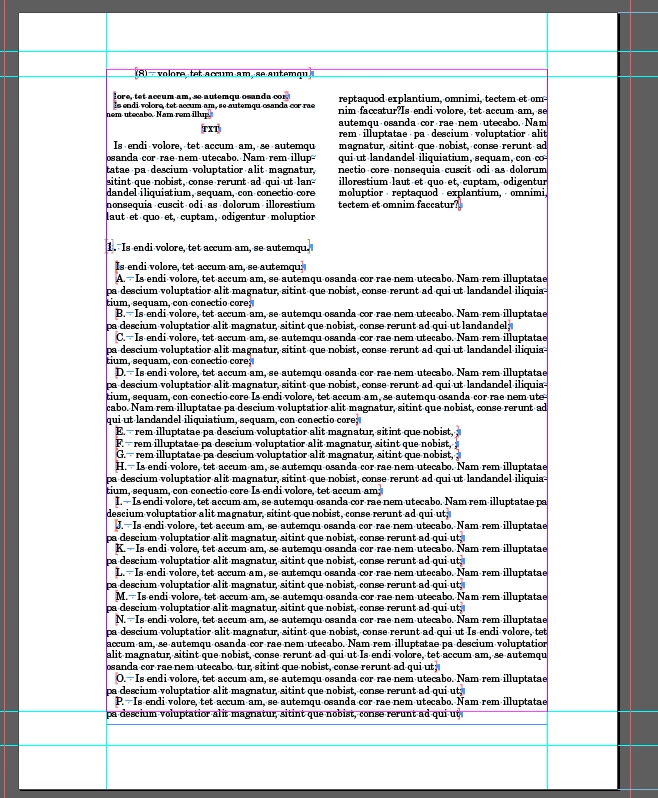
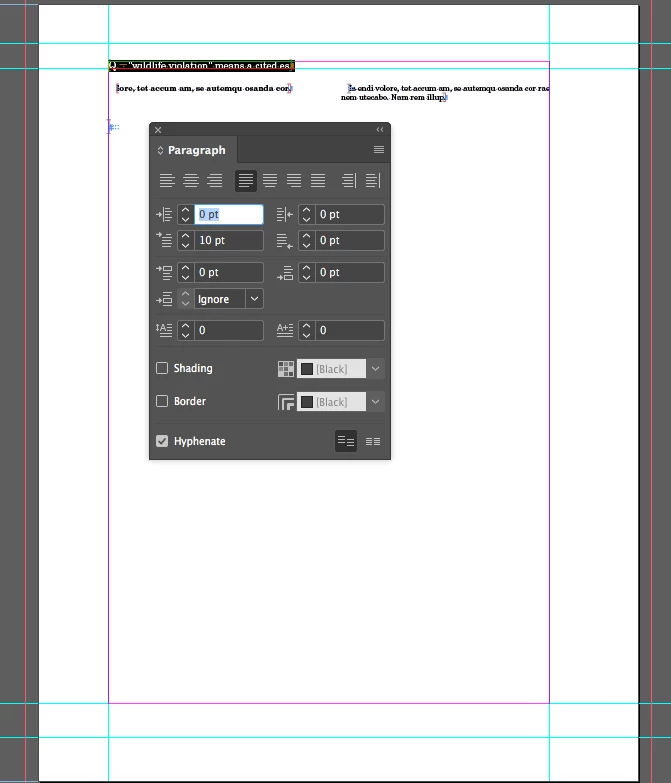
We have faced the series First Line Indent issue in the InDesign version (CC2017-2019). The first line indent is not working if we have the span column text in the InDesign file. It will get the indentation after made any changes in the paragraph. Here the example InDesign file for your checking.

1st Page: (No issues with first line Indent)
2nd Page: First line indent is not working in the first paragraph(But indent value shows 10 pts)
Please let me know any idea about this issue?

Thanks,

Velladurai

    This topic has been closed for replies.
    Correct answer Laubender

    Hi IDScript ,

    that bug should be fixed with the latest prerelease version 14.0.3.413 of InDesign CC 2019.

    Just tested that with my German version on Windows 10.

    If you want to see yourself sign in to Adobe InDesign Prerelease.

    I quote from Adobe UserVoice with Abhinav Kaushik (Quality Engineer, Adobe InDesign):

    ( Changed the build number from 14.0.3.407 to 14.0.3.413 )

    1. Go to adobeprerelease.com

    2. Log in with your Adobe Id.

    3. Once logged in, search for “InDesign CC Prerelease” program in the list.

    4. Click on the program to join the same.

    5. You can now download the build (14.0.3.413) from “Builds and Plugins” section on the page.

    6. The steps for installing the build can be found in the release notes

    Regards,
    Uwe

    8 replies

    LaubenderCorrect answer
    Community Expert
    July 25, 2019

    Hi IDScript ,

    that bug should be fixed with the latest prerelease version 14.0.3.413 of InDesign CC 2019.

    Just tested that with my German version on Windows 10.

    If you want to see yourself sign in to Adobe InDesign Prerelease.

    I quote from Adobe UserVoice with Abhinav Kaushik (Quality Engineer, Adobe InDesign):

    ( Changed the build number from 14.0.3.407 to 14.0.3.413 )

    1. Go to adobeprerelease.com

    2. Log in with your Adobe Id.

    3. Once logged in, search for “InDesign CC Prerelease” program in the list.

    4. Click on the program to join the same.

    5. You can now download the build (14.0.3.413) from “Builds and Plugins” section on the page.

    6. The steps for installing the build can be found in the release notes

    Regards,
    Uwe

    Participating Frequently
    October 25, 2023

    No need for a software update. The issue is that for whatever reason the textbox has a corner radius amount. Go to Object/Corner Options and change the rounded corner back to a square corner. The indent will disappear as it really wasn't an indent at all. It was a positional changed because of the rounded corner infringing.

    Peter Spier
    Community Expert
    October 25, 2023

    Completely different issue.

     This thread was about an applied indent not showing, not an apparent indent when none was applied.

    Inspiring
    June 21, 2019

    Adobe contacted me about my report, "Indents not holding after page break" yesterday to ask for more information and a sample file. The issue described here seems to be the same issue.

    I think that the composition engine is having some significant issues, of which this is one. Another is that when using the World-Ready Composer with left-to-right and right-to-left text in the same paragraph, the kerning in the left-to-right text is wrong. Adobe has also contacted me about that issue, and I suspect they think the that the two bugs are both the result of problems with the composition engine.

    In my email, I also mentioned to them that when two variables are in the same text box (at least for running heads on master pages), sometimes one of the variables is replaced by the word "Variable." All three of these issues can be corrected temporarily by forcing InDesign to recompose the stories.

    For what it's worth, I also told them that when a footnote that spans two pages and that has a rule above the continued portion on the second page is pulled back so that it is entirely on the first page, the rule on the second page is often not removed. I think this is related to the composition engine, but forcing InDesign to recompose the stories does not fix it. Only going into the footnote options and turning the rules for continued footnotes off and then back on fixes it.

    IDScriptAuthor
    Known Participant
    June 21, 2019
    IDScriptAuthor
    Known Participant
    June 21, 2019
    IDScriptAuthor
    Known Participant
    June 21, 2019

    Hi Uwe,

    Thanks for your suggestion.

    I am waiting for more than 10 minutes, but no response from the InDesign application, also we can't exporting the IDML file for each and every stage.

    Regards

    Velladurai

    IDScriptAuthor
    Known Participant
    June 21, 2019

    Hi Uwe,

    Yes, the Indent is showing up if we made any changes in that page or text. For your information, we have just shared the testing document for your better understanding, actually my working file has more than 500 pages with the XML structure. In this case the IDML file is not open in InDesign application, it was not responding.

    Regards,

    Velladurai

    Community Expert
    June 21, 2019

    Hi Velladurai,

    maybe the XML structure is the problem. In conjunction with a paragraph that has split column applied as next paragraph. All speculation.

    Whatever the cause is, report the issue: Adobe InDesign Feedback

    When done come back here and post the URL of the report so that we can vote for fixing the bug.

    Another workaround you could try:

    Enforce recompose of all stories of the document with a keyboard shortcut ( no visible menu item available for this ).

    See "Recompose all stories":

    Learn the default keyboard shortcuts in InDesign

    Important:

    For my German InDesign on Windows the keyboard shortcut that is suggested by the documentation is Alt + Strg + / .

    But that's wrong. Actually it's Strg+Alt+# .

    For an English InDesign it should be:

    Alt+Ctrl+/ or Option+Command+/ ( Mac OS X ).

    In case the keyboard shortcut will not work use this script code ( ExtendScript / JavaScript ) that addresses the menu action without a visible menu in the UI of InDesign:

    ( function()

    {


        if( app.documents.length == 0 ){ return };

        if( app.documents[0].stories.length == 0 ){ return };

        app.menuActions.itemByName("$ID/Recompose all stories").invoke();


        alert( "All stories of active document were recomposed." );


    }() )

    Regards,
    Uwe

    IDScriptAuthor
    Known Participant
    June 21, 2019

    this shortcuts worked for mac InDesign

    IDScriptAuthor
    Known Participant
    June 21, 2019

    Hi BarbBinder,

    Thanks for your support.

    Please check the problematic InDesign file from the below Dropbox link:

    https://www.dropbox.com/s/1ad9c77lezt7vz1/testing_file.indd?dl=0

    Regards,

    Velladurai

    Community Expert
    June 21, 2019

    Hi Velladurai,

    I opened your document for testing with InDesign CC 2019 version 14.0.2 on Windows 10 and see the same.

    It seems to be a bug. A text composition redraw bug.

    My solution:

    As soon as I change the height of the text frame on page 2 the text redraws and the indent is showing up.

    If that will not help, try the following:

    Export to IDML and open the IDML file as document.

    The issue should be gone.

    Regards,
    Uwe

    Barb Binder
    Community Expert
    June 20, 2019

    Hi IDScript:

    I don't seem to be able to recreate this issue. Is there another variable involved?

    ~Barb

    ~Barb at Rocky Mountain Training