



YvonS
Known Participant
September 12, 2022
Answered

Tab order in pdf doesn't work (no fields or forms, just text blocks)

  • September 12, 2022
  • 3 replies
  • 6872 views

I've seen more threads about this subject, but haven't found a satisfying answer yet...
I'm trying to create an accessible pdf-file from an InDesign file (a flyer with a lot of small text blocks; no threading). I followed all the steps in this (excellent!) description: https://helpx.adobe.com/indesign/using/creating-accessible-pdfs.html, (among other things) setting the (desired) order in the Articles panel. I thought that would determine the reading order in my pdf. After exporting, the reading order as shown in Acrobat's accessibility tool is just totally random (and not at all the order I put in the Articles panel). (I can't post any screenshots cause my client's information is confidential)
I read some posts where people said 'Acrobat doesn't show the right order, but in practice it does have the right order' but how can I check this? I tried the VoiceOver function on my Mac, but I guess I need more training to be able to use that properly (besides: it shouldn't be necessary - though it is a great user's test).
Can somebody please enlighten me and help me solve my problem? 
This topic has been closed for replies.
Correct answer Frans v.d. Geest

Thanks so much @Dave Creamer of IDEAS and @Bevi Chagnon - PubCom.com for your help so far! The blog is very useful, as is your plan of action [recommende reading!].

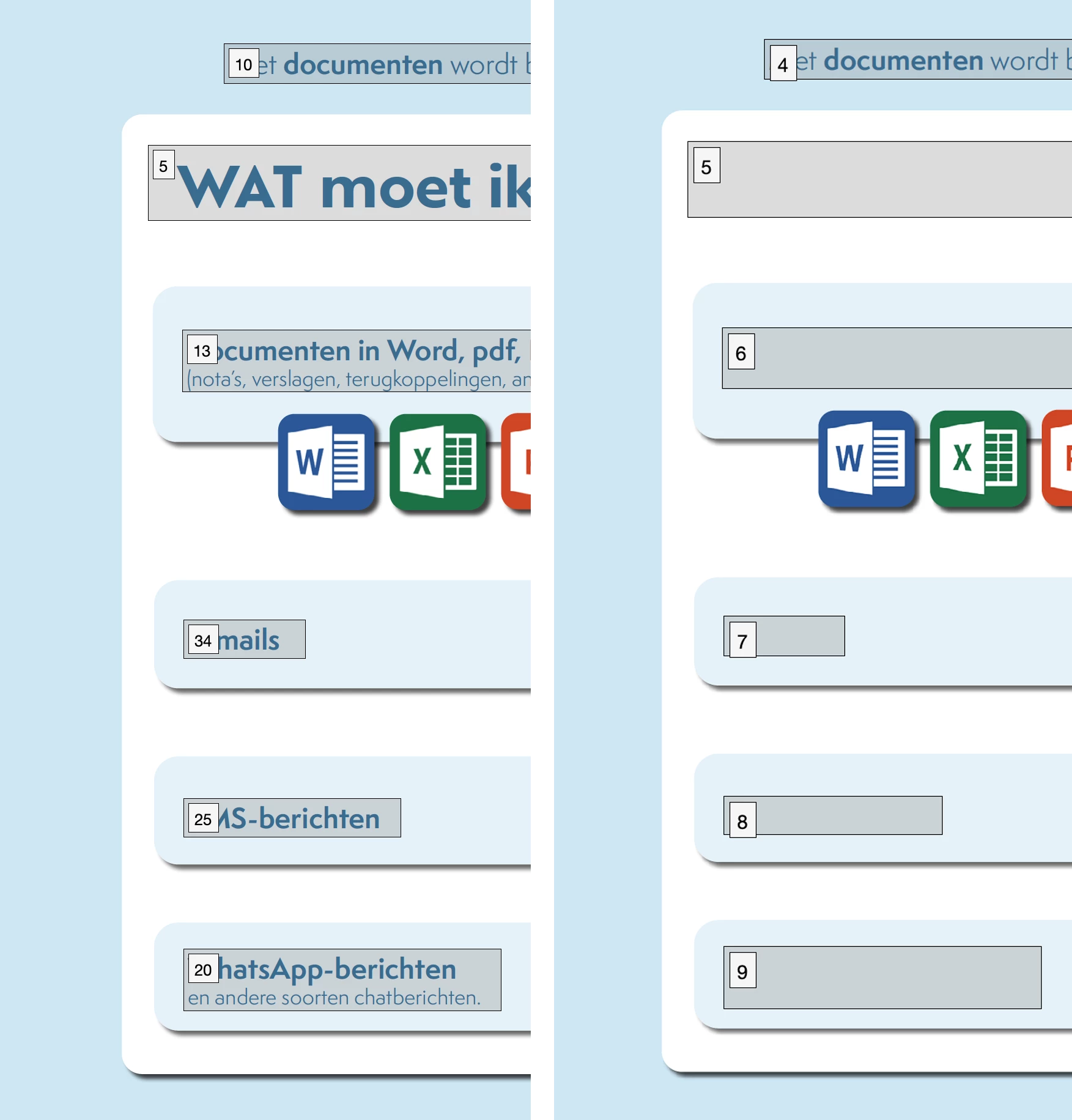
Tag RO and Tab RO are all set in my document, but it gets messy when I try to fix the architectural RO… This order is totally messed up in the first place; probably follows too much of the order in the Layers panel? And that just doesn't make sense to me at all - why would they use the stacking order of my visual elements to dictate a reading order…? I tried to fix this, but here arises the next problem: when I do, my tekst disappears - looks like it ends up behind one of the white/blue blocks (as shown in screenshot: left: original order in the order panel; left: what happens when I try to correct it…)


Don't drag that order in Acrobat, it is like dragging text below frames in InDesign (top/bottom)!

The Article panel ONLY sets the Tag order; the Layer panel sets the Reading/Z/Logical (whatever you want to name it) order, and that one is from bottom to top! So go back, open the Layers panel and there place them in the order you want: bottom ('1') and then stack up. So a bit 'reversed' in what you see in the tags-tree (Article panel).

3 replies

Dave Creamer of IDEAS
Adobe Expert
September 12, 2022

Are you referring to "tab" order or "reading" order? Your title and text refer to different things.


David Creamer: Community Expert (ACI and ACE 1995-2023)
YvonS
YvonSAuthor
Known Participant
September 12, 2022

In human terms, it's the reading order: how the information should be read.
In Adobe terms I guess it's the tab order: the order in which a screen reader should be guided through the document in a logical way (either by tab or buttons/inputs). 

Dave Creamer of IDEAS
Adobe Expert
September 12, 2022

Did you select Use for Tagging Order in Tagged PDF?


David Creamer: Community Expert (ACI and ACE 1995-2023)
YvonS
YvonSAuthor
Known Participant
September 12, 2022

I did manage to change the order in Acrobat (see screenshot), but this also seems to change the stacking order (?) so the text in my blocks disappears...

Willi Adelberger
Adobe Expert
September 12, 2022

You should thread the text bloxks in the right order. If not, InDesign follows the order when these text rame were created.

I wonder why you use different text frames? In my experience most, near to all, layouts can be done in a single text frame. This will guarantee the right reading order.

YvonS
YvonSAuthor
Known Participant
September 12, 2022

Thank you, @Willi Adelberger for your reply.
I didn't use threads because there's no need for it; text blocks are standing on their own and I don't want text to flow into another block. It's more of an infographic/schematic visualisation, so I need to be able to position all the blocks very precisely. 
But I guess threading might be a workaround... 
Still hoping somebody can help me find a better method (like the one Adobe provides - but then with a better result)...