


Participant
December 5, 2019
Answered

Table of Contents not generated

  • December 5, 2019
  • 5 replies
  • 1133 views

I have a book with 10 chapter files, and each one starts with a chapter title "Heading, chapter" style. I want to create a table of contents using these chapter titles, but InDesign isn't wanting to do it.
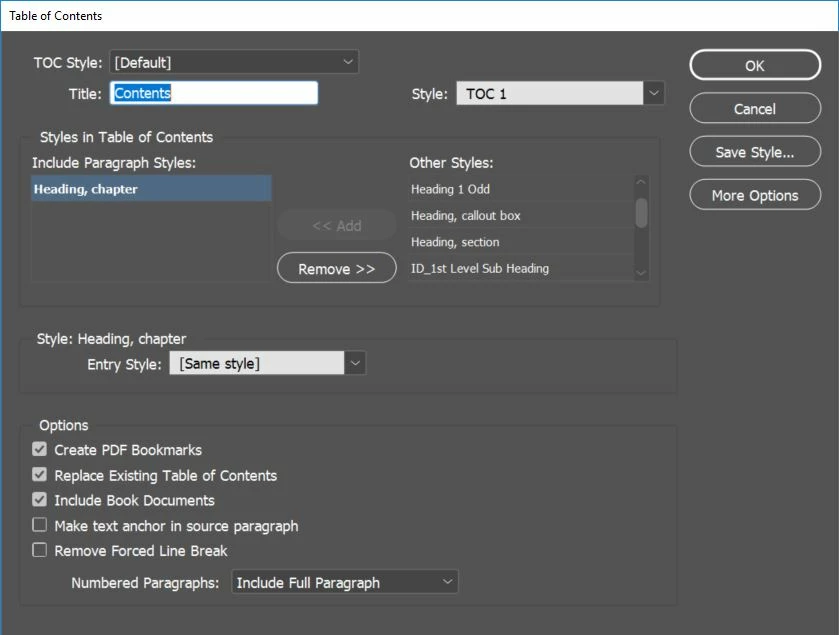
I'm definitely including the Book documents. I get a pop-up telling me that the table of contents has been generated.
The textbox where I put the cursor, however, remains empty. I have no idea why. I've done this before in exactly the same way with other books and had no problem.

This vexes me. I'm terribly vexed. Any idea what might be going on?

This topic has been closed for replies.
Correct answer Ted C

I seem to have found the problem. There was a text box with a table of contents that had been moved outside the margins on a different page. The update was going there, not where I was expecting it.

5 replies

Ted CAuthorCorrect answer
Participant
December 6, 2019

I seem to have found the problem. There was a text box with a table of contents that had been moved outside the margins on a different page. The update was going there, not where I was expecting it.

Community Expert
December 6, 2019

I see that you're using the [Same style] as the Entry Style. Is it possibe the text is becoming overset due to any Keeps Options that are in the original Heading, chapter style?

Community Expert
December 5, 2019

Generally, the Table of Contents is created as a new text thread.


Are you getting a loaded "place gun" cursor indicating text is loaded into the cursor?

Ted CAuthor
Participant
December 5, 2019

I am not. I haven't gotten that on previous uses, either, but they worked. I just place the cursor, then used Layout > Table of Contents. InDesign has always put the TOC where I left the cursor on previous occasions.


If it matters, this is version 14.0.3 x64.

Community Expert
December 5, 2019

You've got me. I'm using the same, and just got the same, expected result — a new cursor with the freshly-generated ToC, based on the 14-chapter book the file is linked to ...


It stinks if you have a bunch of custom preferences set, but a lot of odd problems with InDesign can be fixed by resetting preferences:


Press Shift+Ctrl+Alt and start InDesign. Click Yes when asked if you want to allow InDesign to modify your system to delete preference files.


Hope this helps,


Randy

Derek Cross
Community Expert
Community Expert
December 5, 2019

If it's two items – e.g. Chapter 1. The Chapter Name – you would need a Paragraph Style for item

Ted CAuthor
Participant
December 5, 2019

"Heading, Chapter" is the paragraph style used for the chapter titles.

Document Geek
Community Expert
Community Expert
December 5, 2019

Can you post a link to the file so we ca troubleshoot it?

Ted CAuthor
Participant
December 5, 2019

I don't really have a place to put it.