


Participating Frequently
June 11, 2025
Question

Text and tables disappearing

  • June 11, 2025
  • 4 replies
  • 355 views

I am having problem with tables and text disappearing in some of my InDesign-documents with more than 50 pages. The textframes are still there, but all text or tables are gone (as you can see on the screenshot). Has anyone experienced this and know what to do? Adobe has guided me to save on Adobe cloud, and so far it works, but I have all my work on Dropbox and would like it to work there as well. The content always disappears on a page that I am not working on at the moment, so I can only see that it has happened when I scroll through the pages. Once it happened in a document with 246 pages, and suddenly on approx. 10 of them, and only some of the frames on each page.
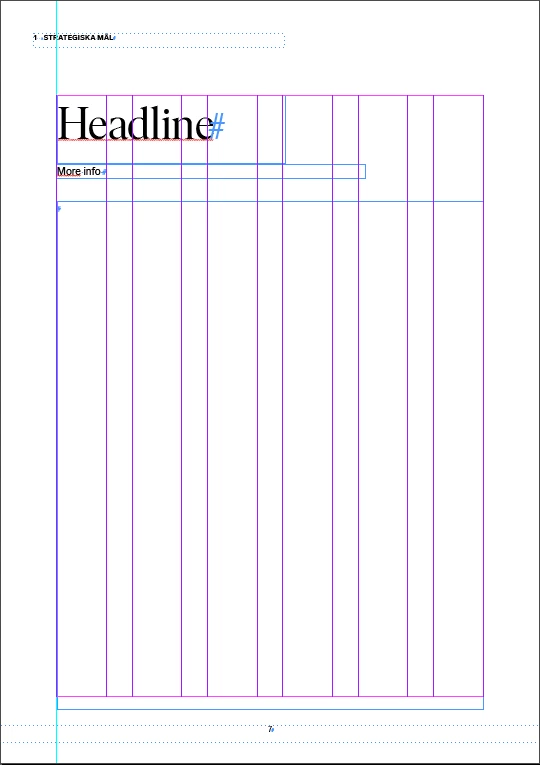
4 replies

Mike Witherell
Community Expert
June 11, 2025

Do you share this folder with someone else? IOW, could someone over-write your files?

Mike Witherell
Nina 2025Author
Participating Frequently
June 11, 2025

No it is only me who can edit.

Mike Witherell
Community Expert
June 11, 2025

Perhaps exploring an older version of your file will show you when the disappearance began?

Mike Witherell
Nina 2025Author
Participating Frequently
June 11, 2025

I save copies of my large documents several times a day, and I have been able to find the text/tables in those versions, but I have not been able to figure out why or exactly when they disappeared (as it does not happen on the page I am working on).

Mike Witherell
Community Expert
June 11, 2025

Nina, when using Dropbox, or any cloud-based storage, do you have it set to make available offline? This means the file is on your computer as well as in Dropbox.

https://help.dropbox.com/sync/access-files-offline


Dropbox allows you to open older versions of your file:

https://help.dropbox.com/delete-restore/recover-older-versions

Mike Witherell
Nina 2025Author
Participating Frequently
June 11, 2025

Yes, they are synced to my computer and available offline.

Mike Witherell
Community Expert
June 11, 2025

Hi Nina,

Did you look to see the text in Edit > Story Editor mode in order to find out if the text is overset?

Mike Witherell
Nina 2025Author
Participating Frequently
June 11, 2025

The text is completly gone. If I look in Story Editor, it´s empty...