muskoka lake
Inspiring
February 21, 2019
Answered

Text box size and position not applied from master to document pages

  • February 21, 2019
  • 3 replies
  • 588 views

I am not sure of the version of Indesign I am using. I purchased a subscription in November 2018 of the Online Cloud based  product. I am using an HP ZBook with windows 7 Operating system.

I have studied the tutorials and User Manual but still can't solve this problem.I need help to learn to work with masters.

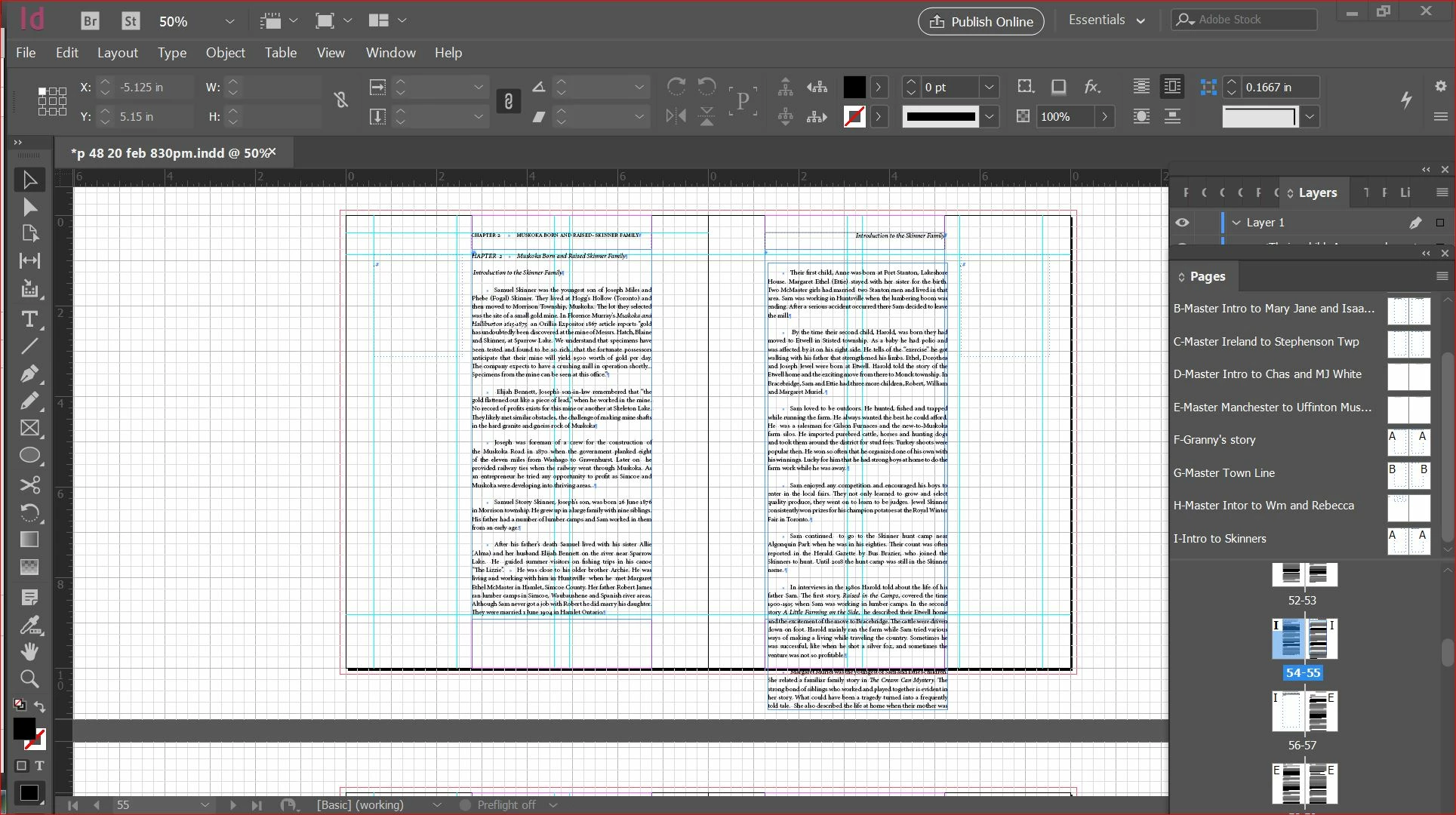
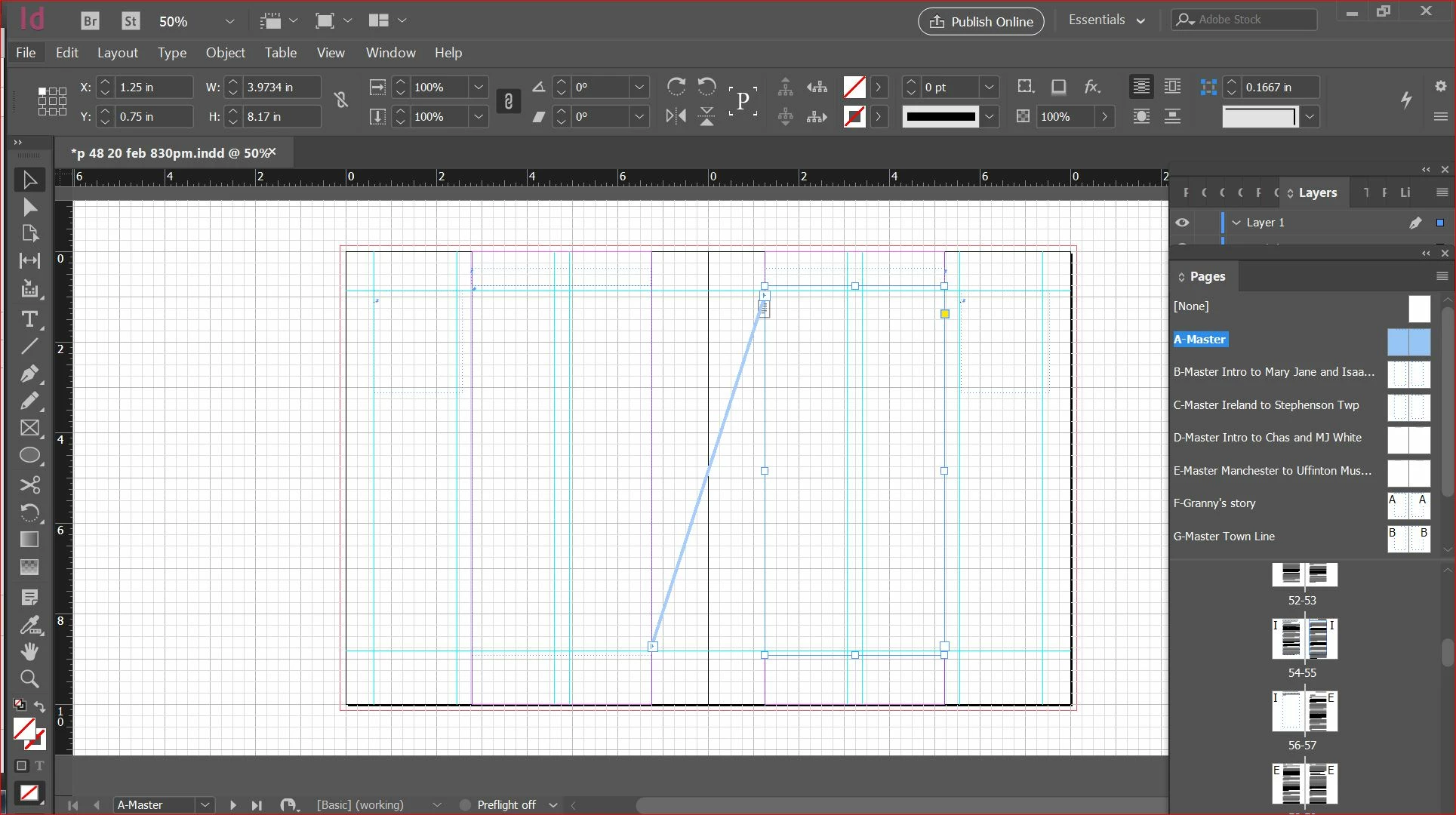
I made an A master with text boxes on it. (screen shot 2) I then duplicated it and created other masters. The one I am working on now is Master I Intro to Skinners (screen shot 03.) When I apply master I , which has the same text box position and size as Master A, the change does not occur on the document page (screen shot 1)

I tried locking the text box on A but that did not help. so now I have unlocked it (God bless the forum for that help.)

I would appreciate any help. I do not want to have to manually change the text box data for every page of a 150 page document.

It may be something simple that a beginner does not catch, at least I am hoping that is the case.

Grace
    This topic has been closed for replies.
    Correct answer jane-e

    https://forums.adobe.com/people/muskoka+lake  wrote

    I made an A master with text boxes on it. (screen shot 2) I then duplicated it and created other masters.

    ...

    It may be something simple that a beginner does not catch, at least I am hoping that is the case.

    Hi Grace,

    I have to question why you have so many Masters that are duplicates of the A Master. What I think you are going to answer — I could be wrong — is that you need different headers and footers.

    If that’s the case, you may only need one Master. You can use Text Variables to count the Chapters and to insert the book title and the chapter title and more.

    We can help you with that if you want to simplify the document.

    ~ Jane

    3 replies

    jane-e
    Community Expert
    jane-eCommunity ExpertCorrect answer
    Community Expert
    February 21, 2019

    https://forums.adobe.com/people/muskoka+lake  wrote

    I made an A master with text boxes on it. (screen shot 2) I then duplicated it and created other masters.

    ...

    It may be something simple that a beginner does not catch, at least I am hoping that is the case.

    Hi Grace,

    I have to question why you have so many Masters that are duplicates of the A Master. What I think you are going to answer — I could be wrong — is that you need different headers and footers.

    If that’s the case, you may only need one Master. You can use Text Variables to count the Chapters and to insert the book title and the chapter title and more.

    We can help you with that if you want to simplify the document.

    ~ Jane

    muskoka lake
    Inspiring
    February 22, 2019

    You are exactly right, that is all I want to change. I'll explore the

    Text Variables.

    Barb Binder
    Community Expert
    Community Expert
    February 21, 2019

    Hi muskoka lake:

    You can confirm your version with Help > About InDesign.

    When you are working with multiple master pages on a long document there is normally a parent (typically A-Master, though can be renamed or numbered) and child masters based on a previous master.

    For example:

    A new file has an A-Master. After setting that one up, I use New Master (not Duplicate Master) to create a B-Master, and based on A.

    See the big "A"s on the page icons?: This means that B-Master is based on A-Master. Changes make to A (the parent) impact B (the child). There are many variations on this theme, but that's the basic premise. Take a look at your master pages again—most are not linked to a parent page.

    ~Barb

    ~Barb at Rocky Mountain Training
    muskoka lake
    Inspiring
    February 22, 2019

    Thank you very much. I will look at the parent child on each master.

    So much to learn, I appreciate someone with a more experienced eye

    helping me find the problem.

    Grace

    Derek Cross
    Community Expert
    Community Expert
    February 21, 2019

    Just a side issue — I suggest a line space or an indent for paragraphs, not both. Also use Paragraph (and Character) Styles, and indicate your paragraph indents there (don’t use tabs for these).

    muskoka lake
    Inspiring
    February 21, 2019

    I hope to deal with the "side issues" after I get the text into text boxes. So my problem still remains how to get master page to apply to document correctly. I am using a Rt click on the Master, choose Apply master to pages, and then inserting the desired pages. In this case I typed in for pages 54-56. Do I need to write that differently or do each page separately? that would be silly.