


Question
Text formatting question - 1 column and 2 column text in 1 text box
Hello.
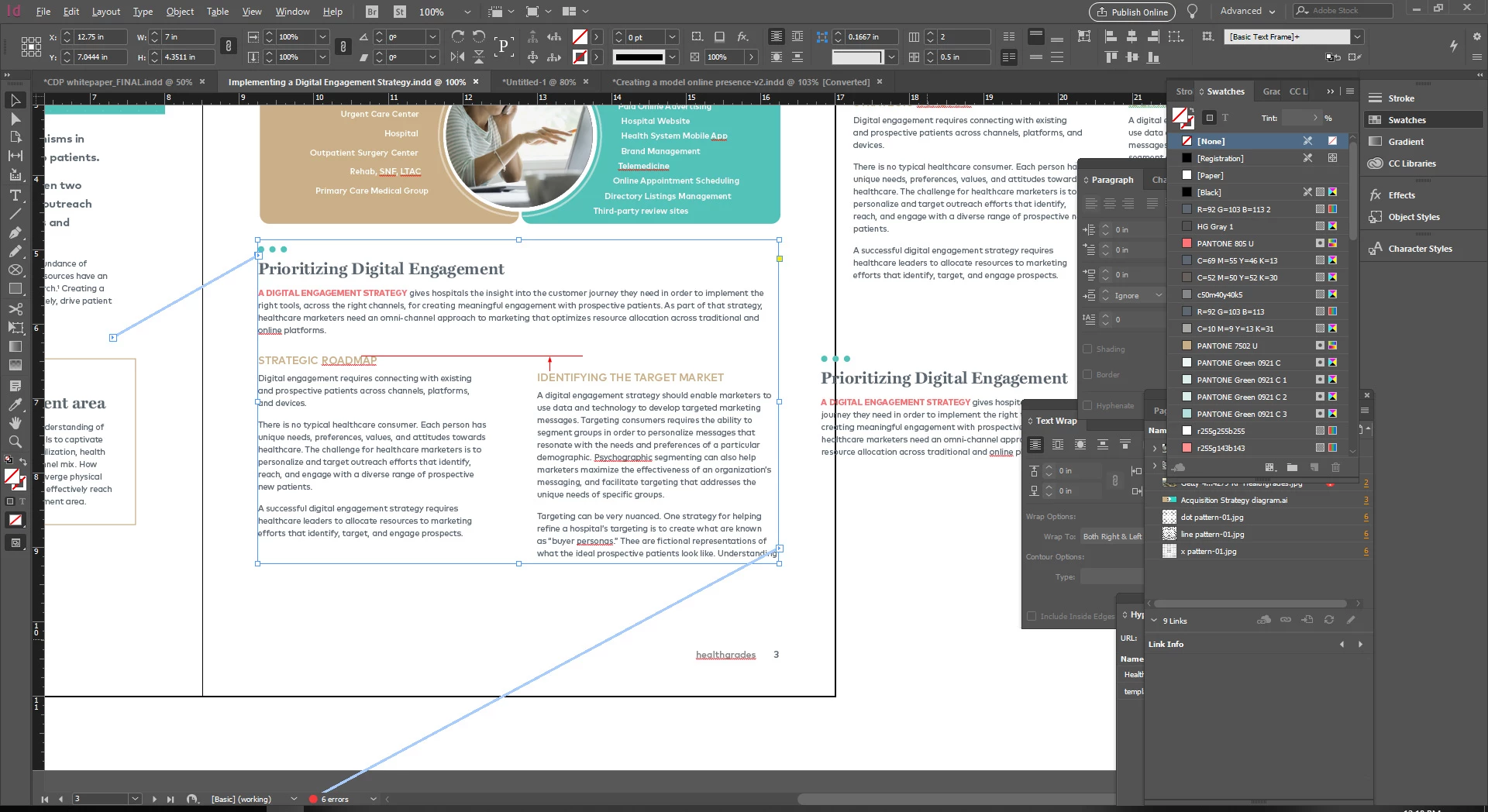
I am working with a previous designer's InDesign file and can't figure out how to edit and/duplicate the styling in a particular text box. I have looked everywhere and can't figure this out. Any help would be greatly appreciated!
I've attached a screenshot for reference. Here are the questions that I have:
- This is 1 textbox with a single column of text that spans the 2 columns under it and below that the text flows into 2 columns, however, there isn't a table or additional textboxes. How can I duplicate this or find the panel to make adjustments? I couldn't figure this out.
- 2nd question, there are 2 headers: "Strategic Roadmap" and "Identifying the Target Market". I can not figure out how to change the settings so the "Identifying the Target Market" header aligns with the "Strategic Roadmap" header to the left of it. When you don't add a header, the right column body copy text aligns nicely with the first line of body copy text to the left, but adding a header pushes down rather than aligning at the top.
Thanks so much!!!
 AdChoices